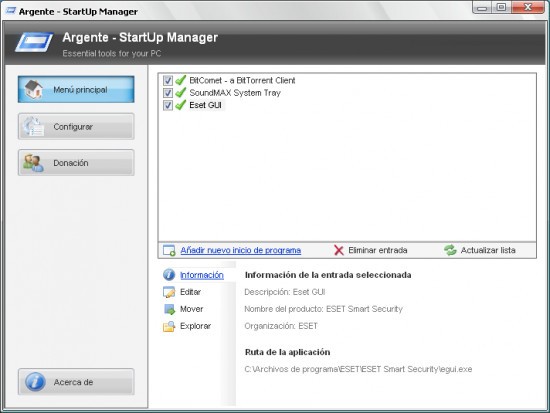
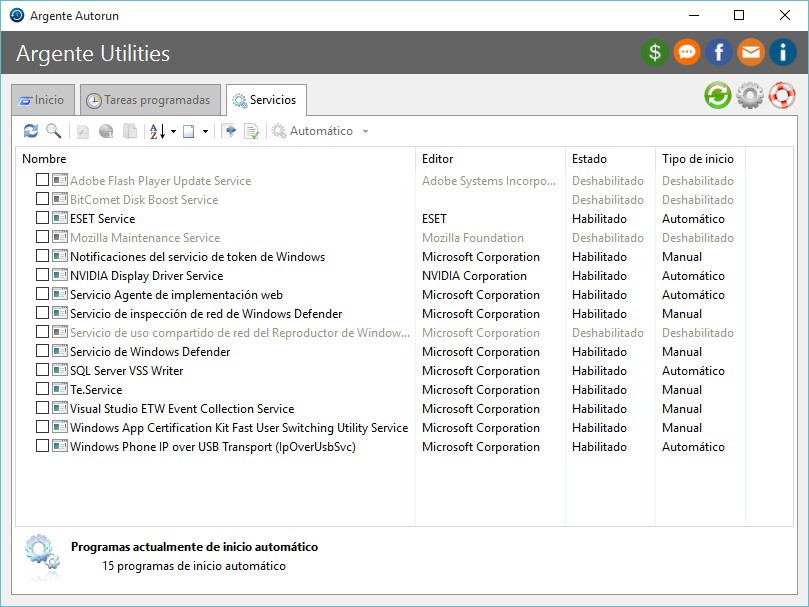
Argente Autorun is a handy little tool to quickly launch Autorun, while others viewed it as a malware threat. It is among those small utilities that do only one task, but with such a great level of success that it leaves a definite mark on the way your system operates. It is a utility that allows you to view and control programs that run automatically when you turn on your computer. And that may sound like a minor detail, but startup programs are at the root of long boot times, occasional lags, and systems that feel slower than they ought to.
You open Argente Autorun and receive a clear list of all that attempts to launch on startup. The ones that are easy to see, such as your messaging application or antivirus, as well as the secret ones hidden away in the registry, scheduled tasks, services, and others. It not only names them, it also identifies their locations, functions (if it manages to read it), with the option to enable or disable each safely.
It doesn’t scream for attention; it simply helps you clean up. That type of power tool is what makes things seem to move quickly again in an otherwise slowing system.
Why Should I Download Argente Autorun?
All computers are very speedy when they are new. However, with time, software accumulates. The programs start taking their positions in startup, and without permission, and before you know it, your system is taking eternity just to get started. That is where Argente Autorun enters the scene. It puts you in the position to regain that control.
You won’t just see a checkbox and a name. You will be told in detail: the type of startup, the form of launch (registry, folder, schedule of the tasks), and in some cases, even flag whether a file is considered dangerous or safe. That will save you time as you make decisions without Googling each entry separately. An entry can be turned off, postponed, or killed with a few clicks, and immediately experience a difference when you reboot.
The other factor that would make one consider using Argente Autorun is that it is simple yet elaborate. It does not tuck features under tabs, nor does it subject you to complex procedures. You can really see what is eating up your computer and can do something about it immediately.
Regardless of whether you are a novice who simply signs on to increase the pace of things or a bit of an expert ready to gain an idea of what is going on behind the scenes of startups, the tool will greet you at your level. It is time-saving, non-confusing, and gives you back control over your system’s behavior without your being an expert in information technology.
Argente Autorun also lets you back up settings before making changes, something most free tools do not. In that manner, when you disable something important, you can quickly restore your previous settings. It is protection that helps experiments not to seem as dangerous.
The other reason why the users do not change it is that it does not nag. No advertisement, no pop-ups, no commitments to upgrade. It is clean, straight-to-the-point, and concentrated. This resource provides you with an insight that Task Manager does not always provide you with, whether you are cleaning up the mess on your family member’s computer, cleaning up your own computer or you are simply wondering what is happening behind the scenes.
Have you ever felt that your PC used to go faster, but now it is slower than ever? Well, the chances that it is slow because of too many startup programs are high. Argente Autorun provides you with a diagram of what launches during startup and the resources to correct it without involving the registry and hoping that you chose the correct process to disable. And when you use it a couple of times, it comes as a matter of second nature.
Is Argente Autorun Free?
Indeed, Argente Autorun is absolutely free. Nothing is paid or locked. You receive the whole package of tools without any concealed pricing or restrictions, and therefore, this is a good choice to make by any person who would need simple but effective control of startup programs.
What Operating Systems Are Compatible with Argente Autorun?
Argente Autorun is a Windows-based app and can properly operate on most versions, especially Windows 7, 8, and 10. It works well on 32-bit and 64-bit platforms. The program is not resource hungry, does not hitch on your system's performance, and can actually be used even on a portable basis, i.e., there is no need to install it, just run it when required.
What Are the Alternatives to Argente Autorun?
There are some other tools with the same idea, having their own vision of startup management. However, your inclination to a more technical tool or something of a more graphical nature depends on two factors: how much control you want and your comfort with system settings.
The most well-known alternative is probably Autoruns. Similarly, it was written by the Microsoft Sysinternals group, so it is highly detailed, perhaps to an extent that it is too detailed for casual users. It does not simply present startup programs. It displays all of them: services, drivers, DLLs, codecs, and browser extensions. Provided it is loaded during startup, then Autoruns will list it. It will be a terrific help to power users and system administrators, but to someone simply wanting to make their computer work faster, it can be a daunting task.
There is also an Autorun Organizer. This is the one that is a bit more approachable. It provides a clean interface and makes suggestions on whether a program should be kept or whether it should be disabled, and also provides a delay feature so that you can actually stretch out the startup programs as opposed to disabling them entirely. That would be helpful when you still desire a tool you want to load, but not right away. It also provides you with performance statistics, and thus, you would be able to determine what items are most affecting the performance of your system.
There is one more variant that sits between the two extremes, which is HiBit Startup Manager. It provides a clean interface, allows you to work with startup entries as well as scheduled tasks, and has several extra features such as editing of context menu and working with services. It is portable, quick, and useful to people who want more features than Task Manager provides but do not want the complexity that a full-fledged program like Autoruns can offer.