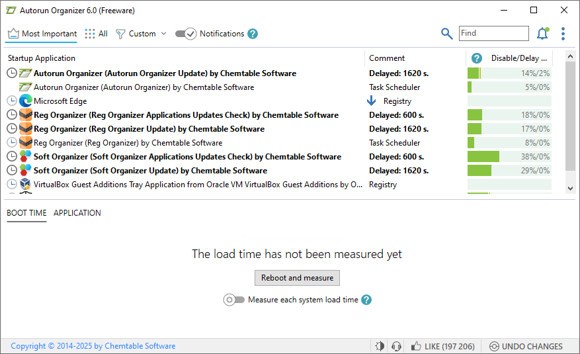
Autorun Organizer is a utility that may seem simple on the surface, but handles a lot under the hood. Its purpose is to control the programs that run in automatic mode when your PC is switched on. At first, these startup programs may not seem like a big issue, but gradually, as time passes, they accumulate and begin to slow everything down. Autorun Organizer gives you a way to keep those startup entries under control, such that your system won’t take an eternity to boot up.
It is possible to disable entries indefinitely, delay them, or even delete them entirely. It also tells you the time it takes to load any given program, and in one sense, that is eye-opening enough. The tool offers accelerated startup time and ensures that the system is not slowed down by unnecessary junk. It is more of a control tool than a cleaning one.
Individuals who do not tune into the startup programs end up discovering their systems filled with bloatware and sluggish performance, unsure of what went wrong. Autorun Organizer goes behind the scenes to repair that. No flash, no bloat, just a tool that does one thing well, unlike many others.
Why Should I Download Autorun Organizer?
You may not realize how much startup entries impact your computer’s speed. The majority of users tend to install software and forget that it sneaks into the boot. Over time, you may not even realize your PC is taking longer to start. And that is where Autorun Organizer comes in handy, not with some magic, just letting you take out what is unnecessary. There is no need to be technical. The software simply logically presents everything.
When your computer seems to be bogging down, and particularly immediately after startup, then chances are that you have startup clutter. Autorun Organizer provides an opportunity to take a closer look under the surface and make your own choice of what has to remain and what is to be left. You’ll be surprised how many processes are running in the background. It does not automatically delete anything, so you still have control. It’s like a flashlight in a dark room where you can finally see what’s there.
The software provides you with control over what runs with your system and when, allowing you to speed it up. It silently takes you through the list of the apps slowing your startup time and allows you to postpone them, disable them, and eliminate them. No complex procedures, no tech-savvyness. All you have is a clear list, fair stats, and the ability to tidy up without fear of breaking something big. It makes your system seem quicker, leaner, and less congested, as opening the windows in a closed-up room to breathe again.
Better still is the delayed launch power. Rather than eliminate a program altogether, you can delay booting by a few minutes. This way, the important programs are still executed, but they do not act simultaneously, which can drag the system down. It specializes in one task: managing your startup programs, and it does it well.
The other reason to consider it is its tracking capability of changes. When a program is attempting to gain entry to the startup by stealth, Autorun Organizer will warn you about it. That comes in handy in case you have installed some scumware accidentally, or downloaded freeware which is rife with junkware. There will be times when you will not know what has been added, but this software will. And the fact that you can temporarily disable something lets you test without making a permanent change. It is one of those tools that is not really a big deal until you use it, and you realize a difference.
Is Autorun Organizer Free?
Thankfully, Autorun Organizer is completely free. No hidden costs or trial periods. You download it, unpack it, and it functions immediately. The free version offers all the core features most users will ever need.
What Operating Systems Are Compatible with Autorun Organizer?
Autorun Organizer is programmed to work on different Windows operating systems. It is compatible with Windows 7, Windows 8, Windows 10, and Windows 11. You may be running on an old desktop or a more modern one, and it is likely to run smoothly. You do not need a fancy PC to use it, and neither will it take up much space nor slow down your system. Note that you need Administrator rights to use the software.
What Are the Alternatives to Autorun Organizer?
The tools that concentrate specifically on the process of managing the startup without extra unnecessary material are not that numerous, but still, some can be mentioned.
Autoruns is one of them. It is more powerful and displays nearly everything that begins with your computer, including the entries at deepest system-level entries that most users usually don’t touch at all. Autoruns are effective yet do not necessarily suit beginners. It has hundreds of entries organized in various tabs, and the thing may get a bit overwhelming quickly. Still, when you are such a user who insists on full control and does not fear technical terminology, then it does a good job.
A tool added in this space is Quick StartUp. It is more visual and simpler to understand as compared to Autoruns. It is made to be used by people who simply want to accelerate things a little. You will get an overview of the programs with basic information, and they can be turned off or deleted with one click. While it keeps things simple, it may miss some of the hidden or more subtle entries. It is not too deep, and at the same time, it is a strength and a weakness.
The other alternative is Argente Autorun, which is also in a middle spot between simplicity and complexity. It is not as sharp as the Autorun Organizer, though it is workable. You have an opportunity to browse startup programs, services, and scheduled tasks. The interface is old-fashioned, yet it works as it promises. Some users love it, and others think it is a little clunky. Still, if Autorun Organizer isn’t for you, Argente can get the job done.