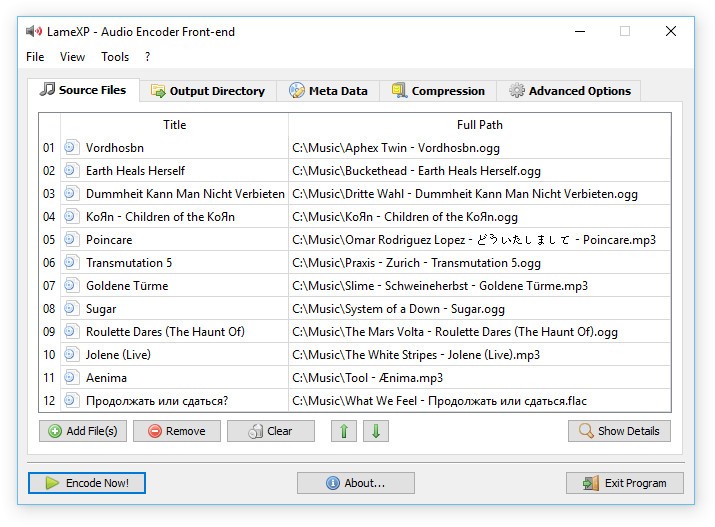
LameXP is an open-source audio conversion tool that simplifies the process of encoding, converting, and managing audio files. At its core, it acts as a front-end for the well-known LAME MP3 encoder, but it doesn’t stop there. The software supports a variety of popular audio formats, including MP3, AAC, Ogg Vorbis, FLAC, Opus, and many others. This makes it a versatile choice for anyone who needs to work with different kinds of audio files without juggling multiple programs.
The “XP” in its name might sound dated, but don’t let that fool you. LameXP continues to be updated and maintained, and it runs on modern versions of Windows without issue. Its user interface is designed to be accessible even for beginners. Instead of requiring you to type in command-line instructions, the program presents you with a clean, graphical interface where you can drag, drop, and adjust settings intuitively.
For people who care about audio quality, LameXP is especially appealing. It allows you to fine-tune bitrates, sample rates, and other encoding options so you can balance quality with file size depending on your needs. Whether you’re archiving a music library, preparing podcasts, or shrinking audio files to fit on a device with limited storage, LameXP has the flexibility to make it work.
Why should I download LameXP?
There are plenty of reasons to consider downloading LameXP, but one of the main ones is simplicity. Audio conversion tools can sometimes feel overwhelming, especially if they’re packed with jargon or overly technical menus. This software takes that complexity and streamlines it. You don’t need to be an audio engineer to understand how it works—you just pick your files, choose your output format, and let the program handle the rest.
Another reason is control. While the interface is simple, LameXP still gives you access to deeper options if you want them. For example, you can adjust encoding parameters to achieve the exact quality you’re looking for. This makes it great for advanced users who want to squeeze every bit of efficiency out of their audio files without compromising on sound.
Speed is also worth mentioning. LameXP takes advantage of modern multi-core processors, which means it can handle batch conversions quickly. If you’ve ever had to convert dozens or even hundreds of files one at a time, you’ll appreciate the ability to load them all into LameXP and let it run through the batch automatically.
Another standout feature is metadata support. The software lets you edit tags such as artist, album, track number, and cover art. This ensures your converted files stay organized, especially if you plan to use them in a music library or on portable devices.
And of course, let’s not forget stability. Unlike some audio converters that crash frequently or come bundled with unnecessary extras, LameXP is lightweight and reliable. It does its job without trying to push extra software onto your system or overwhelming you with ads.
Is LameXP free?
Yes, LameXP is completely free to use. It’s released under an open-source license, which means you don’t have to pay for it, and you’re free to share it with others. There are no premium versions, no hidden subscriptions, and no “trial” restrictions. You get the full software right away, without limitations.
This is one of the biggest reasons LameXP has built such a loyal following. In a market where many audio converters either charge high one-time fees or lock useful features behind paywalls, LameXP offers a no-strings-attached experience. You can use it for personal projects, professional work, or even large-scale batch conversions without worrying about licensing costs.
Being free also means it has a strong community presence. Open-source software often benefits from feedback and contributions from its users, and LameXP is no different. Issues are patched, features get refined, and the tool continues to evolve thanks to community input and the dedication of its developers.
What operating systems are compatible with LameXP?
LameXP is Windows operating system specific. Although the name presupposes its affiliation with Windows XP, the software is compatible with a large variety of recent Windows applications, such as Windows 7, Windows 8, Windows 10, and Windows 11. The maintenance over the years indicates that it can still operate well even in the newer systems.
Since it is a Windows-only program, you will not find official versions for macOS/Linux. But it can be easily executed using compatibility layers such as Wine by users on those platforms, with mixed success. Windows users, however, find it easy and quick to install. The program does not need complex setup processes and more components to execute.
On performance, it is optimized to exploit multicore CPUs, meaning that it is able to process multiple files simultaneously without taxing your system. LameXP is also a good choice on older machines, as it can operate efficiently and provides a user with reliable audio conversion even without state-of-the-art hardware.
What are the alternatives to LameXP?
LameXP is a very good tool, but it is not the only one. You may wish to consider some options depending on your requirements.
One of the good competitors is MediaHuman Audio Converter. Similar to LameXP, it is free and can accept a huge range of audio formats. The fact that it is cross-platform makes it attractive to use, i.e., it can be used not only on Windows but also on macOS. Its interface is easy to use, and it is suitable for those who wish to get quick, hassle-free conversions without going too deep into technical specifications.
Another alternative is Any Audio Converter. This one can convert audio and video files, which is why it is more versatile in case you have to work with other types of media. It also has some additional features, such as downloading sound files online, but the compensation is that the free version is sometimes limited, and you are tempted to upgrade to a paid version.
Freemake Audio Converter completes the list. It is said to be user-friendly, having a highly simplistic drag-and-drop interface. It supports the majority of the common audio formats and gives the option of doing a batch conversion, though the free version puts certain limitations with restrictions on output files in some cases, unless you upgrade to the paid version.