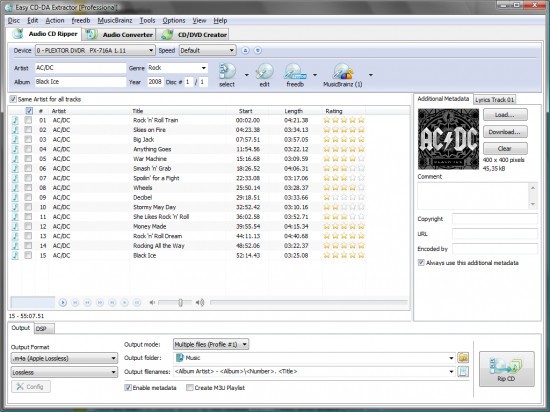
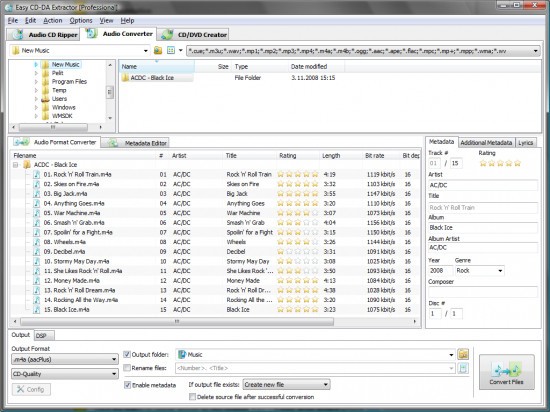
EZ CD Audio Converter, created by Poikosoft, allows converting audio files across numerous formats without complicated installation or knowledge of technical expertise. It can rip audio CDs, edit metadata, and convert large libraries in batches. It is straightforward to use, just add files, choose an output format, change settings (or not), and convert.
The program works with a wide variety of formats MP3, FLAC, WAV, DSD, AAC, Opus, and many more. It also provides normalization and sample-rate conversion tools of high quality. EZ CD Audio Converter is not a digital audio workstation; it is all about getting the correct conversion, correct metadata, and getting a dependable CD ripping without having to get into the menus. The design is simple, but the software lacks the richness that advanced users might desire in the control of finer output.
Why Should I Download EZ CD Audio Converter?
This is the tool that is selected by many people due to their need to have a reliable method of converting and organizing music. Other converters tend to reduce file size or quality, inject users with advertisements, and impose restrictions. EZ CD Audio Converter does not fall into those traps and offers a steady and sound-quality-oriented experience. It also reads CDs to confirm that the music that is extracted is correct and does not contain read errors or skips, which is vital to older CDs or unique collections.
The other reason why it should be tried is the efficient batch conversion option. With thousands of songs in folders, the software can convert them simultaneously and save metadata and folders. The interface remains clean: most of the actions are mere drag-and-drops. Such advanced settings as bit depth and sample rate control can be enabled, but must be adjusted only when you desire.
Individuals who believe in being organized will like the metadata editor. In managing large collections, it is easier to tag them properly so that they can be managed easily in the future. The program will extract metadata online and allow you to edit it and then save it. It also allows cue sheets and gapless encoding when users would like the music to sound as it was originally recorded, and this makes this tool a one-stop solution for accuracy, reliability, and convenience.
Is EZ CD Audio Converter Free?
The software is not an absolutely free one. Trial is where the users are allowed to test the main features for a limited time. There is a need to purchase a license after the trial. The subscription type is nonexistent, and the one-time payment is worth it to many people who want to experience the professional-grade ripping and conversions.
What Operating Systems Are Compatible with EZ CD Audio Converter?
EZ CD Audio Converter is mostly Windows-based. It is compatible with Windows 10, Windows 11, as well as several older versions. It is easy to install, download, and follow the instructions on the screen. It is based on the capabilities of the Windows CD readers, and thus it is compatible with the internal and external CD drives recognized by Windows.
MacOS has no official release, nor does Linux. Others execute it through compatibility software such as Wine, which produces mixed results and is not always comparable to a native Windows environment. Since the software is hardware-accelerated and includes Windows-specific functionality, non-Windows platforms are deprived of performance benefits. EZ CD Audio Converter will also work well with Windows PCs that have a CD drive or audio files without any additional plug-ins or frameworks. The developers are interested in maintaining the Windows version optimized rather than expanding the platform support.
What Are the Alternatives to EZ CD Audio Converter?
CDex is an old, simple audio CD extracting utility oriented towards the extraction of discs to digital files. It is simple and no-frills, which is attractive to those users who desire a simple rip -and - save workflow, without any additional functionality or complicated controls. CDex handles MP3, WAV, FLAC, and OGG, etc., and it has simple metadata tools. Although it is not as slick and sophisticated as the EZ CD Audio Converter, it is still a decent choice when one needs to do certain conversions sometimes, particularly in older systems that do not necessitate powerful hardware or extensive installations. Many users still download CDex whenever they need a quick, lightweight way to extract tracks without extra steps.
fre:ac is an open-source competitor that supports Windows, macOS, Linux, and portable systems, allowing it a cross-platform benefit. It has the capacity of CD ripping, conversion of audio files, metadata editing, and a wide range of encoders. It is maintained and bug-free by the community. The interface is easy to use but allows batch operations. It might be a bit heavier than CDex, yet it is user-friendly to beginners. fre:ac is the best choice for users who demand a free-of-charge, reliable tool that is not confined to features under a paywall. People download fre:ac mainly because it is free, often updated, and available on almost every major platform.
LameXP is not a CD-ripping application, though it is commonly used after ripping to convert audio files, batch-process, and re-encode audio files with options. Its stability and minimal features are valued by users who desire to have command over bitrates, encoding modes, and quality of sound. Given that LameXP does not extract CDs, you will still need CDex or fre:ac to extract. LameXP is an efficient fine-tuner of sound files and is also capable of sustaining high quality in cross-format. Audio enthusiasts usually download LameXP to refine and re-encode tracks after ripping, with more control over sound quality.