iDevice Manager is a Windows tool that allows you to work with iPhones and iPads without the use of the aging iTunes (which is quietly replaced by Apple Devices). It provides the user with immediate access to their Apple devices' data through a personal computer or a laptop. The software is locality-oriented; hence, files are managed on your computer rather than cloud services.
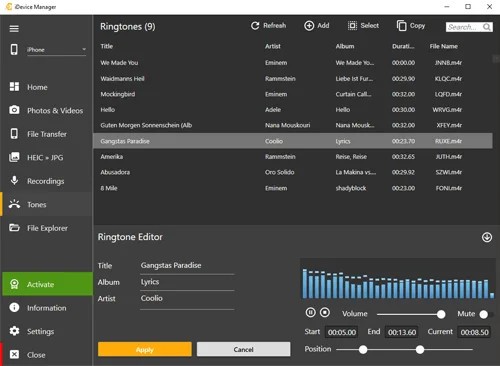
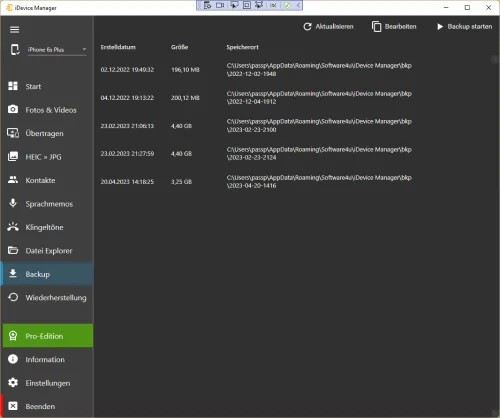
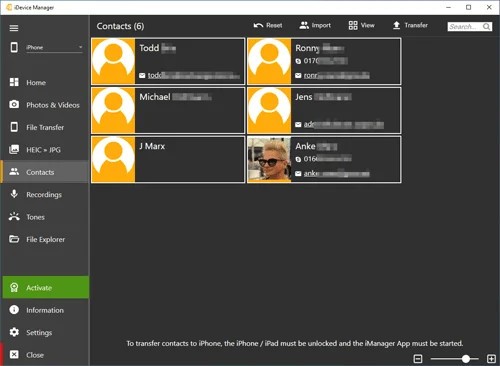
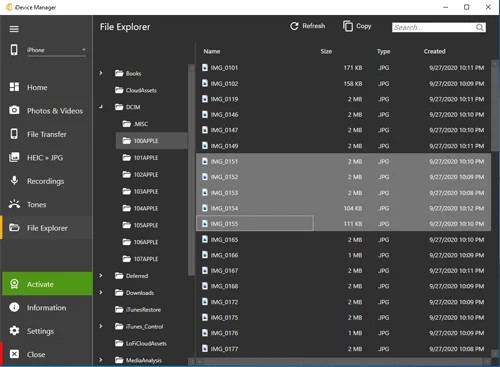
iDevice Manager allows transferring photos and videos between the iPhone and PC, making backups and restoring the data, controlling ringtones, and managing contacts. It also has a file browser, which allows access to the phone's files and folders that are otherwise obscured by the regular Apple applications. As it is described, it does not require jailbreaking or installation of iTunes.
Wireless photo and video transfers via Wi-Fi are also supported by the program, along with the old-fashioned cable connections. It transfers files in either direction (iPhone to PC and in the reverse direction too). It can also convert HEIC images to JPG or PNG, and the iPhone photos can easily be utilized on Windows.
iDevice Manager is not a media or entertainment application; it is a device manager. It is aimed at reaching Windows users who are interested in managing iPhone data of photos, contacts, backups, and ringtones in a single place.
Why Should I Download iDevice Manager?
You may consider downloading iDevice Manager in case you want to manage your iPhone or iPad from your Windows PC without the use of iTunes (which can be quite complicated). Apple mobile devices are not recognized easily by Microsoft’s system. But with this software, iPhone users do not have to perform the most complex data service: they can deal with copying the photos, keeping the backups, and managing their contacts, and this program is aimed at those routine tasks.
One of the reasons why it is important to use the iDevice Manager is the transfer of photos and videos. It allows you to wirelessly copy media by Wi-Fi or to just do it directly by a cable, which leaves more space on your iPhone. Manual media management could also be done by the capability to send files back to the iPhone via a PC.
Contact management is another reason why you should download it. The software synchronizes the contacts in Outlook, Windows Contacts, Google accounts, and vCard files. This assists individuals who change their devices or maintain contacts who are not using iCloud.
Backup and restore facilities are a must. iPhone data can be generated in local backups and reconstructed files without relying on an automatic cloud solution, which provides greater control over files. Users who wish to go to a greater degree in exploring files on their device also have the file explorer.
The tool is best applicable to Windows users; it will be redundant to Mac users or those who like cloud-based applications. Its price is determined by the extent to which you want to have control over your iPhone data on a PC.
Is iDevice Manager Free?
The iDevice Manager is free to download, and some services are free. It also provides a Pro Edition, which comes with additional features such as full backups, restore, and prolonged file management. These tools can be added with a license.
Users who use older versions of Pro can continue with their license, but new users might have to upgrade to get the premium features. Pricing information is not properly posted, and thus, expenses can differ by version and location. Anticipate both free and paid functionality.
What Operating Systems Are Compatible with iDevice Manager?
iDevice Manager is compatible with Windows OS only. It is compatible with Windows 10 and Windows 11, both 32-bit and 64-bit. The software runs on PCs and laptops and is not designed to operate directly as a mobile app.
As for the Apple mobile platform, it is compatible with many iPhones and iPads, both of the current generation and older generations. It is compatible with iOS 11 and above. The software doesn’t need jailbreaking or the use of iTunes. Just plug your device with its USB cable into your computer, and run iDevice Manager on it.
Since it works only under Windows, users of the macOS or Linux operating systems will have to find other options.
What Are the Alternatives to iDevice Manager?
One of the more recognized subsidiaries is Dr.Fone, which specializes in data recovery, device repair, and file transfers. It supports iPhone, transfers data, and restores information that has been lost, like messages or contacts. Although it is compatible with Windows and macOS, numerous functionalities are exclusive to paid subscriptions, and its user interface may be heavy for those who want to get basic file transfer services. Many users download Dr.Fone when they need recovery-focused tools beyond simple data transfers.
Another alternative for working between Apple devices and Windows is 3uTools. It provides profound access to iPhone data. It comes with file management, backup solutions, information about the device, and firmware. It is also mighty and may be technical and baffling to the layman. It has users who are more comfortable with simpler tools that have fewer advanced system options. Advanced users usually download 3uTools when they want deeper system-level control over their iPhone.
Wondershare MobileTrans is developed primarily to transfer data between phones. It is efficient in switching gadgets from Android to iPhone or an old iPhone to a new one. It enables contacts, media files, and messages, and is not as concentrated on file browsing and device management. Users who require constant access to iPhone storage might be restricted by it. People often download MobileTrans when their main goal is switching data between devices quickly.