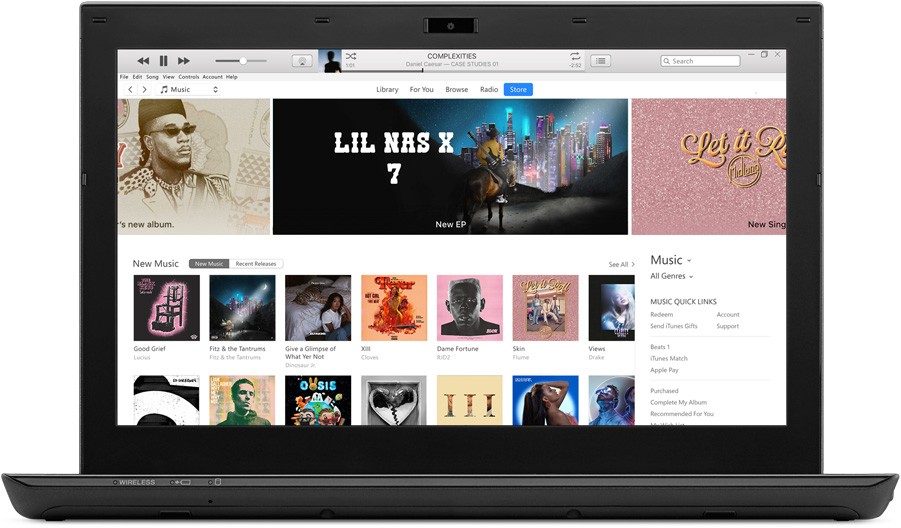
When iTunes first launched, it was one of the main ways people got their music and other media. Since then, the tool has evolved significantly. On Windows computers, it still works as a media manager and as the primary tool for syncing your iPhone, iPad, or iPod. It let you import music from CDs or files in formats like MP3, AAC, or Apple Lossless. It also provided easy access to the iTunes Store, where you could buy songs, movies, TV shows, and podcasts. With iTunes, everything lived in one place, making it simple to manage all kinds of media.
iTunes also helped users keep their Apple devices up to date. You could sync data, back up your files, and install iOS updates directly from the app. That made it a useful and reliable tool for managing both content and devices. With its intelligent playlist generation, advanced media tagging features, and access to the iTunes library, it remains a capable media manager worth considering.
Note that iTunes for macOS has been discontinued. All of its features have been replaced by Finder, Apple Music, Apple TV, Apple Books, and Apple Podcasts. On Windows, iTunes still functions as a media manager and syncing tool. Apple is gradually replacing it with newer apps like the Apple Music app, the Apple TV App, and the Apple Devices app, but iTunes remains available for now.
Why Should I Download iTunes?
For years, iTunes was the only way to connect your iPhone, iPad, or iPod to a Windows computer, and it served as the official macOS app for syncing Apple mobile devices.
Things have changed. iPhone and iPad users who want to connect their Apple device to a Mac running macOS Catalina or later can no longer download iTunes. The application has been replaced with dedicated tools for each Apple service: Apple Music, Apple TV, Apple Books, and Apple Podcasts. Device syncing is now handled natively in Finder.
If you are a Windows user with an iPhone or iPad, though, you can still download iTunes to manage your device. For creating backups, checking storage, or updating your phone through your computer, iTunes was the go-to software for years. It also integrated Apple services like Apple Music and Apple TV. For now, iTunes still works on Windows, though Apple has already released a replacement called the Apple Devices App.
iTunes still has some genuinely useful features, including the intelligent playlist generator called Genius. Once you select a song, Genius automatically builds a playlist based on the track's metadata, your listening history, and your preferences. It is easy to use but surprisingly effective. You can also create custom playlists manually, and iTunes supports playback of high-quality audio and video files, plus downloading music or movies for offline listening and viewing.
Beyond playback, you can organize your entire media library however you prefer, whether by genre, release year, album, artist, or collection. Updating metadata and uploading album artwork is simple. If iTunes spots a missing or incorrect cover, it searches for and downloads the correct artwork automatically. You can use all that information not just for organization, but also for searching through large libraries efficiently.
When you download iTunes, you also get access to podcasts and a large media store that includes songs, movies, books, and other content available to rent or buy on demand. The interface has been refined over years of development and remains user-friendly despite the amount of functionality packed into the app. Whatever your goal, whether building a personal music collection, managing podcasts, or keeping your Apple device synced and backed up, iTunes still handles all of it from a single window.
Is iTunes Free?
Yes, iTunes itself is entirely free for media management and device syncing. Keep in mind that most content in the store requires a purchase. Since iTunes integrates with Apple Music, Apple TV, Apple Books, Apple Podcasts, and Apple Devices on Windows, using those streaming services would require separate subscriptions. You can still download iTunes and use it for free if you just want to manage your existing media library or connect your iPhone, iPad, or iPod to your Windows computer.
What Operating Systems are Compatible with iTunes?
On Mac, iTunes is no longer available. Starting with macOS Catalina, all its functions are either built into Finder or split across dedicated Apple apps (Music, Books, Podcasts, TV). Earlier macOS versions can still find iTunes on the Mac App Store, but Apple has moved on entirely from the application on its own platform.
On Windows, iTunes remains available and supports Windows 10 and 11 (both 32-bit and 64-bit). However, Apple is gradually replacing it with the Apple Devices app, so Windows users should be aware that a transition is already underway and future support is not guaranteed indefinitely.
What Are the Alternatives to iTunes?
Apple has stopped developing iTunes. On macOS, device files are accessed through Finder, while Apple TV and Apple Music handle videos and music. On Windows, Apple built a replacement called Apple Devices App. It lets Windows users back up files, update devices, and manage their Apple hardware. For music and video, Apple TV and Apple Music are available on Windows as separate downloads.
If you want a full-featured media manager on Windows, MediaMonkey is excellent for large music collections. It supports high-quality and high-resolution audio formats and comes with tools for automatic track tagging, duplicate detection, and advanced file categorization. MediaMonkey has a free version with enough features for casual users, and a one-time purchase Gold edition that unlocks everything.
For users who mainly need a good audio player, Foobar2000 is lightweight but powerful. It supports a huge range of file formats, handles high-quality audio without breaking a sweat, and offers extensive plugin support for advanced audio processing and custom visualizations. You can download Foobar2000 on Windows, iOS, and Android. There is currently no version for macOS or Linux.
If device management is your main priority, apps like 3uTools, CopyTrans Manager, and AnyTrans all let you connect your iOS device, transfer files to your computer, and manage your iPhone or iPad. Each has its own extras worth exploring: media library management, wireless connectivity over WiFi, or custom ringtone creation, for example. 3uTools and CopyTrans Manager are Windows-only applications, while AnyTrans is available on both macOS and Windows. All three offer file transfer and backup capabilities that rival or exceed what iTunes provides, though none of them replicate the media store and streaming service integration that iTunes bundles together.
Whichever direction Apple takes with its Windows strategy, iTunes remains functional today and still handles the combination of media management, device syncing, and store access that no single replacement app has fully matched yet. For Windows users who own Apple devices, it is still worth having installed until the transition to newer Apple apps is complete.