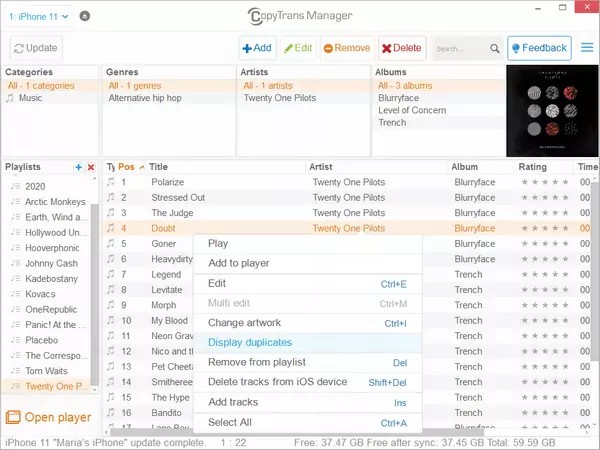
CopyTrans Manager is a software suite that enables users to manage, transfer, and back up data from iOS devices, including iPhones, iPads, and iPods. CopyTrans serves as a replacement for iTunes, allowing you to transfer, organize, and manage media files, contacts, messages, and other data between your iOS device and your computer seamlessly. It also supports the transfer of playlists, ringtones, audiobooks, and voice memos, enabling complete control over your media library without depending on iTunes. Unlike Apple’s own file management tools, CopyTrans selectively transfers files, offering users more control over their data without the risk of accidentally or inadvertently losing it, and synchronizing only the desired files.
Perhaps the strongest feature you get with CopyTrans is access to a backup of many items on your iPhone without having to pay for iCloud. For users who prefer local backups instead of relying on internet-based cloud storage, CopyTrans offers a simple and effective offline solution. That's especially useful for users who are looking for much more of a streamlined drag-and-drop interface rather than having to work in and out of Apple's much more closed ecosystem. In addition to photos, videos, and music, the backup process can include your playlists, ringtones, audiobooks, and voice memos, ensuring that all your personal data is safely stored on your computer.
Why Should I Download CopyTrans Manager?
CopyTrans Manager is an essential tool for anyone who needs a powerful, low-maintenance solution for transferring and managing iPhone data from a Windows PC. iTunes is largely inflexible, while CopyTrans gives you the option of transferring files selectively. This enables them to transfer individual songs, photos, or videos without altering their entire media library. This form of control is important for users who may want to back up only certain files or transfer content without the fear of overwriting existing data.
CopyTrans has one of the best advantages that you can quickly and easily back up or restore data within a short time. With this software, users can make a complete or selective backup of the iOS device that keeps all the essential contacts and messages with media files secure on a PC. The program can also restore playlists and ringtones during a device migration, maintaining your customized audio setup. Additionally, while iCloud offers minimal free storage and requires internet access, CopyTrans supports local backups, making it an appealing option for those who want to store their data offline. This feature offers data customization for a full reset and is very useful when the user needs to restore only some data instead of a complete backup.
Once you download CopyTrans, another compelling reason to love this tool is its user-friendliness. Whereas iTunes can be somewhat complicated and make steps needlessly complex, CopyTrans provides separate modules for the actual functions you want to perform. It allows users to transfer music with the ease of a few clicks, lets them manage photo albums with a simple drag-and-drop function, and also allows them to edit or delete contacts straight from their PC. This modular approach focuses on the users without inundating them with unnecessary features.
In addition, CopyTrans also offers an efficient solution for users who wish to transfer content between iOS devices and Windows computers without resorting to Apple’s cloud-based ecosystem. A common problem for iPhone users is transferring files to a Windows PC because of compatibility issues. CopyTrans fills that gap by enabling smooth transfers without needing to have other software on your PC.
If you’re looking to transfer photos off your iPhone to your computer for backup, extract messages for backup, or even copy your music library over without syncing, CopyTrans makes the experience a breeze. Its media management features extend beyond basic file transfer, giving you control over playlists, tones, audiobooks, and voice memos for a more complete iOS data management experience.
CopyTrans makes migration easy for those who switch devices often or upgrade to a newer iPhone. This means that all user data, such as music, photos, and contacts, can easily be transferred to a new device without losing any information. This is an especially advantageous feature for people who want to make sure all of their critical data is in place when they move to a new phone. Even personalized content such as playlists and ringtones can be preserved and restored automatically, making device upgrades seamless.
CopyTrans is an excellent and useful software that allows iPhone users to obtain a better experience while managing their data in a fast and efficient way. Its flexibility, ease of use, and ability to perform selective transfers make it a great alternative to Apple’s more crippled file management system.
Is CopyTrans Manager Free?
CopyTrans Manager is owned by a company called WindSolutions, which provides both free and paid versions of its software, depending on what users are looking for. The free version is basic, allowing the user to perform basic transfers and backups. Some advanced features, such as full data backups, bulk transfers, and additional modules, come at a cost, though, and you need a paid license.
So we know CopyTrans is a paid version, but it is a one-time purchase, not a subscription-based service. This is the more economical solution if you need to manage hundreds of thousands of gigabytes from your iPhone over the long haul without recurring costs. CopyTrans has a much lower overall cost and higher flexibility compared to iCloud storage subscriptions or any other paid service for backup.
What Operating Systems Are Compatible with CopyTrans Manager?
CopyTrans Manager is designed only for Windows operating systems, so if you are an iPhone user who manages their files using a Windows PC, then it is a perfect choice for you. The software works on Windows 11, Windows 10, Windows 8, and Windows 7. There are no versions for macOS and Linux, or other systems, so Mac users will have to look for alternatives to replace them.
There is no separate CopyTrans mobile application, but users can transfer files if they connect their iPhones or iPads to the USB port of a Windows computer. CopyTrans can transfer files without iTunes, but sometimes having Apple’s drivers on the PC can assist in passing files between the two.
CopyTrans is one of the best iPhone data management tools for Windows. With seamless performance, great design, and compatibility with the latest Windows versions, CopyTrans is by far an excellent tool to manage your iOS content without the inherent Apple ecosystem.
What Are the Alternatives to CopyTrans Manager?
The most famous is probably iMazing, an iOS content management software that helps users transfer files, backup information, and restore data without the need to use iTunes. With wireless transfers and a modern interface, it is a real CopyTrans alternative. It also supports incremental backups, scheduled automatic backups, backups to external drives or custom locations, and app management (installing, uninstalling, backing up app data).
Another option is AnyTrans, an iPhone data management all-in-one tool. It enables users to transfer music, photos, contacts, and other files between iOS devices and computers running Windows or macOS. It adds wireless device-to-device transfer, integration with cloud drives (Dropbox, Google Drive, OneDrive), management of notes, reminders, books/PDFs, voice memos, calendar events, and even app data transfer without reinstalling apps. This file explorer alternative offers a lot of features, so it is better for anyone who needs a complete file management system.
If a free option is what you're considering, iExplorer is a lightweight, convenient program that allows you to browse its content and transfer files from an iPhone to a computer. It doesn't have the advanced features of CopyTrans, but it's a straightforward tool that allows you to transfer just the essentials without requiring iTunes. It can also access and export messages, voicemails, call logs, and attachments, giving users a quick way to back up personal data. In addition, iExplorer supports mounting iOS devices as external drives, which allows direct access to certain folders for manual file management.