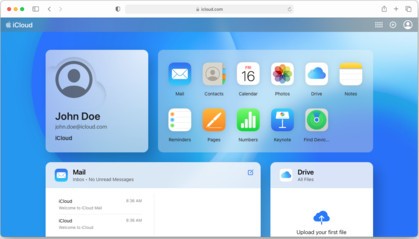
Apple provides iCloud as its cloud storage solution, designed to maintain synchronization of device data across all Apple products. The main function of iCloud involves the safe storage of photos, videos, and important documents, which users can retrieve across multiple Apple devices. iCloud provides automatic synchronization between any combination of iPhone, iPad, Mac, and Windows computers without breaking the workflow between devices. The main benefit of iCloud goes beyond backup, as it provides both organization and digital security to protect your digital assets.
Cloud storage through iCloud uploads your pictures and videos to the cloud, thus freeing up device storage. Users who capture many photos and videos can benefit from this feature, as it provides storage clean-up together with secure media protection. With iCloud backup, your digital content, including music and documents, remains safe so you can restore every element you need by performing simple interface clicks.
iCloud provides two security features to its users: Find My iPhone for device tracking and iCloud Keychain for password management. Once you sign in, iCloud functions silently and unobtrusively in the background to secure automated data backup between your Apple applications throughout all services. The file-sharing option of iCloud makes collaborative work more efficient, since users can exchange files and folders with other people to work on shared documents and joint projects, thanks to the iWork office suite.
Why Should I Download iCloud?
The main advantage of iCloud is that it unites all Apple devices into a single environment. Those who use their iPhone alongside iPad and Mac benefit greatly from having iCloud. The platform allows you to access your critical files, including images, videos, notes, and documents, on whichever Apple product you use. The link between various tasks creates a smooth workflow because you never need to pause your work to change devices.
Downloading iCloud is necessary because it automatically backs up your Apple devices. Icy conditions won't harm your contacts, messages, photos, or app data because they'll stay intact through a seamless backup process. The restoration of all content occurs through logging in to your Apple ID on a new device and re-establishing your digital profile after hardware damage or loss of your equipment. The sense of security that comes from backup protection has such high value that it cannot be easily measured, especially when your device stores crucial information.
The cloud-based storage of your photos and videos through iCloud keeps your device's storage clear. Having this feature is extremely helpful when your phone storage regularly reaches capacity. The iCloud Photos feature enables users to access their complete photo collection on Apple devices or through their iCloud web page from non-Apple devices. Cloud storage through iCloud provides exceptional convenience for individuals who save numerous high-quality photos but need them accessible beyond their device's storage.
Among iCloud's capabilities, you can find shared albums that enable easy cooperation with people through single album photo and video additions. Using this feature enables groups and families to view all their shared pictures during social gatherings. The iCloud Drive feature gives users an effective tool to store and access all files across multiple devices. You will have instant access to all your files, regardless of where you are, whether you work from home or away from a stationary environment.
Users of Apple Music automatically enable their music library to synchronize across all their supported devices through iCloud. The password management service in iCloud Keychain guarantees secure storage of login credentials for automatic app and website authentication, without requiring users to remember individual passwords. The convenience features of iCloud convert it into an important element of the Apple ecosystem that maintains smooth and effective device operation.
From the web version of iCloud, every user can create, open, and edit documents in the iWork office suite (Pages, Numbers, and Keynote).
Is iCloud Free?
Using iCloud requires an Apple ID to access its initial 5 GB of storage for free. The available 5 GB of free storage space provides enough capacity for simple backup needs and data storage.
The pricing system for Apple subscriptions starts at low rates, yet users can subscribe to expand their storage capacity up to 2 TB. Customers can access the monthly subscription and share it with family members via Family Sharing.
What Operating Systems Are Compatible with iCloud?
The main purpose of iCloud operates within Apple's device collection, which extends from iOS to iPadOS, together with macOS. Apple’s operating systems, including iPhones, iPads, and Mac computers, run this service with complete compatibility while smoothly integrating with Apple applications.
Computer users operating with Windows can access their stored cloud photos, videos, and documents through the iCloud for Windows application.
The iCloud system lacks Android and Linux-compatible services, but users can access all the features by connecting to the iCloud website.
What Are the Alternatives to iCloud?
The cloud storage system iCloud suits Apple customers well, but users still have additional options to meet their needs.
The most sought-after replacement for iCloud Drive is Google Drive, which offers users 15 GB of free storage, whereas iCloud only offers 5 GB. Google Drive functions as a popular option because its extra storage space and easy cooperation with Google Docs, Sheets, and Slides appeal to many users. The platform supports operation through iOS, Android, Windows, and macOS platforms. Through Google Drive, users can work together in real time while sharing documents with other users, but iCloud does not offer this functionality across multiple operating systems. The convenience of using Google Drive matches other already existing Google services because it integrates smoothly into your existing tools.
Another rival in the market is Dropbox, which delivers dependable file syncing features alongside an intuitive user interface. The service serves as one of the foundational cloud storage products that first standardized file synchronization operations. Users value the fast performance and reliable large-file data transfers, even though this service offers only 2 GB of free storage. The seamless connection of Dropbox to various third-party applications makes it adapt to both personal and work needs. The system enables you to share both files and folders and allows deleted items file recovery through its time-limited recovery system. Users will find the cross-platform capabilities outstanding because the solution functions with any device, ranging from smartphones to tablets and computers.
Microsoft OneDrive serves as an important cloud storage solution for people who require additional options. This storage platform appears as part of the Windows operating system while integrating with the documents in Microsoft Office applications. Microsoft OneDrive exists as the preferred cloud solution for users who use Word, Excel, and PowerPoint because it enables instant file saving and editing through the cloud. Users can access 5 GB of free storage through OneDrive, whereas another benefit becomes available with a Microsoft 365 membership that provides 1 TB storage along with premium versions of Office apps. The service enables users to access their files from both Android and iOS systems, creating flexibility for users who work on different mobile devices. OneDrive displays a simple interface that helps users maintain accessibility while enabling them to retrieve previous file versions through its built-in file versioning system.