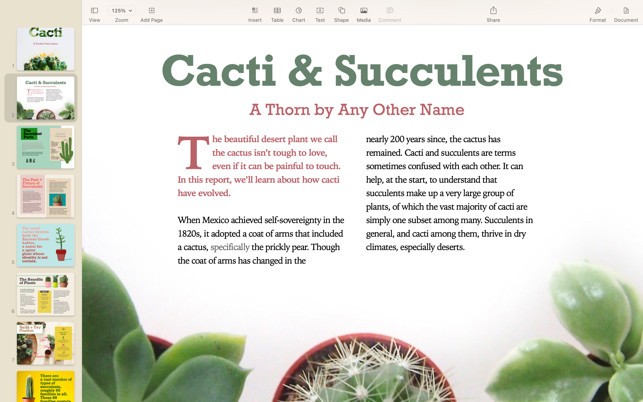
The word processing application Apple Pages is part of Apple’s iWork suite. Night writing and intuitive document functions combine to deliver this application, which focuses on user-friendly interfaces. Users seeking attractive document creation with minimal formatting complexity will find Pages beneficial, as it offers an aesthetic, simple approach that differs from traditional word processors. In addition to Microsoft Word, Apple introduced this program as its modern take on word processing, with a streamlined interface that works seamlessly across Mac and iOS platforms.
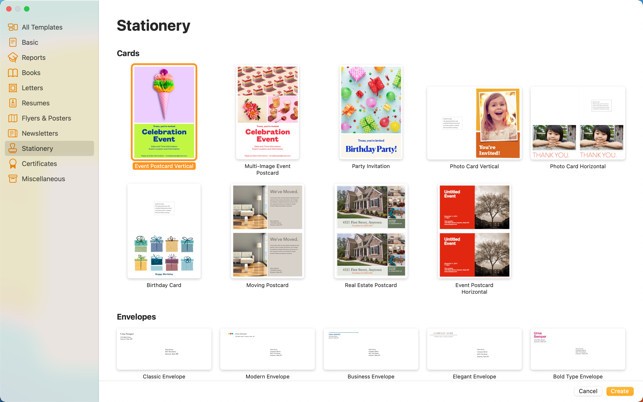
Pages' main feature allows users to work with a variety of files, including simple texts, complex brochures, reports, and professional resumes. They can start their project with the built-in templates in Pages and customize their documents without any restrictions. They can easily upload images, charts, and graphics using the drag-and-drop interface because the application eliminates the need for design expertise while still providing creative control.
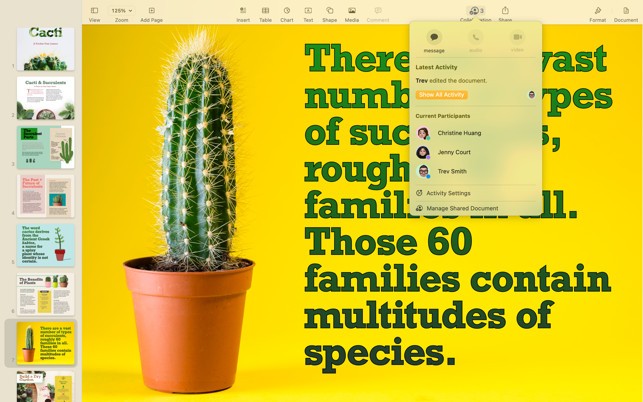
Pages allows for real-time document collaboration when features are enabled and files are shared with other users via iCloud. The program serves as an effective collaboration system for teams and students who require joint assistance on document projects despite working from separate areas. Pages is an accessible and effective tool that allows all users to efficiently create and edit documents for personal writing, business reports, and academic assignments.
Why Should I Download Apple Pages?
Apple Pages, a word processor, provides excellent writing convenience as well as intuitive operation that avoids complicated features for users who prefer simplicity. The attractive user interface stands as one of the primary motivations for users to install Pages. Pages' word processing interface is unique in that it offers users an uncluttered design that keeps the writing content front and center. Those who want to work on documents with ease should consider downloading this application.
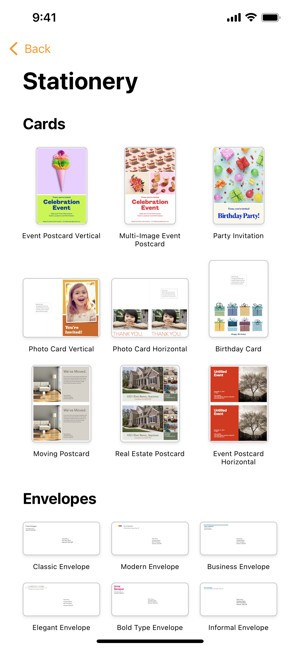
Pages delivers exceptional value through complete integration with Apple products. People with Apple devices can utilize Mac, iPhone, or iPad to edit the same documents without limitation. Most of them find it convenient to edit documents through different Apple devices thanks to integrated cloud storage. The program automatically saves all changes using iCloud syncing, ensuring that users always have access to the most recent document from any Apple device.
Among Pages' features lies its effective system for designing and managing document layouts. Pages' primary strength as a document creation tool is its elegant design features, which Microsoft Word users may not have access to. People have easy access to high-quality visual elements such as images, shapes, and tables to use in their documents. Pages' professional features, including advanced typography and layout tools, produce high-quality presentations that are ideal for newsletter creation, report development, and invitation production.
Pages includes collaboration as one of its key features. Users can add additional editors to their documents in real time using the built-in iCloud sharing feature. They can easily collaborate on their group assignments, review content, and receive feedback using an interface that eliminates excessive file transmission via email. Because it works with macOS, iOS, and web access via iCloud, they can use the collaboration feature to edit documents without any technical limitations.
Pages gives users two export options to choose from: PDF and Word files. They can create Pages documents that are easily transferable to Word-compatible users via document sharing without encountering any compatibility issues. The application gives users direct access to manage Word documents within Pages, allowing them to easily switch between platforms while maintaining smooth work operations.
Pages, a free word processor, works well as a premium software substitute for students and writers. This application provides users with all of the necessary features for writing documents, as well as formatting and editing tools, while maintaining clear usability throughout. Pages allows users to create a professional experience when working with text, whether they're drafting a business proposal, personal letters, or academic assignments.
Is Apple Pages Free?
Users of macOS and iOS can access Apple Pages without any cost because it operates as a free application. They receive Apple Pages without additional cost because Apple distributes this app free on their Mac computers, as well as iPads and iPhones.
It is possible to download the free application again from the Mac App Store or App Store, even when the app is removed. Pages stands out as one of the top free word processors since users can access all its features through a free offer that makes it attractive to numerous users.
What Operating Systems Are Compatible with Apple Pages?
The Apple Pages app functions only as a native application for macOS and iOS operating systems. The application operates optimally on every model of Apple computer, including MacBooks and iMacs, along with Mac Minis. You can edit documents using Pages on your iPhone and iPad, along with macOS computers.
You can also access Pages documents by opening a web browser to your iCloud account, even though Pages does not offer support for Windows or Linux operating systems. Users with Windows systems can work on Pages files using the iCloud web platform, yet their experience will be inherently less efficient compared to native Apple device applications.
Users who use operating systems other than Apple devices should consider alternative applications, as Pages has limited compatibility with platforms other than the Apple OS. Users of Apple devices should consider Pages as one of the best completely free word processing solutions.
What Are the Alternatives to Apple Pages?
Apple Pages is ideal for Mac and iOS users. However, several other programs offer comparable or superior functionality, particularly when users require cross-platform compatibility. Microsoft Word is one option, with Google Docs and LibreOffice Writer rounding out the top two.
Microsoft Word maintains its position as the globally dominant word processing program that holds the industry position as the benchmark. Users benefit from broad structure customization features joined to its ability to work with diverse formats alongside seamless Microsoft Office integration. The necessity for many users demands Microsoft Word, even though it remains a non-free product due to its extensive utilization within business, education, and professional settings. Users can find this software suite installed on Windows and macOS systems, together with mobile versions, which unify the program experience across different platforms. The primary benefits of Word exist in its powerful formatting options, together with its sophisticated team-working tools and industry-standard compatibility features.
Users who focus on working with the cloud will find Google Docs to be their ideal choice. The web-based operating system of Google Docs enables users to access the program from all devices through any internet connection because it does not need a traditional software installation. Documents saved to Google Drive through this program do not need manual intervention since automatic saving protects data from system crashes and file erasure. Students, along with remote teams and businesses that need to document collaboration tools, prefer Google Docs because it provides free services for real-time document editing. The application excels at basic functionality because it maintains a simple approach to use.
LibreOffice Writer operates as an open-source word processor that substitutes paid versions of Microsoft Word and Apple Pages since it is completely free to access. Writer provides a full set of elements available in Word while supporting various document formats through its offline functionality. Users seeking a cross-platform word processor beyond Pages can choose LibreOffice Writer because it operates on Windows, macOS, and Linux systems through free access rather than Microsoft Office payments. LibreOffice Writer provides complete offline functionality together with its comprehensive feature fundamentals that create an attractive solution for users who desire classic document creation tools.