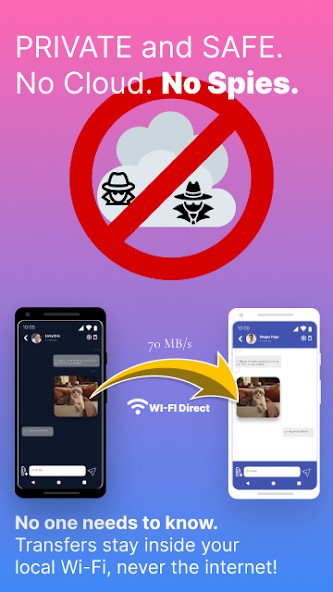
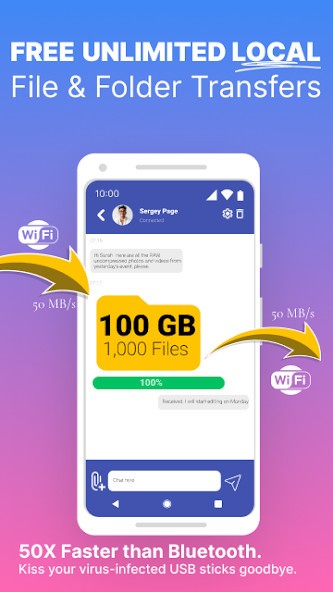
The software application Feem serves as a file-sharing network that expedites confidential data exchange while maintaining high security levels between devices. Users can transfer files using Feem because the application works completely offline and does not require internet access to send data. Feem uses Wi-Fi Direct technology to establish local networks between devices, allowing for seamless file transfers that do not require external server connections. The app provides top-level privacy protection because files stay outside all third-party networks.
Feem provides users with an encryption feature that improves file transfer security. File-sharing applications typically prioritize speed over security because their systems lack proper protection methods, leaving files vulnerable to interception. Feem uses encryption to protect file downloads, ensuring that only intended recipients can view the content. The app meets the needs of professional and business users, as well as anyone who deals with confidential information.
Through its chat interface, users can both send files and messages through Feem. Because it serves as a communication channel that connects devices, the application has more capabilities than just file sharing. Feem's ability to share a variety of document types, including images and videos, results in an efficient confidential data transmission process, putting it in a strong position in the file-transfer business.
Why Should I Download Feem?
The following list explains why users should consider downloading Feem. The app allows users to send files directly to neighboring devices using its built-in connection feature, which does not require internet access. Feem uses Wi-Fi Direct to establish system-to-system connections, which eliminates the need for cloud storage upload and download procedures. It transfers files faster because it operates at speeds that exceed Bluetooth and email attachment limits. Users can benefit from this capability because it enables data sharing even when mobile data and Wi-Fi networks are absent. Thus, it proves helpful, especially when internet connectivity is restricted.
Feem's advanced security features play a significant role in its selection for file transfer. File-sharing applications usually transfer data without encryption, making files accessible to interceptors. The encryption process with Feem begins before each file is sent because it protects data and ensures that only recipients can decrypt and access files. Feem's file-sharing capability stands out as the most secure solution available for protecting sensitive documents and personal files from privacy invasion.
The main advantage of Feem is its ability to work across multiple platforms simultaneously. Users can transfer files between Windows, mac OS, Linux, Android, and iOS systems with no additional setup required. Feem provides user-friendly file exchanges that enable instant sharing between operating systems, smartphones, and laptops.
The application has an easy-to-use control panel, making it suitable for users with limited technological knowledge. Feem operates without demanding complex network setups by detecting all devices connected to the same network. This enables users to make file sharing easy by picking files and selecting the target recipient. Because of its chat-style interface design, the application provides a user experience similar to that of online chatting.
Feem's users benefit greatly from its speed. File transfers between devices via Feem are extremely fast because they do not require cloud storage or external servers, outperforming email, Bluetooth, and traditional Wi-Fi transfers. When using Feem, you can now share HD videos and entire folders instantly, rather than taking minutes.
Feem is an effective solution for business professionals seeking to conduct secure file transfers of their work documents. The app allows users to exchange confidential files by granting their team members direct access to networked devices, preventing these files from being exposed to online threats. Encryption through its system adds an extra layer of security, protecting files from unauthorized access when they move between devices.
Feem doesn't require user accounts or login authentication, so users don't have to create credentials or remember passwords. Feem, a file-sharing application, bypasses traditional registration procedures, allowing for immediate use after installation, making it a top choice.
Feem uses few resources because it is a lightweight application. It works well on a variety of devices, whereas heavier file-sharing solutions can slow down system performance, making it an excellent choice. People who need file-sharing apps for personal or business use can rely on Feem to provide an effective solution that respects user privacy.
Is Feem Free?
Users can access two versions of Feem for free and premium services. Local Wi-Fi transfers, together with cross-platform functionality, provide the essential features available within the free version of the application.
Users who opt for the premium version will access three main additional features, including speedier transfers and no ads, alongside premium support assistance. Basic users who require file-sharing can rely on the free version of Feem, but those requiring premium capabilities should choose the paid version.
What Operating Systems Are Compatible with Feem?
Feem supports a wide range of operating systems, making it ideal for users who frequently transfer files between devices. The application supports Windows, macOS, Linux, Android, and iOS operating systems, allowing for continuous file transfers between smartphones, tablets, and computers. Feem distinguishes itself from other file-sharing tools with a feature that allows device connections across operating systems.
Feem adds a web-based interface that allows users to share files via a browser, whereas most apps require setup on multiple devices. The app allows for simple file transfers between Windows PCs and MacBooks, as well as Android phones and iPhones, without requiring to go through complicated installation steps.
What Are the Alternatives to Feem?
Feem provides powerful file sharing, but users can consider several other options for their same transfer needs. Xender, along with SHAREit and Send Anywhere, is one of the most popular file-sharing tools.
Xender is a popular file-transfer app that allows users to share data quickly without using mobile data. This platform allows them to share files across multiple platforms, including Android, iOS, Windows, and macOS. Xender stands out as the most efficient platform for sending large files, which is especially useful for those who frequently transfer videos, documents, and programs. Multiple users can exchange files in real time using the application's group sharing feature. Xender contains promotional advertisements that occasionally interrupt the user's interaction with the app.
SHAREit is a comprehensive file-sharing application that offers fast wireless file-sharing capabilities. The file-sharing application uses Wi-Fi Direct connections to move files quickly without requiring USB or Bluetooth connections. Users can enjoy playing music and videos with SHAREit because it includes an integrated media player. Most of them criticize SHAREit for its excessive advertising and bloated software.
The privacy-oriented file-sharing application Send Anywhere provides encryption during file transmission sessions for increased security purposes. Send Anywhere offers the unique feature of integrating cloud storage, allowing users to access shared files across multiple devices. The application enables user-to-user file transfers that provide quick and dependable operations while keeping files off external server systems. A few advanced file sharing features require users to subscribe to a premium account.