Skip to content
Free PDF Reader

Free PDF Reader

By Gnostice Information Technologies

22
12/17/25
1.4
Freeware

If you need a PDF reader and you don't want to use Adobe Acrobat Reader, you can try Free PDF Reader. Available for Windows, Linux, and macOS, but with no updates since 2020 (see alternatives for newer software).

About Free PDF Reader

Users can access and operate PDF files through Free PDF Reader at no subscription cost. The application provides dedicated access to PDFs for users because this document format represents one of the most popular sharing and storage formats. Users can perform enhanced PDF document interactions through Free PDF Reader since it surpasses standard web browsers along with built-in document viewers. A user-friendly interface enables continuous scrolling in addition to zoom control with the ability to mark text or create remarks.

PDF users who need basic document viewing capabilities should consider Free PDF Reader because it gives them an uncomplicated alternative to costly alternative software programs. The software functions well for reading electronic books and manuals as well as contracts and scanned documents. Its latest versions contain additional features that incorporate text selection with a search engine, which facilitates navigation through extensive documents. The program loads files rapidly without impacting system resources because it was designed for speed, and its size remains minimal.

Users can find various Free PDF Reader applications on the market, which additionally provide supplemental features that protect files with passwords and convert documents and handle form completion tasks. A Free PDF Reader operates as a basic software tool that enables users to open PDF files from various computing platforms.

Why Should I Download Free PDF Reader?

Every person who needs to work efficiently with PDF files should download Free PDF Reader because it provides an exclusive solution to view and open their files. Standard web browsers on computers and mobile devices include basic PDF viewing but usually do not have all the capabilities needed for reading PDF files effectively. Using Free PDF Reader guarantees smooth document navigation between multiple pages and sharp text display together with quick file rendering performance for large files.

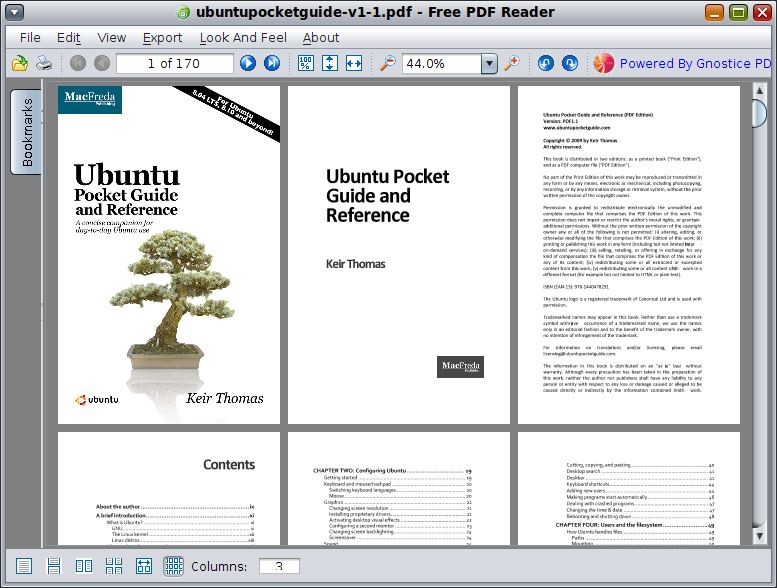
The most significant feature of this tool is the ability to effectively control PDF display parameters. It let users read documents through features such as page rotation, text selection, and zoom adjustments. They can view multiple pages at one time, use bookmarks, export PDF files to popular images formats, etc.

Users gain access to interactive PDF functions through the program. Standard web browsers sometimes fail to display the interactive features found in numerous PDF files, such as links along with forms and multimedia components. The software enables users to interact with all of the file's features correctly, thus making it a valuable utility when completing forms or using embedded documents or verifying signatures in digital documents.

The professional and student audience benefits from Free PDF Reader through its systematic document management system. The updated versions of Free PDF Reader enable users to establish document libraries and add bookmarks for crucial sections while allowing annotations with highlights along with comments. These features become essential for research work as well as document study or contract and report review tasks.

The secure nature of the application provides one more motivation for users to download it. Web browsers function as PDF viewers, but users should be aware that these applications remain exposed to harmful scripts in malicious PDF documents.

Document access is made possible through the offline capabilities of Free PDF Reader. A standalone reader allows you to view PDF documents, whereas browser-based PDF viewers require internet access. Free PDF Reader provides significant benefits to users who work with large files outside of cloud storage platforms, as well as traveling professionals and remote workers.

The application performs quickly because developers designed it to be lightweight, thus surpassing the loading speed of programs such as Adobe Acrobat. Users who need quick and hassle-free PDF opening without application startup delays should choose Free PDF Reader as their preferred solution. They benefit from Free PDF Reader because it doesn't need to be installed to be used; it is portable. They can carry it on a simple flash drive as well as run it directly from your computer hard drive.

Is Free PDF Reader Free?

Free PDF Reader exists as a completely free program available to users. It avoids extra charges for licensing subscriptions and initial payments, thus demonstrating their value to users who compare premium PDF software solutions.

There are no premium functions available for purchase to gain improved editing features, as well as storage options and PDF transformation features. All users get free access to their PDF files' viewing capabilities, as the essential PDF opening and reading features stay totally cost-free.

What Operating Systems Are Compatible with Free PDF Reader?

Users can easily install Free PDF Reader on various operating systems because this program works across multiple devices. Users can install Free PDF Reader on Windows 7, Windows 10, and Windows 11 versions without limitations. Free PDF Reader applications are designed to work with macOS operating systems, allowing Mac platform users to view PDF files specifically.

Along with the Windows and macOS platforms, there is also a version available for Linux users, allowing for flexibility across multiple operating systems. This is a portable app, which means that you don't have to install the software to make it work; just unzip the archive.

What Are the Alternatives to Free PDF Reader?

Free PDF Reader functions well for PDF file management, yet users have multiple other options that give comparable or superior functionality to this tool. These alternatives either emphasize speed along with lightness in design, or they introduce complete sets of PDF editing features with annotation and conversion support. Moreover, they are more up-to-date than Free PDF Reader.

The most frequently used free alternative for PDF viewing is Adobe Acrobat Reader. Adobe provides the official PDF reader, which delivers complete functionality through its capability to work with forms and electronic signatures and connect users to cloud-stored PDF materials. The original version of Adobe Acrobat Reader functions at no cost, but users need to subscribe to access enhanced features, which include PDF editing capabilities and file conversion tools. The slight increase in system demands does not stop this application from being a top PDF reading solution because of its trusted performance across all PDF documents.

Users who seek faster performance alongside lightweight features should opt for the Foxit Reader software, which surpasses Adobe's software in both aspects. Foxit Reader delivers features for notes and text marking as well as form entry through its system, which produces small programs that start quickly. Its user base mainly consists of individuals who need additional capabilities beyond Free PDF Reader essentials but do not want the size and features of Adobe Acrobat. The security functions in Foxit Reader include a safe reading mode that protects users against potentially dangerous scripts found in PDFs.

Users looking for an open-source PDF solution should choose Sumatra PDF as their preferred application. Sumatra PDF stands out as both speedy and slim when viewing PDF files, since it was made for individuals who want only basic document viewing capabilities. ReaderMode Sumatra PDF works as a perfect minimalistic PDF reading solution because it provides no extra editing capabilities nor annotation tools other than basic reading accessibility. Users will benefit from this tool, as it accepts EPUB, MOBI, and XPS formats together with PDFs, which enables reading various documents besides digital books.

Free PDF Reader

Free PDF Reader

Freeware
22
1.4

Specifications

Version 1.4
Last update December 17, 2025
License Freeware
Downloads 22 (last 30 days)
Author Gnostice Information Technologies
Category Office
OS Windows XP/Vista/7/8/10/11, macOS, Linux

Screenshots

Apps related to Free PDF Reader

Explore More

All trademarks, logos, downloadable files, and other copyright-protected materials displayed on this website are the sole property of their respective owners. They are used here for informational and illustrative purposes only.