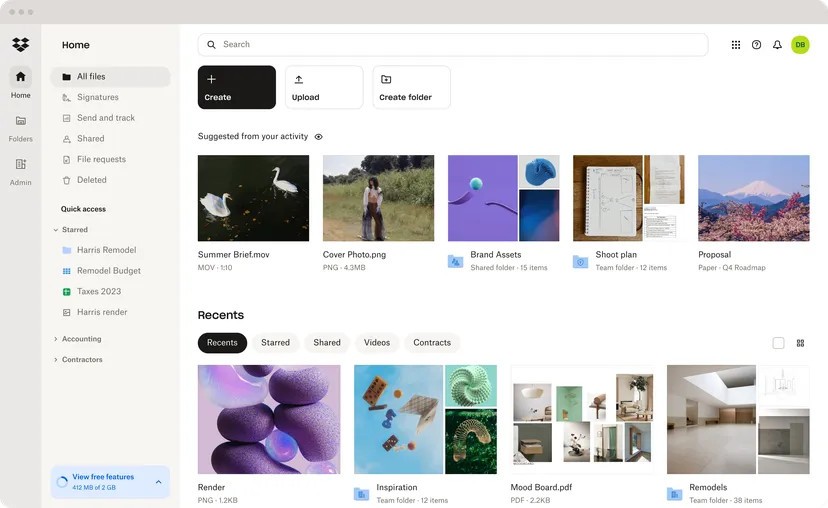
Dropbox is a cloud storage service that allows users to store, share, and synchronize files across devices. It offers features such as file recovery, version history, and collaboration tools. You can use it both as a cloud storage and a file synchronization platform, keeping your files safely stored while enabling access from any internet-connected device.
The service introduced cloud storage to the masses as the first widely popular cloud platform that maintained file accessibility at any time. Users can store all file types, including documents, photos, videos, and other content, with Dropbox before they access their information from smartphones, PCs, or tablets. Accessing files is always simple because they remain within reach with a single click, regardless of your current location.
The smooth integration of file synchronization is the primary motivation why users choose Dropbox. The system lets you upload files to one device so they become immediately available across different devices automatically. With Dropbox, users can generate sharing links that enable simple file and folder exchange with multiple collaborators. Professionals often choose this platform as their preferred method to handle file sharing, together with project collaboration needs. Dropbox maintains a flexible and dependable system to organize files, including personal and work materials, together with multimedia files.
The incorporation of Dropbox with different productivity applications stands as one of its key benefits to users. Dropbox serves as a seamless tool that permits users to save and retrieve work materials within any software environment, including Microsoft Office, Google Workspace, or Adobe programs. Real-time collaborative document work is possible through Dropbox Paper that simplifies team collaboration tasks. Dropbox provides a reliable file management solution that meets the needs of users who require efficient file sharing features.
Why Should I Download Dropbox?
Downloading Dropbox offers users a convenient way to securely access their files from everywhere through its easy storage system. Dropbox offers such remarkable ease of use that it stands out as its main attraction. The Dropbox system allows you to upload your files, then access them at any time, instead of using traditional methods such as USB drives or emails to share important documents. Your stored data is available whenever you need it, across any combination of devices, including computers, tablets, and smartphones.
Powerful collaboration tools found within Dropbox provide users with a compelling basis to download the application. Dropbox provides effortless sharing capabilities for working on files jointly with your friends and colleagues. Dropbox enables users to create shared file folders containing the most current versions of their content, including documents, presentations, and multimedia files. Users can stop sending redundant email attachments since Dropbox maintains a real-time synchronization of all files in a single shared space. The platform lets users establish permissions systems that determine which users can view files and edit them to guarantee additional security.
Dropbox provides secure data storage that should be your choice. Your information remains secure because the platform encrypts data both during transfer and during storage on the server. Two-factor authentication offers stronger protection and becomes available through user activation. The platform functions as a trustworthy system for business documents as well as personal files when handling confidential data.
The recovery and version management features of Dropbox present superior capabilities to users. Dropbox provides users with the ability to bring back older versions of files and recover accidentally deleted files, so users maintain access to previously saved versions. The feature helps users who work with teammates because it provides the tools needed to observe edits together and resolve errors. The Smart Sync feature in Dropbox enables users with small storage space to access their files while simultaneously avoiding filling their device's capacity.
Obtaining Dropbox through application download allows users to get access to a modern tool that combines efficient security features with an easy-to-use interface. Anyone can use the different features of Dropbox without technical skills because it flawlessly operates with other programs, making it the preferred platform for individual use as well as business requirements and group work. Any person who needs efficient file organization with global accessibility must use this platform due to its well-known reputation as an excellent data solution.
Is Dropbox Free?
Users can access the free Dropbox Basic plan that provides 2 GB of storage capacity through the service. The basic plan is ideal for users who require safe data storage for their important documents and media files.
There are also various paid packages, including Dropbox Plus and Dropbox Professional, to get more storage and additional features. Users can assess the suitability of Dropbox through its free trial plan before becoming a subscriber.
What Operating Systems Are Compatible with Dropbox?
You can access Dropbox through various operating systems because it features compatibility options for almost every device. Users can obtain Dropbox's official application version by downloading it from Windows, along with macOS, Linux, iOS, and Android systems.
Any computer connected to the internet via its web interface makes it easy to retrieve your data even without having Dropbox installed. The mobile applications provide an interface that matches desktop functionality and enables users to upload files and share their documents without difficulty.
What Are the Alternatives to Dropbox?
Microsoft OneDrive stands out as one of the main alternatives to the Dropbox platform. OneDrive functions naturally within the Microsoft ecosystem since it integrates without interruption with Office applications, including Word, Excel, and PowerPoint, to serve users who use Microsoft services. By using a Microsoft account, users can access 5 GB of storage space through OneDrive, which exceeds Dropbox's free storage capacity. Business users can access Microsoft 365 subscriptions to get increased storage capacities while gaining access to productivity tools. OneDrive delivers seamless real-time document co-authoring as well as effortless Windows file management because of its built-in Windows integration features.
The storage capacity of Google Drive extends to 15 GB throughout all Google services and includes Gmail and Google Photos. Google Workspace integration provides an excellent value for users who regularly work with Google Docs, Sheets, and Slides documents. Users can edit documents at the same time with no complications between multiple users working on shared documents. The mobile app of Google Drive enables efficient file management, so users can access their files anywhere. Additionally, the service supports countless file types, which include text files and videos. The platform shines because it provides device-backed data synchronization strategies, which attract personal and professional users.
Users invested in Apple’s product line should consider iCloud as their storage solution, since it provides 5 GB of free storage that automatically keeps information in sync between iPhones, iPads, and Macs. The system facilitates photo and document backup together with application data storage. Through Find My, users can track their misplaced devices, while Family Sharing enables storage and purchase sharing between multiple accounts. The main benefit of iCloud should appeal to users who rely mainly on Apple devices, since it provides restricted functionality for non-Apple systems.