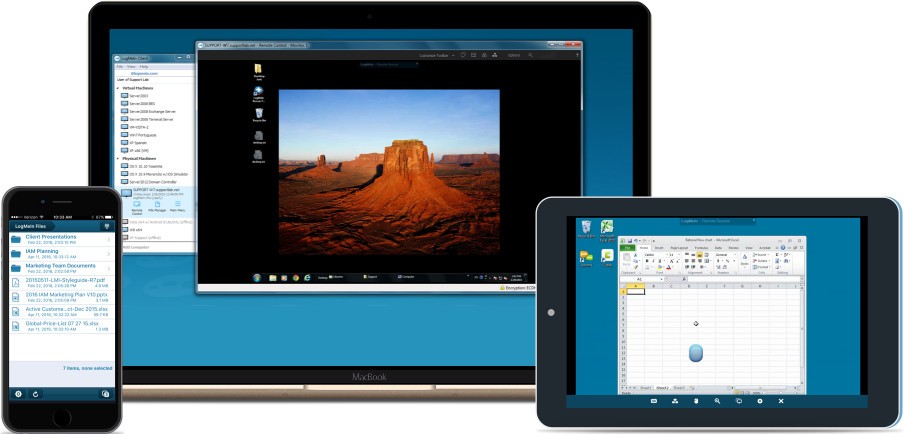
LogMeIn is a remote desktop and cloud-based access app that provides device control capabilities from anywhere in the world. LogMeIn serves personal users wanting remote file access, alongside corporate customers managing remote machine control. The app enables them to manage computer connections while running programs and transferring files, and to provide remote assistance to other users.
Security remains a crucial issue for remote access, so LogMeIn provides end-to-end encryption and multifactor authentication to verify user identity. The system provides dependable and secure remote connection capabilities that multiple IT professionals, as well as individuals and business organizations, adopt. In addition to remote access, LogMeIn provides cloud storage functions that let people store and access their data without an extra app.
Through a single dashboard, LogMeIn enables businesses to manage their clients and devices simultaneously. People can use the app to share their screen content, which is beneficial for remote presentations, online meetings, and customer support. LogMeIn stands among the leading providers of remote access solutions, while remaining the top choice for those seeking reliable operation, secure connections, and exceptional remote computing performance.
Why Should I Download LogMeIn?
Users will find multiple reasons to download LogMeIn, as it provides excellent remote access features. The central advantage of using LogMeIn is its ability to allow access to files and applications from any location. LogMeIn enables users to establish connections to computers and networks at any location with a three-click system, whether they work from home, travel for business, or provide IT assistance to clients. LogMeIn makes computing and file transfer easy with a simple interface that stands apart from the challenging app setups that plague other remote desktop solutions.
The business world uses LogMeIn to simplify the administration of various devices. A remote technical support service allows IT professionals to fix problems by using computer software while remaining off-site from clients. The system removes two operational disadvantages: it accelerates operational performance and bypasses physical IT service requirements, thereby minimizing expenses. Through its cloud integration, LogMeIn enables professionals to store and share files in the cloud, improving teamwork among distributed employees.
LogMeIn established itself as a credible security solution, a major reason users installed the app. Remote device access requires security measures to be the most important consideration. LogMeIn's security measures include 256-bit AES encryption, multifactor authentication, and automatic session termination to ensure secure connections. The listed security measures prevent unauthorized access, making the app ideal for handling sensitive data.
Through LogMeIn, users can easily run remote presentations and conduct meetings. Screen-sharing capabilities allow them to organize virtual meetings, including real-time file sharing and collaborative work sessions. As a result, this app is a perfect tool for businesses and professionals conducting online training events, customer support, or team meetings.
LogMeIn distinguishes itself by enabling users to access their computers from mobile devices without being limited by other remote desktop applications. Through LogMeIn, they can grant computer access from both a tablet and a smartphone, so they never lose connection during their work or rest periods. They benefit from remote access features on their smartphones and tablets, which provide them with enhanced convenience, especially if they spend much time moving between locations.
LogMeIn provides users with better remote device video and audio streaming capabilities than most alternative remote access solutions. Those with smooth graphical app requirements and media file needs should consider this tool as their remote access solution. The remote access solution provided by LogMeIn offers both an extensive range of capabilities and enhanced security for users across business, IT support, and personal needs.
Is LogMeIn Free?
LogMeIn is not free. LogMeIn operates on a subscription basis at pricing levels suitable for individuals, small-business clients, and large enterprises.
Users must buy a LogMeIn plan to access its features, as the previously available free version has been discontinued. During the free trial period, they can try out LogMeIn to determine if they want to subscribe to the service.
What Operating Systems Are Compatible with LogMeIn?
LogMeIn supports popular operating systems, enabling its use across various user communities. The app enables users to remotely access and control Windows and Mac OS computers because it supports both operating systems. Through mobile applications available on both iOS and Android, they can remotely connect to their devices, including smartphones and tablets.
Those who want browser-based computer access through LogMeIn do not need to install software on their multiple devices because LogMeIn provides a cloud interface. The app enables easy remote access on shared or public computers because of its convenient design. Geeks and Linux users must look beyond LogMeIn because the app has limitations when working with their operating systems, so alternative remote access solutions exist.
What Are the Alternatives to LogMeIn?
LogMeIn stands as a potent and secure remote desktop system, but numerous alternative solutions exist that provide identical functionality. Among the superior substitutes for remote control services are Chrome Remote Desktop, AnyDesk, and TeamViewer.
Users obtain free remote access to their computers through the Chrome Remote Desktop service, developed by Google. The service operates smoothly, making it well-suited to individual needs and basic remote use requirements. Chrome Remote Desktop offers a free solution without file transfer capabilities or multi-user administration, but provides a practical connection method for simple requirements.
People frequently rely on AnyDesk because it delivers impressive remote access software with lightweight system requirements and high-speed connectivity. The app enables fast remote connections through an efficient system that meets the needs of users who want immediate computer access. Cross-platform compatibility is a strong point for AnyDesk, as its service operates on Windows, Mac OS, Linux, iOS, and Android. People with personal needs can access free AnyDesk services, but business customers must purchase advanced options, including unattended access and custom branding.
TeamViewer is a leading remote access solution used by a broad user base for a wide range of personal and business needs. The remote access solution enables users to connect screens and access files, and provides video call functionality through its platform. TeamViewer provides free, non-commercial access to users, making it a practical solution for people who require occasional remote connection capabilities. Businesses and professionals need to acquire a paid TeamViewer license because the cost surpasses the basic plans of competing alternatives.