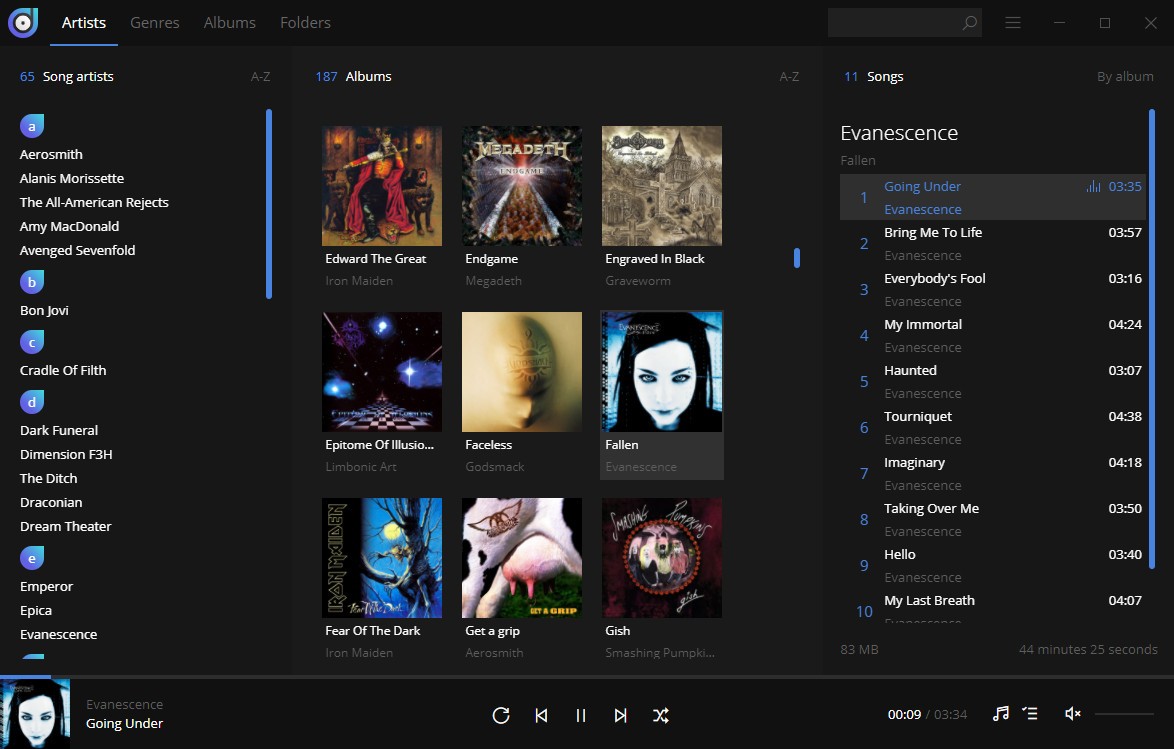
Dopamine serves as a music player which avoids superficial features and eye-catching devices in its design. The music player works discreetly because it grasps that music should remain unfiltered. Users who seek a simple interface without any performance limitations can use Dopamine to enjoy their personal music library. The application features a minimal design yet powerful framework to let users easily play music through its optimized interface.
The main unique aspect of this program lies in its requirement of minimal user input. Users can easily maneuver through the peaceful interface without interruptions during their listening experience. The application presents its primary features, which include music playback with playlists and moment viewing capabilities.
The application dedicates a simple and logical display for each track, together with every album and artist profile. The interface enables you to bypass endless scrolling as well as navigate between numerous tabs. Dopamine becomes noticeable only during listening periods and becomes invisible whenever music playback stops. It’s not here to shout. The application exists to play music while maintaining both simplicity and beauty for its users.
Why Should I Download Dopamine?
Dopamine brings relief to users who navigate the crowded media app market. Users who get tired of coping with music applications filled with advertisements, along with paid services and additional features, have a solution through this platform. Dopamine strips it all back. No noise. No complicated menus. The app avoids forcing unwanted changes upon its users to transform their music player. Your music, along with a perfect music-playing environment.
Opening an app provides immediate comfort because you can instantly locate all the elements within the interface. Albums feel like albums. The tracklist exists in the same pattern you anticipate. The fonts are legible. The artwork looks clean. Dopamine provides all basic functionality, such as searching and queuing, together with repetition and shuffling features, without requiring you to relearn the application during each new launch.
The audio experience remains straightforward because playing music eliminates all distracting pop-ups with additional analytics or streaming suggestion interruptions. Music plays smoothly and sustainably after I open up the application.
The multiple audio format support in Dopamine eliminates the need to convert files or lock yourself into the MP3 format. The player functions without disturbance to your work environment while delivering high-quality audio output from FLAC, WAV, and AAC file types through a system resource-efficient process. This feature proves crucial for people who work or game, since the music application does not consume excessive system resources.
The application recognizes that numerous users maintain their offline music databases as valuable assets. Internet-based services and paid streaming services remain unacceptable to numerous individuals. Dopamine celebrates that. This music player provides methods to manage your offline music collection professionally by employing correct tagging techniques alongside sophisticated display options and smooth interface controls. The application sticks to a single high-quality feature rather than attempting multiple functions.
This may be the most valuable characteristic of Dopamine. It respects your space. It respects your time. It doesn’t overreach. You can keep Dopamine by your side as part of your day through simple play-button action, while it provides silent support the entire time.
Is Dopamine Free?
Yes, Dopamine is completely free. Users can download this software without any payment by accessing its open-source design. Users access all features of Dopamine without additional expenses because it has no advertising content or premium versions available. You can use Dopamine without cost because it allows simple download and installation, followed by absolutely free access.
What Operating Systems Are Compatible with Dopamine?
The Dopamine program operates on Windows operating system platforms at present. The program functions optimally on both Windows 10 and Windows 11 operating systems, and is available for macOS and Linux users as well. Regardless of your device strength, from a high-end PC to a basic laptop setup, the application remains so minimal that it runs without delay.
You can easily install Dopamine with a few minimal requirements regarding your system. Dopamine presents itself as a top-notch local music player for Windows platform users, making it the best available option specifically for Windows operating system consumers.
What Are the Alternatives to Dopamine?
Besides its elegant listening experience, Dopamine users can find several other distinctive music players available in the marketplace. Deciding between music players depends either on personal aesthetics or on managing musical needs and listening preferences.
The highly esteemed alternative to meet musical playback needs is Foobar2000. It doesn’t hold your hand. By offering ultimate customization and unparalled raw functionality, this application becomes an ideal choice. The application allows you to simplify its core elements or expand it through plugins and skins until it matches your requirements exactly. From its basic layout, one can tell that it lacks sleekness, but its modification possibilities remain extraordinary for anyone who prefers customization.
Another big name is VLC. The worldwide video player known as VLC actually performs incredibly well as a music management application. With support for every basic audio format combined with extensive music playback control, you can access it from its user interface. The application provides dependable service, even though it features an unappealing user interface and outdated interface elements. The main reason to choose VLC over other players is its functional design, which makes up for its unappealing appearance. The application spans across different operating systems because it operates on Windows and macOS, and Linux platforms, and is available for mobile (Android, iOS), smart TVs, etc.
Then there’s MediaMonkey. MediaMonkey has been designed specifically for enthusiastic music collectors who want ultimate power from their music player. MediaMonkey provides you with a solution to consolidate all your numerous music files located across multiple drives and folders. The application provides users with advanced tagging capabilities while offering playlist management features alongside automatic organizational tools that handle disorganized libraries. The program presents an initial complexity challenge to users who use Dopamine or similar straightforward players, but delivers powerful functionalities when users master its operation. The platform provides synchronized management capabilities for device music distribution.