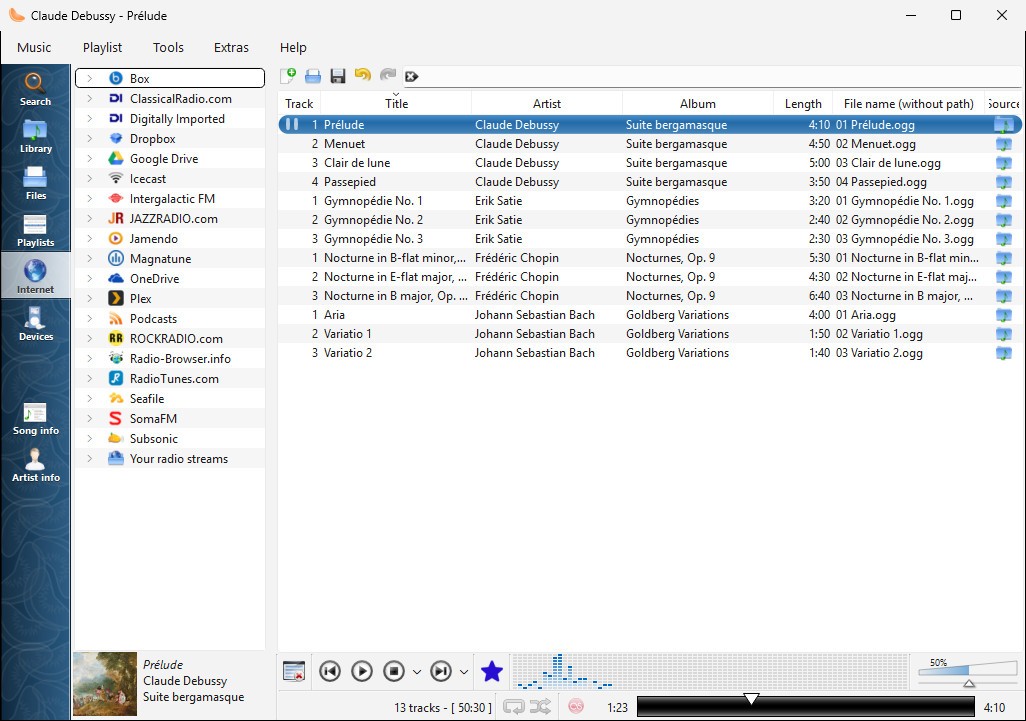
Clementine Music Player is the perfect choice for music enthusiasts. This audio player allows you to build complex playlists, edit tags, and enjoy gapless playback when listening to albums. You can connect it to cloud storage like Dropbox or streaming services, or use local MP3 or FLAC files and combine different music libraries in a single player. You can also use it to listen to podcasts or online radio.
While Clementine Music Player has a relatively simple interface, it comes with powerful features such as smart playlists, a queue manager, an audio transcoder, music visualization, a great search engine, and more. The tool was developed as an open-source project inspired by Amarok 1.4.
You can download Clementine Music Player on Windows, macOS, and Linux, and enjoy high-quality audio playback that is adjusted to your needs and system. Whether you require more control over your music or are just looking for a simple software to play your files, Clementine Music Player will fill your needs.
Why should I download Clementine Music Player?
If you need a tool that works as a common platform for managing, playing, and organizing your music collections both locally and in the cloud, then Clementine Music Player is the right choice for you. Thanks to its features dedicated to library management, you can scan your folders for music, organize your files by using metatags, download album art from the internet, or rename your files and folders based on different information. Clementine also supports bulk actions to avoid spending time applying changes to each file separately.
With Clementine Music Player, you can create smart playlists or use dynamic filters based on things like play count, rating, recently added tracks, or genre. The tool can even adjust your playback and queue based on the song's mood. On top of working with your local files, you can also integrate the app with different online services, like Spotify, SoundCloud, or others, via API keys. With Clementine, you can play podcasts or radio stations, and even add music from Google Drive or Dropbox to your playlists.
On top of that, Clementine Music Player visualizes your music as it plays with different animations, and you can also fetch song lyrics from tools like ChartLyrics and LyricWiki. They will be displayed in real-time as the song plays.
What's also great is that when you download Clementine Music Player, you also get a built-in audio transcoder that lets you convert music between formats such as MP3, FLAC, AAC, and OGG. This way, you can manage your files and adjust them for different needs, such as transforming your high-quality heavy files into more lightweight options for phones or portable music players.
If you download Clementine Music Player on Android, you can control your music through your phone, even if it's playing from a desktop computer, whether it's Windows, macOS, or Linux. With the app, you can change tracks, browse your library, or adjust the volume. If you're a more professional user, you have the option to use command-line control for building scripts or different automated workflows.
Is Clementine Music Player free?
Since it is an open-source software, you can download Clementine Music Player and access all of its features for free. The app is distributed under the GNU General Public License (GPL), so it's great for both personal and commercial use. You can even freely edit the code, build updates or new features, and distribute your version further.
What operating systems are compatible with Clementine Music Player?
Over the years, the app has been developed for different users and operating systems, so you can now download Clementine Music Player on Windows (versions 7, 8, 10, and 11), macOS (versions 10.10 to 10.15, but only Intel-based Macs), and Linux (Ubuntu, Fedora, Debian, Arch, and more).
There's also a portable version for Windows that you can run without installation, and a dedicated Android app called Clementine Remote, which allows you to control the desktop version.
What are the alternatives to Clementine Music Player?
If you need a free and comprehensive tool for Windows, then you should consider MusicBee. The app gives you access to extensive tagging tools, auto-DJ playlists, support for high-resolution audio, and seamless integration with podcasts and online radio. You can integrate this software with other services like SoundCloud and customize the interface to your liking, switching between more detailed and simple views. With MusicBee, you also get automatic new track detection and auto-tagging with metadata from internet databases. The app can serve as a UPnP media server for streaming music to other devices in your network.
AIMP is a simple but powerful audio player you can download for free on Windows and Android devices, and it has a 32-bit audio engine. You can switch between different playlists through tabs, listen to online radio, or even use advanced tools for converting audio. There's also a big library of plugins you can download for AIMP, and extend its features with things like syncing lyrics or playing visualizations.
Another great option for Windows users is MediaMonkey, which is available as a free app or a paid Gold license. In addition to just playing music, the tool gives you access to features such as metadata editing, auto-tagging, multi-device setup, automatic file organization, CD burning, and advanced library management.
Another tool that deserves a mention is Winamp. Winamp was once one of the most popular music players among all types of users. It has undergone a massive makeover for Windows computers. You can extend the tool with various plugins and add skins to customize its interface. The tool offers support for many audio file types and streaming options for free. The app’s developers are working on expanding Winamp to other operating systems like Linux and adding more features.