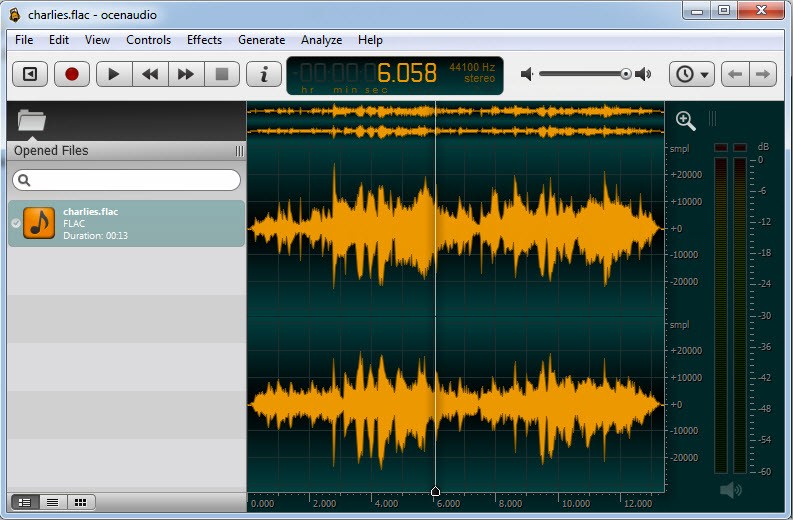
Ocenaudio presents itself as a user-friendly desktop program dedicated to audio recording, editing, and analysis, avoiding complex interface configurations and extensive platform requirements.
The program provides straightforward audio editing solutions for users who want simple environments free of complex settings and lengthy learning curves. Ocenaudio performs basic cut-and-trim edits and applies effects through an uncluttered, calm interface. This application excels at its designed tasks rather than attempting multiple things at once.
The program provides excellent functionality for users who edit audio as part of their work, as well as regular users who need to process audio recordings before making presentations. The key strength of Ocenaudio is its ability to show live effect previews while you work. Many programs lack this feature, but Ocenaudio offers it.
Users experience audio effects immediately during their work because Ocenaudio provides real-time previews of modifications as they perform them. Real-time preview features in Ocenaudio enhance your editing experience, so it becomes more fluid. The application dispenses with complex design and displays only essential features to support users who edit sound efficiently.
Why Should I Download Ocenaudio?
Ocenaudio caters to anyone who avoids messy workflows by offering a tool that lets users start working immediately upon launch. The application starts without compromising your attention from the beginning of the launch. The platform avoids confusion by presenting all tools accessible without mystery, and its controls operate seamlessly.
The application presents its functions in a way that feels like a friendly interface. Every editing function for your file remains within reach with a simple drag-and-drop, including trimming, volume adjustment, noise reduction, and adding effects, without any required tutorial guidance. Working on actual audio content becomes much easier because the software lacks disruptive elements.
The application enables users to modify files in various audio formats without restriction to single or double file types. The program securely accepts new recordings and downloaded or captured media files for editing without any problems. The program allows users to handle large files efficiently while maintaining steady performance, which is often lacking in simpler software tools. Users benefit from the optimized system because it optimizes workflow activities, particularly during long audio recording sessions using high-quality audio files.
The real-time effect application is a primary reason users appreciate this product. The time-saving feature of real-time effect application becomes immediately clear to users who try it. Real-time effect listening enables users to make better editing choices by instantly hearing sound changes from reverb or equalization before they are processed or applied, saving time and maintaining a continuous workflow. The perfect feature of Ocenaudio is its ability to apply effects in real time, which demonstrates that professional development lies in subtle improvements to complex functions that reduce workflow frustration.
The application includes spectral view functionality to enable different audio inspection methods. Using the spectral view demonstrates great value to those who need to find specific sounds or eliminate unwanted noise. Most people think spectral view functions exclusively for sound engineers, yet Ocenaudio features this tool so accessible that it works for any user level. Anyone can understand the software operations even if they lack sound engineering experience. Ocenaudio operates with technical precision in essential areas when its main functions require simplicity.
Ocenaudio provides skilled sound tools for users working with podcasts, social media content, interviews, or basic audio experimentation without creating obstacles for users. Users can perform professional-grade editing with ease using this software, while it maintains system performance and efficiency. This tool delivers excellent service without creating any unnecessary noise, so users should recognize its value.
Is Ocenaudio Free?
The full version of Ocenaudio is free. The tool is available free of charge, with unlimited trials and an obligation-free structure. You can obtain this program by downloading and installing it to access all its features for free. Its free availability for individuals and professionals is the main reason many creators choose to use it.
What Operating Systems Are Compatible with Ocenaudio?
Ocenaudio supports Windows, macOS, and Linux, making it one of the most versatile tools in its category. All computer users with PCs, MacBooks, or Linux systems can quickly download and run this program without compatibility issues. Going between different machines becomes simpler thanks to the application's uniform interface design.
The software operates efficiently on machines with basic specifications, making it available to standard computing equipment. This audio solution stands out for delivering efficient performance at a reasonable weight across multiple operating platforms, which is uncommon in audio software development.
What Are the Alternatives to Ocenaudio?
Multiple audio editing applications are available on the market, so the choice depends on your specific needs.
Audacity is one of the largest names in audio editing, having built a broad user community while retaining its years of experience. New users might find Ocenaudio complex because it offers an overwhelming open-source experience. The technical nature of the interface requires time to learn all its features for users who want to use the comprehensive toolset. The system proves dependable, as it fulfills its purpose efficiently, with a special focus on advanced audio exploration.
Adobe Audition is a professional-grade solution, but it does not meet all the requirements a basic solution should have. As part of the Adobe Creative Cloud, Adobe Audition fulfills all the requirements for radio production and podcasting for music production professionals, though it is not a free tool. This software offers both multi-track editing and advanced effects, along with full connectivity across Adobe applications. Pro users will be able to tackle its difficult learning process, but they must pay a subscription fee. Adobe Audition effectively supports large project teams and professionals, yet offers excessive capabilities beyond basic editing needs for users who only need quick fixes.
Reaper functions best as a complete Digital Audio Workstation rather than an audio editing tool, although it offers more capabilities than traditional programs. The program offers advanced customization through detailed audio project control features that many musicians and producers use daily. Users will find the cost reasonable compared with more sophisticated professional DAW solutions. A large community supports Reaper because it combines speed and stability while offering extensive control over your audio processing. Professional users will gain the most from this program because it offers multi-track recording, MIDI support, and advanced editing features.