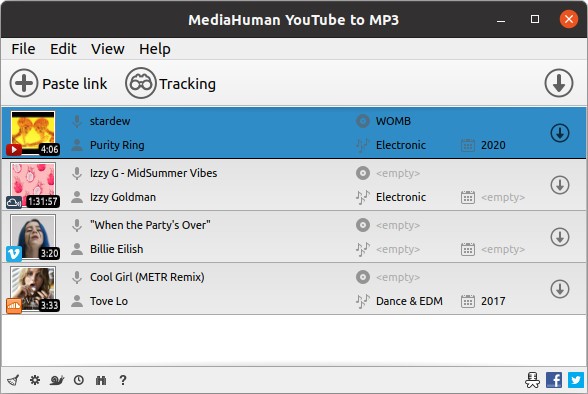
MediaHuman YouTube to MP3 Converter is a desktop application that allows users to download audio content from online video sites and store the music on their personal computers. Instead of listening to music over and over again or having a browser tab open, the tool takes out the audio and stores it in MP3, AAC, or M4A, depending on the preference of the user. It is capable of downloading complete playlists, a complete channel, an individual song, or even an entire library, should you subscribe to the music content regularly.
YouTube Music, SoundCloud mixes, Bandcamp albums, long sets by DJs, and even movie soundtracks are appealing to users. The metadata is automatically identified in the program: artist, title, and cover art, and thus one does not have to re-enter the information after saving. When the tags are not correct, the built-in editor allows fixing them.
The software puts a premium on convenience. It monitors your clipboard: it silently notes a video URL to the download list when you copy it. It is useful to anyone who happens to be a music collector or an offline music listener. The tool does not take only music; podcasts, speeches, and lectures can be extracted as well. It is something one uses daily instead of a mastering tool.
Why Should I Download MediaHuman YouTube to MP3 Converter?
It is mostly used by the majority of the population to ease the audio grabbing without the inconvenience of having to manually convert it. You can simply paste a link and have an MP3 instead of playing a video, recording the sound, and cutting the file. That saves repeated effort. The bulk playlist feature is even more convenient: when you have subscribed to one of the creators' or DJs' channels, the software will search for new uploads and only download new songs, but not to re-download the already owned tracks.
The application also contains no video downloads that are not worth downloading, hence it is beneficial in case of a slow internet connection. Since only the audio stream is pulled, the speed of the download is faster, and less data is consumed. That advantage is particularly evident in the case of long videos or huge playlists.
The tag editor maintains order. A library can get cluttered with wrong titles, a lack of artists, or blank cover art. The built-in editor allows editing all the contents within the program without the use of an additional metadata tool.
Cross-platform Windows, MacOS, and Ubuntu Linux is another attraction. Switchers do not spoil accessibility. The app has the option of exporting to iTunes or Music.app, which is a loss of additional steps when used by Apple customers.
In short, it removes friction. No multitasking between converters and editors. Click copy, press download, and the song appears where you desire. This tool fits perfectly into the routine of all who collect and save DJ sets or prefer to listen to music offline.
Is MediaHuman YouTube to MP3 Converter Free?
Yes. The basic service, which is the downloading and conversion of audio on YouTube and other sites supported by it, is free. It is also free in terms of playlist management, monitoring channels, tagging, and iTunes exportation. Most features are accessible without payment, and it comfortably meets daily requirements for regular users.
What Operating Systems Are Compatible with MediaHuman YouTube to MP3 Converter?
MediaHuman supports Windows, macOS, and Ubuntu Linux, which makes it more accessible than converters that are connected to one operating system. It supports Windows 7, 8, 10, and 11, and macOS supports Catalina, Ventura, Sonoma, and newer Apple Silicon computers (M1, M2, M3) with the app. Ubuntu 16.04 or later is required for Linux users.
The plus is that features remain the same across platforms. The editions do not have any watered-down versions based on the OS, and they are not web-only. An offline application implies that your files are kept on your device rather than being uploaded to cloud options, which is important to users who are privacy-sensitive or have limited bandwidth.
You just require an internet connection to make downloads. The program will not require many resources, not to mention that it will take about 120 MB of disk space. It is also compatible with older laptops. It is capable of automatically adding downloaded tracks to iTunes/Music.app when it is turned on, which is convenient on macOS.
You can retain the same tool when switching between Windows and Mac rather than being exposed to two programs. Installing, pasting a link, and converting have nothing much to do with compatibility.
What Are the Alternatives to MediaHuman YouTube to MP3 Converter?
Free YouTube to MP3 Converter is a free tool for extracting MP3 files from YouTube videos. It is sparse, simple, and it would match the users who do not want numerous options on the interface, but rather a simple button interface. Clicking on links, choosing a format, and starting the download in a single click; the support of bulk playlists. It has a simple interface that is not as flexible as MediaHuman. The process of adjusting the formatting or metadata might involve additional steps. It is a suitable alternative when one wants something fast and simple. Many users download it when they need quick audio extraction without complexity.
Free Video to MP3 Converter is closer to a straightforward converter than to a playlist monitor. It deals with YouTube and with the local files like MP4, AVI, Mand OV. This tool is more suitable than an online downloader in the case you already have the videos and only have to extract the audio. The output mode is usually MP3 or WAV, subject to settings. Its functions are few compared to MediaHuman: it does not track the channels, and there is no automatic update, so it is only useful during occasional extractions, but not during regular music harvesting. It will be good to save time when you have files to convert rather than links to keep track of. People often download it when they already have videos and only need fast conversion.
TubeMate YouTube Downloader is mostly an Android application that allows downloading videos on phones. It allows you to drag audio through a built-in converter or through a third-party plugin. It is lightweight and mobile-centric and can be used by people who need to store music on their phone offline. It does not support massive playlist syncing and has only a little metadata editing. Nevertheless, its portability prevails—no computer required. On an occasion when you need to get a job done on a phone rather than a computer, TubeMate will fit in very well. Mobile listeners usually download TubeMate to save music directly on their device.