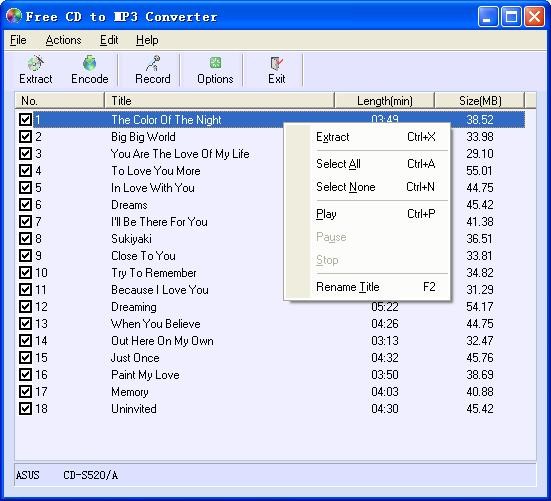
Free CD to MP3 Converter is a simple yet capable audio extraction tool that helps you convert music from physical CDs into common digital audio formats that can be played on computers, smartphones, and media players. Whether you want to back up your music library, transfer songs to your smartphone, or simply enjoy your albums without relying on physical discs, this program is perfect for the job. It supports MP3, WAV, WMA, and OGG, so your music will be compatible with all media players and devices.
Once you insert a CD, Free CD to MP3 Converter automatically reads it and displays all the tracks. You can select individual songs or rip the entire album, and the software connects to an online database to retrieve song titles, artist names, and album information, so you won’t have to rename files manually after conversion. The tool’s built-in quality controls also allow you to choose between different bitrates and sample rates, depending on your needs, ranging from high-fidelity WAV files to compressed MP3s that conserve space on portable devices.
In addition to CD extraction, Free CD to MP3 Converter includes extra tools, such as a built-in audio recorder that captures sound from your microphone or any other input device. You can record audio directly into MP3 or WAV formats, making it handy for creating voice memos, podcasts, or recording live performances. You can also edit metadata and manually adjust song titles, album names, and artist details before saving. You can download the tool for free, and it works on a variety of Windows versions.
Why Should I Download Free CD to MP3 Converter?
With Free CD to MP3 Converter, you don’t need to deal with complicated configurations or multiple steps to extract your music. You insert a CD, the program detects it, and with a few clicks, it converts your tracks into the format you want. The software’s automatic CD recognition feature saves you from manually typing song details by fetching track names and album information online. If you don’t have an internet connection at that moment, you can still edit and label files manually before saving.
Free CD to MP3 Converter basically gives you full control over audio quality and file size. You can select different bitrates for MP3s to balance between quality and storage space, or opt for lossless WAV files if you want to preserve the original sound from your CD. The program’s digital extraction process ensures that the output files are clean, with no static or background noise, and maintain the depth of the original recording. Because it also supports OGG and WMA formats, it’s easy to export files for specific devices or editing software.
On top of other features, within Free CD to MP3 Converter, you also have an integrated audio recorder that is particularly useful if you want to capture external sound. It supports both line-in and microphone inputs, meaning you can record instruments, voices, or ambient sounds and save them instantly in high-quality digital files. The batch processing capability saves you time by letting you rip multiple CDs one after another without reconfiguring your settings. Additionally, the ability to edit metadata helps you keep your music library organized and up to date. You can correct song titles, add genres, or insert album covers directly into the file tags.
If you’re looking for a fast and lightweight solution, then Free CD to MP3 Converter is a great choice, and it runs smoothly on virtually any Windows PC, including older models. It doesn’t consume much CPU or memory, which lets you continue using other applications while it processes your CDs in the background. The ripping process is fast, and converted files can be played immediately afterwards. Whatever your needs, you can download and use the Free CD to MP3 Converter at no cost.
Is Free CD to MP3 Converter Free?
Yes, Free CD to MP3 Converter is completely free to download and use, and there are no hidden costs, subscriptions, or limited versions. All features, including CD ripping, recording, batch conversion, and metadata editing, are available for free. You can use it for personal or non-commercial purposes without paying a cent.
What Operating Systems Are Compatible with Free CD to MP3 Converter?
You can download Free CD to MP3 Converter on a wide range of Windows versions, including Windows 97, 2000, XP, Vista, 7, 8, 10, and 11 in both 32-bit and 64-bit versions. It is perfect even on machines with limited resources; the installation is simple, and the tool takes up very little storage space. There are no versions available for macOS, Linux, or other systems.
What Are the Alternatives to Free CD to MP3 Converter?
Fre:ac is an audio converter and CD ripping tool that you can use for free, as it comes from an open source project. It has a huge library of built-in encoders, which means it can convert between almost any audio format you can think of, including MP3, M4A/AAC, FLAC, and many more. You can also use it to turn your CDs to digital files, and it will automatically check online databases to fetch the song information and album art for you. You can download Fre:ac for Windows, macOS, and Linux.
EZ CD Audio Converter is a universal audio converter suite for Windows and macOS. It supports all popular formats, can compress or convert files in seconds, is able to process files in batches, and you can use it to extract audio from any other format, as well as from videos. The software is paid, but it comes with a free trial, and you can also download its totally free version for non-commercial use.
CDex is an open-source CD ripping and audio converter that can turn your files or CDs into MP3, WAV, or FLAC files. You can customize the bitrate customization, change metadata, and balance volume levels across tracks. You can download it for free, and the tool is often updated by the community of developers around it, but it only works on Windows computers.