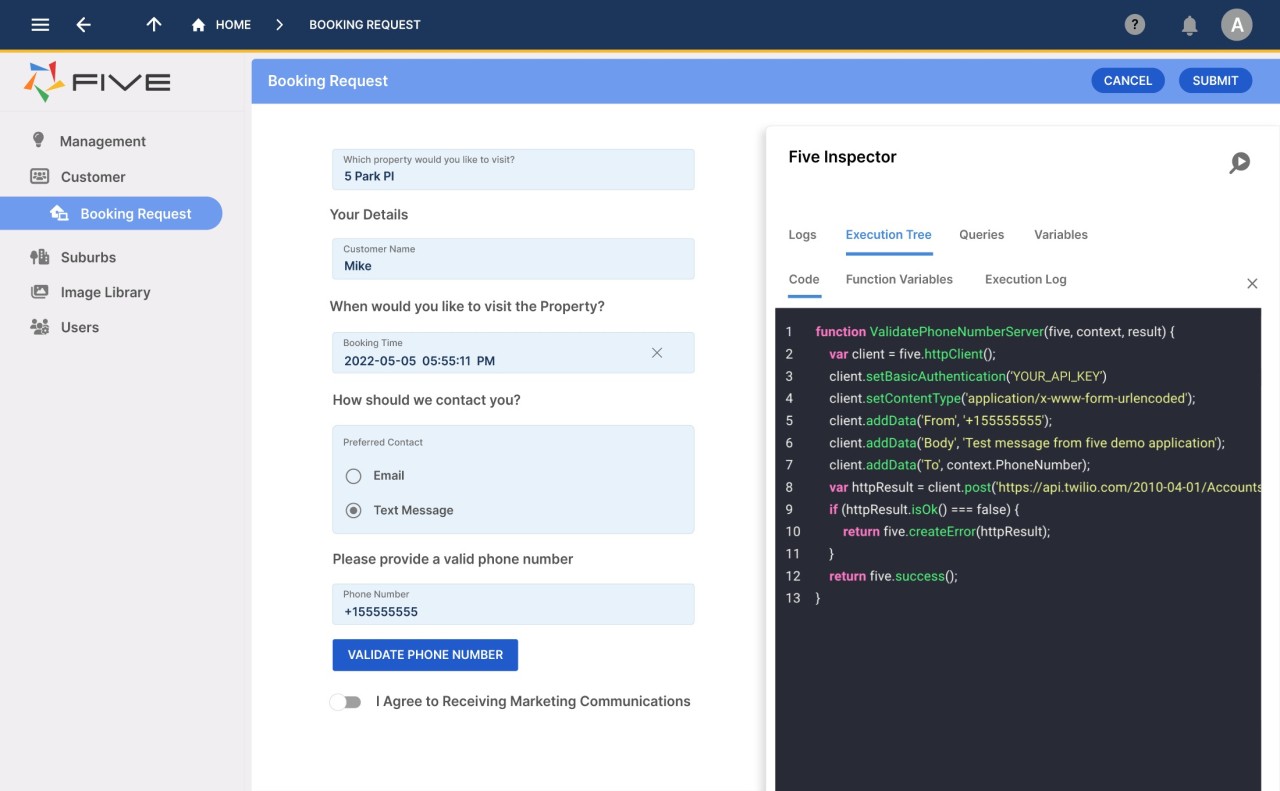
Five is a modern low-code application development platform built for people who want to create powerful web applications without diving too deep into the complexities of traditional coding. Think of it as a bridge between the idea you have in your head and the actual, working software that runs on your browser or desktop. Instead of forcing you to spend months learning multiple programming languages, Five gives you a structured yet flexible way to build applications with drag-and-drop tools, pre-built components, and smart automation options.
At its core, Five is designed to help businesses and individuals move faster. Whether you’re putting together an internal dashboard, a customer-facing app, or a data-driven tool, you don’t have to start from scratch. The platform combines the convenience of a visual builder with the depth of professional-grade features such as database management, API connectivity, and role-based access control. That means it’s not just for hobby projects — it’s robust enough to handle serious, enterprise-level applications.
Another big draw is that Five was created with collaboration in mind. Instead of one developer holding all the knowledge, teams can co-create and tweak applications together. That speeds up the feedback loop and makes it much easier to refine features based on real user needs. In short, Five isn’t just another website builder; it’s a complete development environment that helps turn ideas into fully functional apps.
Why should I download Five?
The most obvious reason is speed. Building software from scratch using traditional coding frameworks is rewarding, but it’s also incredibly time-consuming. Five trims that timeline down dramatically. Instead of manually configuring servers, databases, and front-end code, you’re handed a platform that already knows how to take care of those pieces. You can focus on what matters — the logic, design, and functionality of your app.
Another reason is accessibility. Many people with great ideas for apps simply don’t have a strong programming background. Five lowers that barrier by offering a low-code environment. You don’t need to memorize endless lines of syntax just to get a login form to work. Instead, you can rely on intuitive tools while still having the option to add custom code when it’s needed. That flexibility is crucial. Unlike some other “no-code” solutions that limit you once you grow, Five gives you room to scale.
Businesses also find Five useful because it supports serious back-end capabilities. You can model your data, set up custom roles, and control how information flows across your application. That’s not something you get with a simple website builder. It makes Five suitable for industries like finance, healthcare, or logistics, where data structure and security aren’t negotiable.
Is Five free?
Five isn’t entirely free, but it does offer options that let you test and explore its features before committing to a plan. Like many modern platforms, it operates on a tiered pricing model. This means you can usually start with a trial or limited version to get a feel for how it works. Once you’re ready to deploy larger applications or need access to more advanced features, you’ll likely move into a paid plan.
The value here lies in the flexibility. You don’t have to invest heavily up front just to see whether the platform matches your needs. Instead, you can prototype, experiment, and make sure it aligns with your project goals before scaling. For individuals or small businesses testing new ideas, that’s a huge advantage.
It’s worth pointing out that while a free plan is great for learning, real-world projects often need professional support, stronger hosting, or advanced security. That’s where paid plans come in. So while Five might not be “free” in the sense of unlimited access, it does offer an accessible entry point for anyone who wants to give it a try without immediately pulling out their credit card.
What operating systems are compatible with Five?
One of the strengths of Five is that it isn’t locked into just one ecosystem. It’s designed to work across multiple operating systems, so you’re not limited to a single device type. The platform runs on Windows and macOS, giving desktop users full access to its development environment. That makes it versatile for teams with mixed devices, since everyone can stay in sync regardless of whether they’re on a PC or a Mac.
On top of that, Five is cloud-based, which means much of your work happens inside the browser. That gives you another layer of freedom: as long as you have a decent internet connection, you can log in and continue building your application without worrying about installing bulky software on every machine.
This cross-platform approach is essential for modern businesses. Very few teams today work entirely on a single operating system. By making Five accessible on Windows, macOS, and through web browsers, the developers have ensured that compatibility won’t be the roadblock standing between you and your finished app.
What are the alternatives to Five?
There is no perfect tool that fits all cases, and it is good to see what the rest of the tools can offer. The nearest alternatives to Five are Claris FileMaker Pro, Retool, and Budibase. They all have their merits, and the correct decision is usually determined by what you are using it for.
Claris FileMaker Pro is decades old and reputed to be reliable. It offers a robust platform on which to develop custom business applications, especially those that are very database-intensive. FileMaker Pro is also excellent when you need something that has a long history of professional usage. Nevertheless, it may be more conventional in contrast to the current low-code methodology that Five provides.
Another major player in the low-code is Retool. It puts much emphasis on designing internal tools in a fast manner. It is popular with developers since it enables them to have access to numerous databases and APIs and then create dashboards, administration panels, or internal workflows within record time. Retool is robust, but it tends to be used by technical teams that already understand the ropes in software development. Its learning curve may be a little steep for those who lack significant experience in coding.
Budibase is an open-source platform that is also dedicated to low-code development. It is open-source, and so you can make a lot of changes to make the platform fit your requirements. It is a good choice because you can have complete power over your applications, and you do not mind doing some technical maintenance yourself. The tradeoff, naturally, is that it will have to be more technically and operationally certain than a managed platform such as Five.