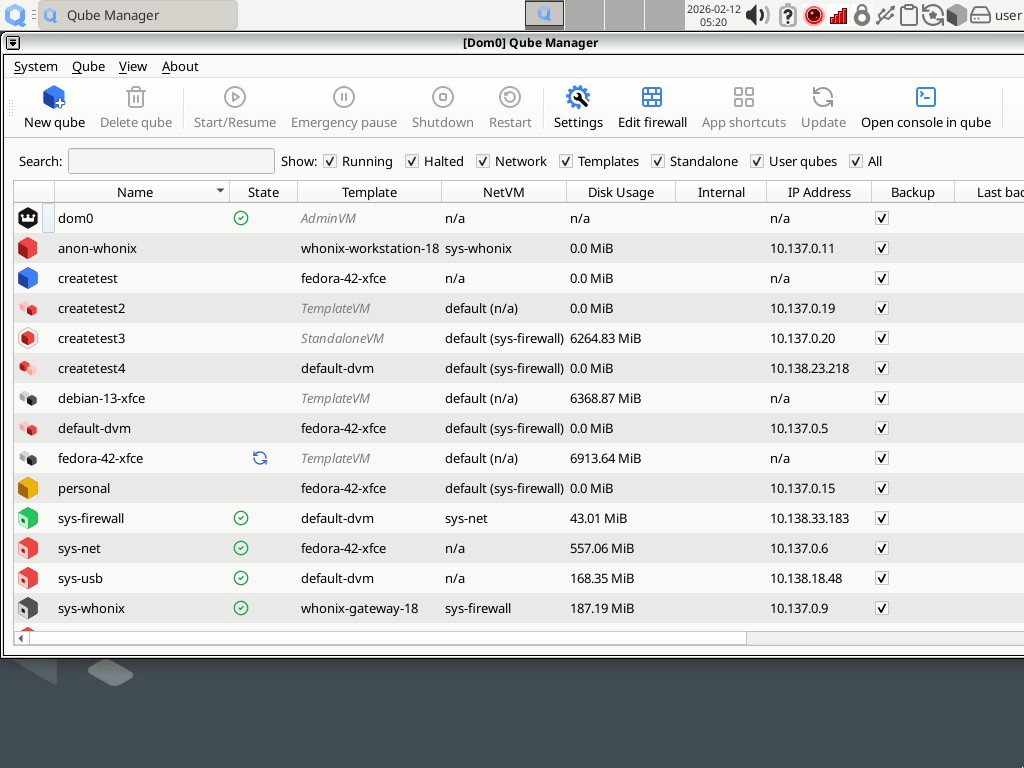
Qubes OS is a pretty unusual operating system. Instead of treating your computer like one single environment where everything mixes, it splits different activities into isolated compartments called qubes. It is a security-oriented operating system for desktop computing, built on Xen-based virtualization. It is less about convenience or simplicity and much more about isolation and containment.
That also explains why Qubes feels different from most operating systems almost immediately. Apps, files, browsers, USB devices, and even networking can all live in separate virtual environments with different trust levels. The goal is not really to stop every attack from ever happening. The project openly assumes software vulnerabilities will always exist somewhere. Instead, Qubes focuses on limiting how much damage one compromised part of the system can actually cause.
Part of what makes Qubes interesting is how physical the idea feels. The project compares it to separating rooms inside a building. Work stays in one place, personal browsing stays somewhere else, risky downloads stay isolated, and everything is compartmentalized instead of blended on one desktop.
Why Should I Download Qubes OS?
The main reason to download Qubes OS is that it approaches computer security very differently from a traditional operating system. Instead of relying mostly on antivirus software or browser protections, Qubes builds security around isolation from the start. Separate qubes can be created for work, personal files, unknown software, disposable browsing sessions, networking, USB devices, and more.
The project also supports multiple operating systems inside the same desktop environment, including Fedora, Debian, Windows, and Whonix integrations for Tor-based networking. Features like disposable virtual machines, device isolation, Split GPG, and template systems are all part of the broader security model. But honestly, the bigger point is really the structure itself. Qubes is designed around keeping activities separated so that one mistake does not automatically expose everything else on the computer, too.
A lot of the appeal comes from the mindset behind it. You are using a system that assumes software will eventually fail somewhere, and then builds layers around containing the fallout when it does.
And that changes the feel of everyday computing quite a bit. Opening attachments, testing unknown software, or browsing risky sites becomes less about trusting everything completely and more about controlling where those risks are allowed to exist.
Is Qubes OS Free?
Yes, Qubes OS is free and open source. The project describes it as free software that users are encouraged to use, modify, and distribute.
That makes the setup fairly straightforward from a licensing perspective. You download the operating system and use it without subscriptions or paid editions sitting in the middle. The bigger commitment is really the learning curve. Qubes asks users to think differently about security and organization compared with a standard desktop operating system.
What Operating Systems Are Compatible with Qubes OS?
Qubes OS runs as its own operating system on desktop and laptop hardware. It is built primarily around Linux-based templates like Fedora and Debian, while also supporting Windows virtual machines and Whonix integrations inside the wider environment.
Qubes is not something you casually install alongside a lightweight workflow. It becomes the structure your whole desktop environment runs through. And because of the virtualization model underneath everything, hardware compatibility and system resources matter more here than they do with many standard operating systems.
What Are the Alternatives to Qubes OS?
OpenBSD is probably the closest alternative if your main interest is security-focused system design. It approaches the problem very differently, though. OpenBSD focuses heavily on secure defaults, careful code auditing, and a minimal system design rather than virtualization-based compartmentalization. Compared with Qubes, it feels more traditional structurally, even though the security mindset behind it is similarly strong.
Whonix overlaps with Qubes quite naturally because the two projects are often connected already. Whonix focuses heavily on anonymity and Tor-based isolation through separate virtual machines. Compared with Qubes, it feels narrower and more privacy-specific, while Qubes works more like a full, compartmentalized desktop system that can include many trust levels and workflows at once.
Tails goes in another direction again. It is a live operating system built around privacy, temporary sessions, and leaving as little a trace behind as possible once you shut down the computer. Compared with Qubes, Tails feels much lighter and more temporary. Qubes is built around long-term compartmentalized desktop use, while Tails is much more about private sessions you carry with you and leave behind when finished.