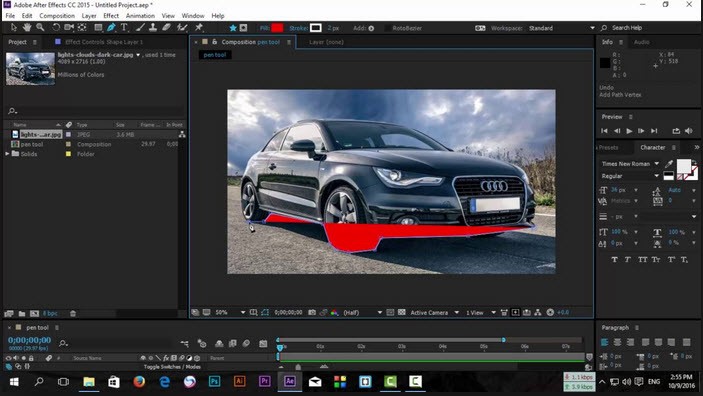
Adobe After Effects gives video editors, filmmakers, and digital artists the tools to produce professional-grade animations, visual effects, and composited projects. It has become the standard post-production tool for anyone who needs to apply serious effects work across films, television, online content, and commercials. Whether the goal is a simple animated lower-third or a full visual effects sequence, After Effects provides the depth to deliver it.
Adobe originally acquired After Effects in 1995 when it purchased CoSA, the software's developer since 1993. The product has expanded significantly since then, gaining new creative features over the years and becoming tightly integrated with other Adobe software in the Creative Cloud suite.
That integration with the broader Adobe ecosystem is one of After Effects' core strengths. Projects move fluidly between Premiere Pro, Photoshop, and Illustrator without workflow disruption, which keeps the creative process faster and more efficient.
Today, After Effects is a trusted tool across film, television, and advertising. As part of Adobe Creative Cloud, it sits alongside Lightroom, Acrobat Reader, and other widely used creative applications. Professionals rely on it for the extensive library of plugins and third-party resources available to create advanced animated visuals.
Why Should I Download After Effects?
After Effects sits at the flexible end of the motion graphics and visual effects spectrum. Professionals working on high-end content and creators wanting to improve their videos both choose it for the level of creative control it provides. Where basic editing tools fall short, After Effects steps in to build complex animations, filmic effects, and visual sequences that transform ordinary footage into something polished and purposeful. Few other tools offer the same combination of depth and flexibility across so many production contexts.
The most fundamental reason to use After Effects is its capability for professional motion graphics. The software handles animated text, logo intros, and lower-thirds as readily as it handles elaborate visual sequences. Its keyframing system gives users precise control over transitions, movement, and property changes over time, so every element on screen behaves exactly as intended.
Visual effects production is another area where After Effects excels. Green screen work, particle effects, and 3D rendering are all within reach through the built-in toolset, letting users blend digital enhancements with live-action footage for results that work in commercial, cinematic, or web contexts. Effects like explosions, weather elements, and HUD overlays can be applied with precision.
Recent versions allow full-composition playback on any computer without interruption, cutting down on time spent waiting during review. HDR color control also lets users manage color and brightness at every stage of the workflow.
The software now supports simplified 3D workflows, making it easier to blend dimensions, animate text in three dimensions, and add realistic detail. Users can import 3D models from Cinema 4D or Adobe Substance 3D, project shadows onto 2D elements, animate cameras, and apply lighting that responds naturally to the scene.
Compositing capabilities let multiple image layers combine to create a final unified output. Through these tools, unwanted elements can be removed from footage, and multiple video layers merged into a single convincing shot. Filmmakers use this to build scenes that could never be captured practically, from environmental replacements to seamlessly integrated digital objects that appear to exist in the real world. This is where visual producers and filmmakers find effects capabilities that would otherwise require expensive, practical methods.
Animation settings are accessible through a context-sensitive Properties panel, and animation properties can be applied across multiple layers simultaneously through parent layers. AI-powered Roto Brush extracts objects, including complex subjects like hair and transparent elements, with significantly less manual work. More than 30 new animation presets, expressions, and automation tools reduce time spent on repetitive tasks and make data-driven animation achievable.
The Creative Cloud connection makes After Effects more valuable still. It integrates directly with Premiere Pro, so switching between editing and effects work is smooth, and the picture quality stays intact. Files from Photoshop and Illustrator import cleanly, and Dynamic Link keeps After Effects and Premiere Pro automatically in sync.
Additional tools include motion tracking, background replacement, lighting adjustments, natural motion simulation via the Puppet tool, Graph Editor, Wiggle Expression, and Motion Blur. Content-Aware Fill removes unwanted objects from clips. GPU-accelerated rendering handles high-quality, photorealistic 3D motion graphics efficiently, and hundreds of third-party plug-ins expand what is possible far beyond the defaults.
Is After Effects Free?
Adobe offers a 7-day free trial, so users can download After Effects and test it fully before any subscription is required. After the trial, a paid Adobe Creative Cloud subscription is needed to keep using the application. That subscription provides access to ongoing software updates, cloud storage, and integration across Adobe's full suite of applications. For professional video producers, the breadth of tools included makes the download a worthwhile investment.
What Operating Systems Are Compatible with Adobe After Effects?
After Effects runs on both Windows and macOS. Users can download After Effects on Windows 10 and newer versions, as well as macOS 11 Big Sur and later. The software is resource-intensive, so a system with sufficient RAM and a dedicated graphics card is necessary for working on complex projects without performance issues. For large projects or high-resolution media, a capable workstation with modern hardware will give the best results.
Linux does not have a native version of After Effects. The software is built and optimized for Windows and macOS, and attempts to run it through virtual machines or compatibility layers have generally not produced reliable results. Users who need After Effects-style motion graphics capabilities on Linux will need to look at alternative tools, as Adobe has not indicated plans to support that platform.
What Are the Alternatives to Adobe After Effects?
Blender is an open-source tool widely known in the 3D space that also includes solid VFX capabilities through its built-in compositor, which covers motion tracking, green screen keying, and particle effects. It is free, highly customizable, and a strong option for anyone seeking professional animation and effects software without a subscription commitment. The workflow is different from After Effects, so new users will need time to get comfortable with how it operates.
DaVinci Resolve combines VFX features with video editing in a single application, making it a useful option for self-directed filmmakers and content creators who want both compositing and editing tools without switching programs. The free version is fully featured, while the Studio edition adds noise reduction, HDR grading, and advanced visual effects capabilities.
PowerDirector is worth considering for users who want complete video editing software in a more approachable package. It suits beginners and experienced users alike, with a broad library of effects, transitions, and templates. Its 360-degree editing, video stabilization, and color correction tools produce consistently high-quality results for most production needs.