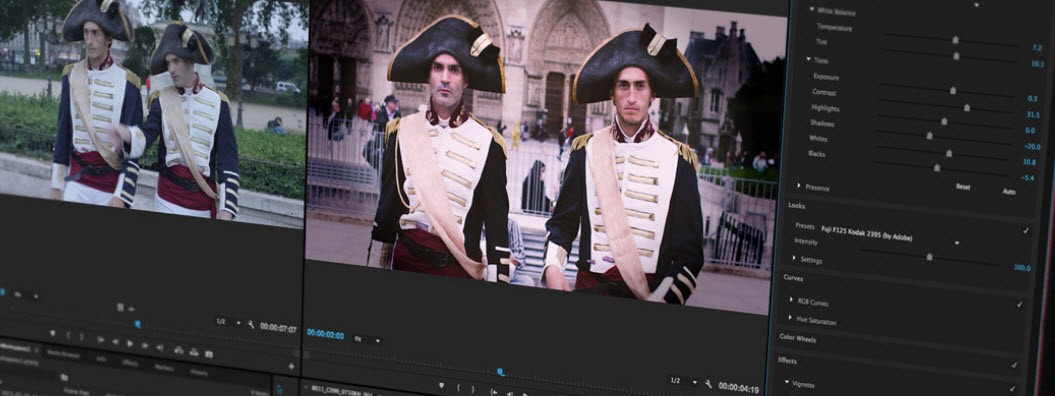
Premiere Pro, now just known as Premiere, is Adobe's professional video editing application, recognized across the film and media industry as one of the most capable editing systems available. It targets filmmakers, video editors, content creators, and professionals who need precise editing control, professional visual effects, and reliable content workflows. From short-form social content to feature-length film, the software is built to handle production at any scale.
Non-linear editing is at the core of how Premiere Pro works. Users can edit across multiple video and audio tracks simultaneously without altering the original source files, which keeps the raw material intact throughout the entire process. The software accepts content ranging from 4K through 8K resolution and supports virtual reality files, covering the full range of professional video production needs.
The editing experience in Premiere Pro is shaped by advanced capabilities including color correction, motion graphics, multicam editing, and AI-powered Adobe Sensei tools. Recent additions include Generative Extend for automatically adding frames to clips, Media Intelligence search for locating footage through metadata and visual descriptions, and multilingual subtitle translation with support for managing multiple subtitle tracks at once.
Premiere Pro connects naturally with the broader Adobe Creative Cloud ecosystem, including After Effects, Photoshop, and Audition, giving editors a clear path to professional audio and visual effects work without disrupting their established workflow. The result is a production environment that handles everything from quick cuts to complex, multi-application projects within a single connected system.
Why Should I Download Adobe Premiere Pro?
Premiere Pro is the industry-standard video editing tool, and its feature set serves both working professionals and content creators still developing their skills. One of its clearest advantages is the ability to handle projects at any scale without changing how the core software operates. Whether the job is a product vlog, an advertising campaign, or a feature film, the tools needed to deliver a polished final product are all present in one application. Anyone who decides to download Adobe Premiere Pro gains access to a depth of features that few competing applications can match.
The timeline is where most of the editing work happens, and Premiere Pro is well-designed for efficient operation: footage arrangement, layer manipulation, and multi-camera editing all run smoothly. Dynamic transitions and motion graphics add production value quickly, while Lumetri Color tools deliver professional-grade color grading that gives finished videos a consistent, polished visual identity. Audio workflows benefit from interactive fade handles directly in the timeline, AI-powered clip tagging that categorizes audio as Dialogue, Music, Sound Effects, or Ambience, and improved mixing controls built for fast adjustments without leaving the edit.
The Creative Cloud connection is one of the strongest reasons to download Premiere Pro rather than a standalone tool. Editors can send work to After Effects for complex animation sequences or route audio to Adobe Audition for detailed sound design. The Dynamic Link system keeps those applications in continuous sync, so changes made in one automatically reflect in another. New timeline organization features, dynamic clip coloring, and extended graphics preferences like default caption fonts further improve usability when working through complex edits.
Adobe Sensei AI tools reduce the time spent on repetitive tasks. Automatic scene detection, intelligent reframing, and auto-transcription speed up operations that would otherwise consume hours without sacrificing edit quality. For editors working under a deadline, these tools help produce strong results quickly. Expanded GPU hardware acceleration for modern graphics cards, optimized 10-bit H.264/HEVC handling, and support for newer formats including MKV (H.264/AAC) and ARRIRAW HDE contribute to smoother performance throughout a project's lifecycle. Enhanced color metadata management keeps HDR and RAW workflows rendering accurately from start to finish.
Format and resolution flexibility is another practical benefit. Premiere Pro handles HD, 4K, 8K, and VR content with fluid playback and efficient rendering. Projects stay adaptable across different devices and output requirements throughout production. At the export stage, Content Credentials can be embedded to authenticate media and establish trust in professional delivery workflows.
Is Adobe Premiere Pro Free?
Adobe Premiere Pro is a paid application, but Adobe provides a 7-day free trial so users can fully test the software before committing to a subscription. After the trial ends, a Creative Cloud plan is required to continue using it.
Subscription options include Premiere Pro on its own or bundled with other Creative Cloud applications, including After Effects, Photoshop, and Illustrator. The subscription model includes continuous software updates, cloud storage, and access to new features as they are released. For users who need several Adobe tools regularly, a bundle plan offers strong overall value compared to purchasing each application separately.
For mobile users, you can download and use Adobe Premiere for free. Only some of the features require an in-app purchase.
What Operating Systems Are Compatible with Premiere Pro?
Premiere Pro runs on Windows and macOS. Users can download Premiere Pro on Windows 10 64-bit or later, with at least 8 GB of RAM and a capable graphics card for reliable video playback and export performance; 16 GB is preferable for demanding work. macOS support starts at version 11 (Big Sur) and extends through all subsequent releases.
Users with Apple M1, M2, and later processors in MacBook and iMac hardware benefit from hardware acceleration that delivers optimized native performance. For Windows users running modern dedicated graphics hardware, GPU acceleration also provides a significant improvement during rendering and real-time playback.
But that's not all. You can also download the mobile version of Adobe Premiere for your Android or iOS (iPhone, iPad) device. This mobile version allows users to access professional video editing on the go. The use of the app is free for the general features; if you want to go deeper, there will be in-app purchases.
What Are the Alternatives to Adobe Premiere Pro?
Final Cut Pro is the primary competitor to Premiere Pro for Mac users. Apple's editing tool offers fast operation, a magnetic timeline built around macOS, and rendering optimized for Apple hardware. It is available through a one-time purchase rather than a subscription, making it more cost-effective over time for users who prefer to avoid recurring fees. Recent additions include Magnetic Mask for quick subject isolation, autogenerated captions directly in the timeline, spatial video editing, and an iPad version with Apple Pencil support and ProRes capture. For Mac-based editors who want professional results without a monthly commitment, Final Cut Pro is a compelling alternative.
DaVinci Resolve is the go-to free option for editors who need professional capabilities without a subscription. Its color grading tools rank among the best available anywhere in the industry, and the free version includes unlimited video and audio tracks, mixed resolution timelines, support for a wide format range, including Blackmagic RAW, and Fusion compositing tools. The Studio paid version adds Smart Reframe, Lens Correction, Scene Cut Detection, Face Detection, and advanced HDR delivery support up to 32K.
Vegas Pro appeals to independent filmmakers and YouTube creators through its intuitive drag-and-drop timeline and strong real-time editing performance, even on modest hardware configurations. A one-time purchase replaces the subscription model. Recent versions added AI text-based editing via transcript, Auto Reframe, Speech-to-Text improvements, Auto Ducking for audio, real-time subtitle word highlighting, AI Smart Mask 2.0 for tracked object masking, and expanded collaboration tools for team-based projects.