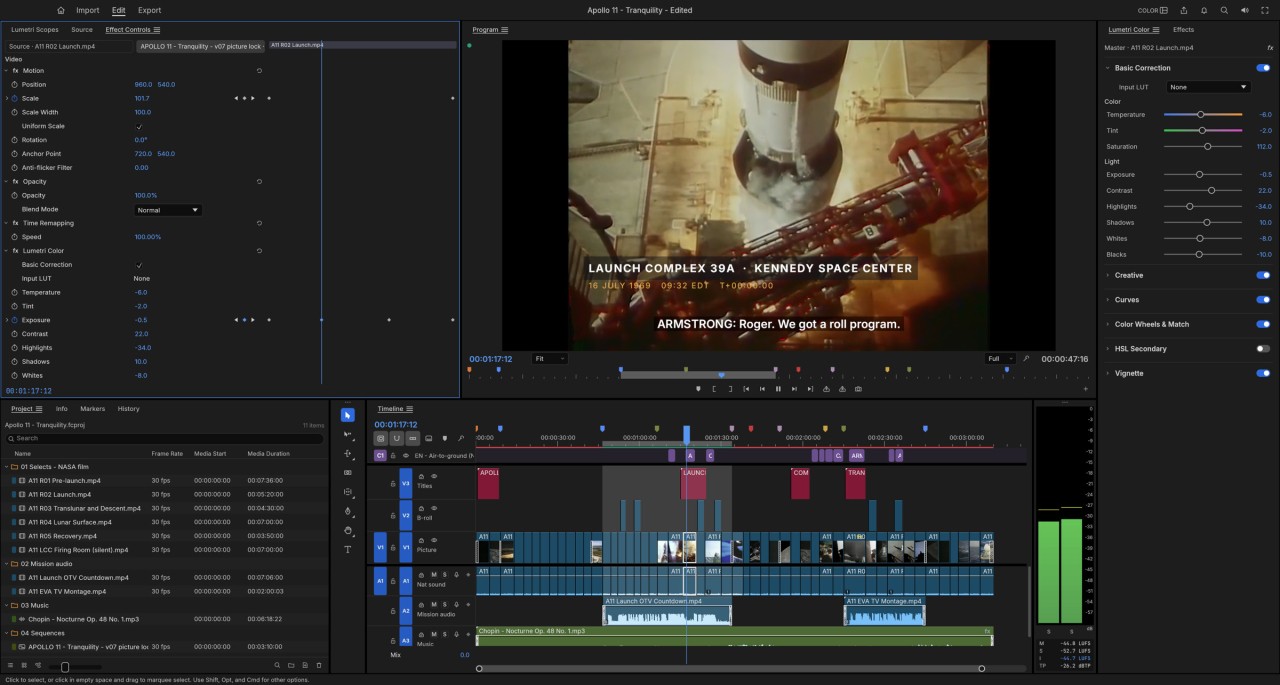
FilmCraft is an open-source video editor developed by the ArtCraft team, helped by Claude AI. Its interface is built around a multitrack timeline, playback monitors, and editing controls. It offers tools for assembling clips, editing audio, and adjusting colors. It is free to use, but development is still ongoing, so certain features and their stability may change with future updates.
The software aims to bring several stages of post-production together in a single environment. You can organize your raw footage, adjust transitions between shots, apply visual effects, and refine image quality using color correction tools. Audio features and keyframe controls also let you work on different aspects of your edit without having to switch between multiple applications.
FilmCraft is aimed at users who want to explore an open-source editing solution or try an alternative to commercial software. Its open-source nature allows users to inspect the source code and follow the project's progress. However, it's important to remember that the software is still under development. Some features may not yet be fully polished, and performance may vary depending on the system used. Before relying on it for a demanding project, it's best to test its capabilities and stability with a few representative clips.
Why Should I Download FilmCraft?
FilmCraft uses a multitrack timeline to organize video projects. You can import media, place clips on the timeline, adjust their duration, and refine transitions between shots. The source and program monitors let you preview your media and check the results of your edits. Trimming modes allow you to fine-tune the start and end points of individual shots.
The software also includes transitions and video effects. Images can be adjusted using curves, color wheels, and selective color correction tools. Support for lookup tables (LUTs) lets you apply preset color looks. FilmCraft also provides tools for working with HDR images and footage recorded using a logarithmic (log) profile. Scopes help you monitor levels and colors throughout the editing process.
The audio section includes a mixer, volume controls, and effects. Level meters help you monitor audio levels, while keyframe controls let you animate certain parameters over the course of a sequence. FilmCraft therefore covers several stages of video editing, from assembling clips to making final adjustments.
The export feature lets you prepare the finished video for your intended use. However, the available features and their reliability may vary depending on the operating system and media type. Since FilmCraft is still under development, it's best to test it with files representative of your usual workflow before using it for a major project.
Is FilmCraft Free?
FilmCraft is free and open source. Its source code is available on GitHub, where anyone can inspect the project and follow its development. No subscription is required to download the versions available on the official website.
Users can use the editing tools without paying for a license. Those with the necessary technical knowledge can also review the source code or contribute to the project. However, FilmCraft remains a work in progress, so compatibility with different media formats, performance, and stability should be assessed before relying on it for important projects.
What Operating Systems Are Compatible with FilmCraft?
You can download FilmCraft for Windows, macOS, and Linux. On Windows, a 64-bit installer is available for standard computers running Windows 10 or Windows 11. Other packages are available for older 32-bit systems and Windows computers powered by ARM processors. A portable version is also available.
On macOS, FilmCraft is available as a universal disk image compatible with both Apple Silicon and Intel-based Macs. On Linux, several package formats are provided to support different distributions. The official website offers packages for Debian and its derivatives, as well as for systems that use RPM packages. We've chosen to provide the AppImage version.
FilmCraft also has a WebAssembly version that can run in a browser. This edition should not be considered fully equivalent to the desktop version. For the most complete experience, choose the native version designed for your operating system.
What Are the Alternatives to FilmCraft?
Adobe Premiere Pro caters to everyone from online content creators to video professionals. It lets you edit raw footage, refine audio tracks, adjust color, and add titles or transitions. Its integration with other Adobe apps makes it easier to add animations and more advanced visual effects. The software is available through a paid subscription.
Kdenlive is a free, open-source video editor. It offers a multitrack timeline, transitions, effects, and audio editing tools. The application lets you arrange clips, add text, and export videos in your preferred format. It runs on Windows, macOS, and Linux, although some features may vary depending on the operating system and software version.
DaVinci Resolve combines video editing, color grading, audio mixing, and visual effects in a single application. It offers a comprehensive free version, along with a paid Studio edition that includes additional advanced features. This solution is well suited to users who want to manage the entire post-production process without switching between applications. It is available for Windows, macOS, and Linux, provided your computer meets the system requirements.