KdenLive is an open-source, free video editing platform that performs above user expectations. The entire application can function without overwhelming users, despite its official name being KDE Non-Linear Video Editor. The workflow of KdenLive provides all editing requirements to users through its background functions without making excessive noise or adding fancy tools.
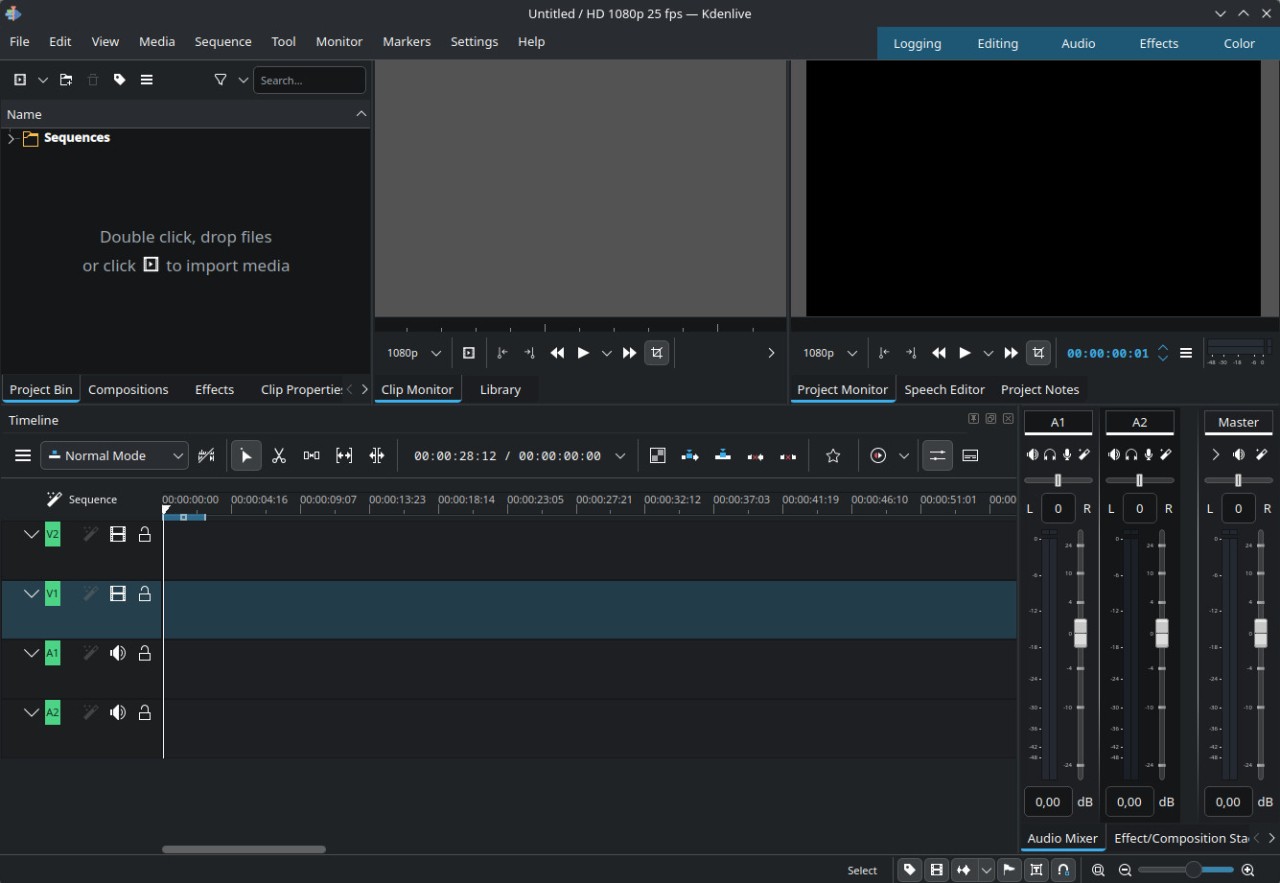
The program presents an easily customizable interface. All necessary editing tools, such as timelines and both audio and video effects and transitions, exist in this software. The software supports multiple file types directly through its platform, so users do not need to install additional plugins or perform complicated conversions.
Freedom rather than elaborate presentation defines the essential value of the KdenLive editor. Users can add or merge files by drag and drop, while also performing trimming and layering their video clips until desired results are achieved through color adjustments and sound additions. Through this platform, users gain the freedom to explore multiple editing possibilities entirely free of charge.
Open-source contributors through the community platform provide software updates because they actively use their own development tools. The developers behind this program demonstrate genuine integrity since they focus on functionality rather than aesthetic appearances. KdenLive maintains this same inspirational quality during its actual usage by users.
Why Should I Download KdenLive?
KdenLive would be an ideal choice for video editing beginners who need software without restrictive monthly fees or costly purchases. All users, from hobbyists to future professionals, will access its complete editing features through a simple tool that requires no membership or fee. The product sale does not encompass any lifestyle package. Users gain access to a proficient editor with which they can modify content to their specifications.
Users can work simultaneously on various video and audio layers because the program supports multi-track editing functionality. KdenLive enables users to organize their project through layer stacks of video and audio alongside various effects and transitions added with titles, while providing smooth video clip transport controls.
The timeline interface serves as your organizational tool, while most additional capabilities present themselves as easy-to-understand features. The program works seamlessly with your editing approach by letting you enlarge specific frames to cut perfectly, and by enabling you to stretch the timeline for comprehensive viewing.
The freedom KdenLive provides stands out as the main reason why users should consider downloading this program. The program gives you total freedom from persistent watermarks, together with resolution constraints and feature restrictions. Initiating work with KdenLive requires no sign-up or account creation. When you launch the program, you find yourself directly in the editing environment.
The video editor provides exceptional support to users who confront obstacles or need guidance because it has an extensive community network. Users from various forums provide step-by-step tutorials which peacefully guide new members through the software without causing any delay in their tasks. As a publicly accessible project all reported issues are resolved, and users can make proposals that are eventually incorporated into the system, while their perspectives hold real value.
The KdenLive software team avoids presenting their product as the top choice among editors. The program concentrates on providing utility to users rather than self-promotion. And that makes it dependable. The application will continue functioning at full speed no matter the length of your content or the duration of your work. It just keeps up. KdenLive offers this rare level of silent dependability, which should be noted by users who want to tell stories rather than follow button commands.
Is KdenLive Free?
KdenLive provides its entire software package without charging any users because it operates under an absolutely free license. KdenLive operates free of charge because users receive the product without paying any fees or facing restrictions of any kind. The application remains open-source because its developers have chosen this model forever. KdenLive offers every feature immediately within your free use of the application without hidden fees or payments.
What Operating Systems Are Compatible with KdenLive?
Users have access to KdenLive through all major operating systems, including Linux, Windows, and macOS, granting almost universal application for all users. This program operates effectively even on standard computing setups, thus requiring no expensive machines to begin.
The package manager system on Linux allows users to install KdenLive, and Windows users can download it as an installer, while macOS users can operate the standalone version. KdenLive maintains a consistent interface view for users who work between different system platforms.
What Are the Alternatives to KdenLive?
KdenLive provides many features, but users can find alternative programs that cater to particular editing preferences. Among the noteworthy video editors are OpenShot Video Editor, Shotcut and DaVinci Resolve. The editors feature distinctive working styles and durational characteristics, therefore users who understand their workflow better will find their most convenient choice among the available options.
The OpenShot program shows a simplified interface that welcomes users who start editing videos without professional experience. When starting with video editing, the simple features in this program will meet your essential needs to trim clips and insert transitions with background music. A smaller tool set exists in this program, but users can learn it easily. OpenShot provides suitable features to achieve basic video editing projects, even for users who avoid complex technology.
Shotcut operates at a point that lies between the attributes of OpenShot and KdenLive software. The application offers more advanced functions than basic editing programs yet makes it easy for users to navigate through its proper environment. KdenLive shares open-source licensing with this software application, which enables support for multiple file types. The system allows for panel repositioning based on your workflow requirements. The mix of basic user-friendliness with power capabilities makes Shotcut an excellent solution for users seeking this balance.
DaVinci Resolve is commonly chosen by those who need professional virtual editing tools of professional standards. Post-production tools found in DaVinci Resolve include detailed features for editing and color adjustment and special effects, and audio master control in one integrated system. This program requires substantial attention from your computer system, as well as time required for mastering its use. Newcomers, together with occasional editors, find the system excessively complicated to use. Users who want to reach high-end project goals will find Resolve to be a robust platform.