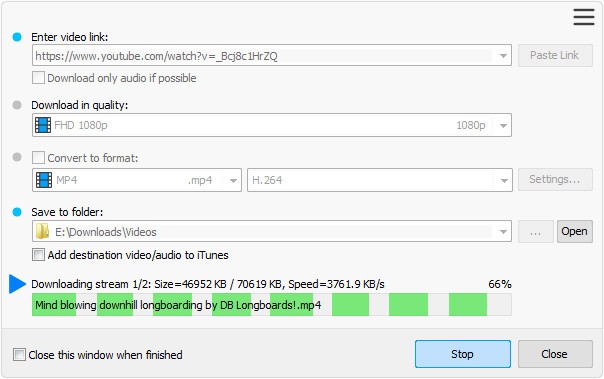
Easy Video Downloader is software you can use to download videos from platforms such as YouTube and social media. It is one of the three flagship products from Easy to Use Software, a studio specializing in the development of internet and video software. The Downloader complements Easy Video Converter, which converts file formats, and Easy Video Player, which plays multimedia files. Easy to Use Software uses multi-stream acceleration technology that increases download speeds by up to 5 times or more. The studio strives to make the web better for users by emphasizing simplicity, ease of use, and efficiency.
It is important to note that Easy to Use Software warns against using its software to download copyrighted content without authorization. The official website specifies that its software is intended for downloading royalty-free videos or videos used under fair use. It states that it does not condone the downloading of copyrighted content, except when the user holds the rights, has obtained permission from the copyright holder, or believes that the use falls under fair use. The publisher thus reminds users that the legality of a download depends, in particular, on the rights associated with the content and the context in which it is used.
Why Should I Download Easy Video Downloader?
As its name suggests, Easy Video Downloader is pretty easy to use: just copy and paste the link to the webpage where the video you want to save is available. To download the video, the software sends a request to the source platform—YouTube, for example. It analyzes the web page to identify the actual source of the video stream, rather than downloading the entire content from the URL. It extracts the necessary information, such as the title, duration, and available resolutions, so you can choose the quality of the final file.
Unlike a traditional download in a web browser, which retrieves the file linearly from start to finish, Easy Video Downloader uses multithreading. The video to be downloaded is divided into several segments. Instead of opening a single connection to the server, the software opens several connections simultaneously. Each connection then downloads a different part of the video at the same time. This accelerates the download process a lot.
After downloading all parts of the video to your hard drive, the software reassembles the various fragments in the correct order to reconstruct the complete video file. Easy Video Downloader then checks the file’s integrity to ensure that no segments are corrupted or missing. Once completed, the file becomes available in your destination folder, usually in MP4 format (or whatever you chose).
All of this technical complexity is hidden behind Easy Video Downloader’s graphical interface. For you, it boils down to three simple steps: copy the link (and choose the format), click “Download,” and wait for the progress bar to finish. This kind of program is meant to save you from having to manually handle these sections or use intricate command lines to get the same outcome.
Is Easy Video Downloader Free?
Easy Video Downloader offers a demo to download, but all in all it is paid software. It features two licenses available for purchase as a one-time payment. The Standard version focuses on downloading videos and promises to increase download speeds by up to 500%. The Pro version adds support for hundreds of additional websites, as well as a batch download mode, while maintaining the accelerated download speeds.
What Operating Systems Are Compatible with Easy Video Downloader?
Easy Video Downloader is a desktop application available only for Windows. Easy to Use Software has optimized its software for PC environments, and it is compatible with recent versions of Microsoft's operating system.
What Are the Alternatives to Easy Video Downloader?
The market for video-downloading software is vast and generally revolves around three key aspects: technical power, user-friendly design, and specialization.
4K Video Downloader Plus is a top-tier solution in this field. Unlike Easy Video Downloader, which is limited to Windows, this software is cross-platform. You can download it to your computer (Windows, macOS) using our direct link. Its processing power allows it to handle very high resolutions, up to 4K or 8K at 60 fps. 4K Video Downloader Plus is free to use with some limitations, but its paid licenses offer a very comprehensive experience.
Any Video Downloader is most closely aligned with Easy Video Downloader's philosophy by emphasizing simplicity and immediate accessibility. This software features a clean interface that makes it easy to get started. It includes conversion features that let you change your video’s format immediately after downloading. Any Video Downloader is compatible only with Windows. It can be used for free with ads and certain limitations, while a paid subscription unlocks all features.
Free YouTube Download is also one of the industry’s long-standing mainstays. Its longevity is a testament to its reliability in the specific YouTube segment. Its interface is minimalist and highly intuitive, designed not to confuse less tech-savvy users. You can use Free YouTube Download for free for everyday needs. However, the software encourages users to upgrade to its paid version for more intensive or specific uses. It is available on both macOS and Windows.