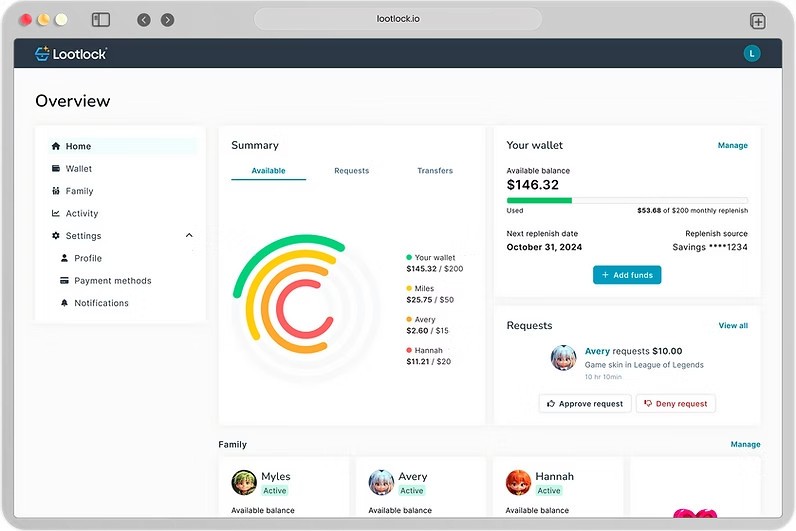
Lootlock is a financial monitoring and parental control system created to prevent your children and loved ones from overspending in online games or digital stores. As a parent, you can monitor and understand how much money is being spent on in-game items, microtransactions, and subscriptions, which is particularly important since a lot of modern mobile gaming is built around purchasing cosmetic items, loot boxes, or upgrades with just a few taps.
Since Lootlock provides real-time tracking and smart alerts, it can send notifications to you about any unusual purchases and block unauthorized payments before they are processed. You can also connect the app to platforms like PlayStation Network, Xbox, Steam, Nintendo Switch, and mobile app stores to gather data and get a clear overview of purchases and playing habits.
Once you connect Lootlock to a specific marketplace or game, you can view every transaction with details such as the game title, purchase amount, and date. It also helps you identify recurring payments, or buying in-game currencies, and items like skins or season passes. You're able to set up alerts for spending limits, get notifications when purchases exceed thresholds, and block specific types of transactions. The system operates in real time so that you can approve or deny purchases directly from your phone or desktop computer.
With Lootlock, you can check out personalized insights that highlight patterns, such as games where spending is most frequent, helping you and your family become more educated about digital spending. The app also provides recommendations for managing costs and can serve as a perfect opportunity to discuss financial responsibility and money management. You can also use it to track playtime as it shows how much time is spent on each platform. It's a great tool to avoid any spending surprises from in-game purchases and is available in both free and paid plans. You can use Lootlock through its web portal and integrate it with the most popular gaming marketplaces.
Why Should I Download Lootlock?
The biggest advantage of downloading Lootlock is that it provides you with a comprehensive system to control spending. While most parental control apps focus solely on time limits, Lootlock specializes in tracking and limiting in-game and digital purchases.
It monitors every transaction across consoles, PCs, and mobile platforms, helping you understand exactly where money is going. You can review purchases in detail and even categorize them by child, game, or platform, which helps prevent accidental purchases and teaches kids about the value of money in digital environments. With the app, you receive instant alerts when an unexpected transaction occurs, so you'll never lose track of your spending.
As a parent, you can use Lootlock to set daily, weekly, or monthly spending limits for each child's account, ensuring that gaming budgets remain under control. If a child tries to make a new purchase, the app sends an approval request directly to the parent's device. Then, you can review the purchase and approve or deny it immediately, giving you total control without having to turn off payments entirely.
You can also designate different rules for different games, for example, allowing purchases in educational or family-friendly titles but restricting them in high-spending games with loot boxes or subscription content. There's also an option to schedule spending-free times, such as during school hours or after bedtime, so there's no impulsive buying late at night.
Lootlock is also a great tool when it comes to educating your kids about financial responsibility. Instead of only blocking purchases, it helps children learn healthy spending habits. The app provides monthly reports that summarize activity, showing how much was spent and where. These summaries include easy-to-understand charts that children and parents can review together. Visualizing spending patterns makes it easier for you and your children to set spending goals, discuss priorities, and celebrate responsible behavior. For example, if a child stays within a set budget for a few months, Lootlock can mark that progress as an achievement.
Since Lootlock integrates with multiple gaming systems or shared devices, you can link accounts from PlayStation, Xbox, Nintendo, Steam, and mobile stores, as well as subscription services like Google Play Pass or Apple Arcade. All this data is centralized in one dashboard, making it easy to see everything at a glance. You don't have to log into different systems or check credit card statements to track purchases, and the app can even detect unauthorized charges made through linked accounts. You can control all that through the Lootlock web portal and manage your spending there.
Is Lootlock Free?
You can use Lootlock both as a free and paid product, with the free version allowing you to set up to 2 profiles for children, limit transactions to $200, and provide limited access to spending restrictions. If you want to use more advanced features, have more children you need profiles for, or want to check detailed analytics and automations, you can choose a paid subscription plan that is modestly priced.
What Operating Systems Are Compatible with Lootlock?
Lootlock is an app that works through any web browser, so you only need to access its website and log in to start using the app. Once you set up an account, you can open the portal on Windows, macOS, Linux, iOS, and Android or any other system by simply using a modern web browser like Chrome, Firefox, Safari, and more.
When it comes to linking gaming systems, Lootlock can be connected directly to the PlayStation Network, Xbox Live, Nintendo Switch, Steam, Epic Games Store, and mobile platforms such as Google Play and the App Store. Once accounts are connected, Lootlock automatically imports transaction data and updates the dashboard with every new purchase.
What Are the Alternatives to Lootlock?
Google Family Link is the official parental control app for Android devices and Chromebooks. It also has a parent app for iOS. You can integrate it with your Google account and use the app for free to manage app installs, set screen time limits, approve in-app purchases, and track your kid's location.
PlayStation Family is Sony's family management service that works with PlayStation 4, PlayStation 5, and PlayStation Portal. It's a free tool that lets you, as a parent, set spending limits, control communication features, and restrict game content based on age ratings. You can receive notifications about purchases or subscription renewals and prevent your children from accessing the PlayStation Store without approval. It works online and through its iOS and Android mobile apps.
Nintendo Switch Parental Controls is Nintendo's official parental control app, compatible with both Android and iOS devices. It lets you set gameplay time limits, restrict content by age, and block in-game purchases. You can also view daily activity reports and receive notifications when time limits are reached. You can download and use the app for free, and it fully integrates with Nintendo Switch so that you can control everything directly from your smartphone.
Microsoft Family Safety is another parental control solution for Windows, Android, and Xbox. You can define web filters, view activity reports, set screen limits, and receive location alerts. The app is available in both free and paid versions and can also limit your child's time in front of a gaming console.