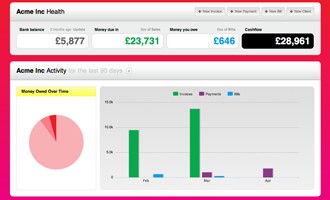
Brightbook is an online bookkeeping solution built for small businesses, freelancers, contractors, and startups that want to manage their accounts without expensive subscriptions or complicated features that only accountants understand.
It was created back in 2007 by two founders who were frustrated with traditional accounting software that felt overwhelming, costly, and too rigid for everyday use. Instead of giving users endless menus and technical jargon, Brightbook puts the essentials front and center. From the moment you log in you can see who owes you money, who you need to pay, and what your current cashflow looks like.
It is not designed for corporate finance teams or technical specialists. Brightbook is aimed at the people who work for themselves or manage very small teams and need a tool that is functional, secure, and easy to use. It allows you to create professional invoices in any currency, track bills, and keep a clear overview of your business finances. Because it is online, there is no need to install complex packages or update desktop software.
Everything you need is accessible anytime as long as you have an internet connection. That accessibility makes it flexible for users who want to check their numbers on the go, at home, or at work. Brightbook has grown from a simple personal project into a platform with thousands of users worldwide, but its purpose has stayed the same: make bookkeeping less of a burden and more of a straightforward task.
Why Should I Download Brightbook?
The main reason to download Brightbook is to save time and remove stress from bookkeeping. Many small business owners and freelancers do not have the patience or the budget for heavyweight accounting programs. What they require is a clean, secure way to send invoices, track expenses, and know their financial position without having to hire an accountant for every minor detail.
Brightbook gives you those essentials without hiding them behind complicated features. When you log in, you immediately see the numbers that matter. Cashflow is visible, outstanding payments are obvious, and you have clarity about where your money is going.
Another strong reason to choose Brightbook is that it is designed for real people, not for experts in financial jargon. The platform markets itself as “for people, not eggheads,” which captures its focus on making accounting approachable. It is not about stripping out professional features; it is about focusing on what actually matters for everyday business operations. With Brightbook you can issue invoices quickly, track bills in a few steps, and monitor the financial health of your work without distractions.
Security is another reason. Brightbook uses bank-level SSL encryption, stores data in enterprise-grade UK facilities, and performs daily backups. You do not have to worry about losing information if your laptop is stolen or your system crashes. You can also give access to advisors or accountants securely inside the system rather than sending files by email. That makes collaboration safer and more reliable. If you want accounting that feels practical, clear, and secure, Brightbook is a solution that meets those expectations.
Is Brightbook Free?
Brightbook is free at its core, and that is one of the features that sets it apart. Most accounting tools for small businesses demand subscriptions, and costs can add up quickly even for basic functions. Brightbook offers its main platform without charge. You can sign up, create invoices, track bills, and run your business finances without paying a monthly fee. For many individuals and small teams, this free plan is enough to cover all essential bookkeeping needs.
There are optionals paid extras if you want more functionality. These are add-on features that enhance the platform but do not replace the free core. The company is transparent about this model: you can use Brightbook at no cost for as long as you want, and if you see value in premium features, you can add them when required. This balance gives users flexibility. You are not locked into a subscription, and you can test the platform without financial risk. In an industry where most accounting software feels expensive or restrictive, Brightbook being free makes it an attractive choice for startups and freelancers who are watching every expense.
What Operating Systems Are Compatible with Brightbook?
Brightbook is compatible with any operating system that supports modern web browsing, including Windows, macOS, and Linux. Because it is an online platform, you do not need to download large installation packages or worry about updates. All you need is a stable connection and a browser. This makes Brightbook accessible across desktops, laptops, and even mobile devices when using a browser. The fact that it is not tied to a single environment means you can switch between systems without any disruption.
For many users, this is a major advantage. Traditional accounting software often requires installation on specific versions of Windows or macOS, and upgrades can be painful. Brightbook avoids this entirely by staying cloud-based. Whether you use Chrome, Firefox, Safari, or another modern browser, you can log in and manage your accounts. This compatibility is especially useful for freelancers and contractors who may use different systems across projects or clients. Brightbook ensures that as long as you can open a browser, you can access your finances securely and reliably.
What Are the Alternatives to Brightbook?
Manager.io (Desktop Edition) is one of the alternatives that can be considered. Its desktop version has a complete suite of accounting capabilities, invoicing, to expenses, and it is offline. This renders it handy in case you wish to have a tool that does not rely on the internet. It is quite functional, and the interface is more classic, hence it can be quite technical in comparison to Brightbook. It is also friendly to users who are comfortable using a desktop-based solution and are not afraid of a higher learning curve.
Another one is GnuCash. It is a years-old open-source accounting application that is supported by a group of volunteers. It has finer capabilities such as double-entry accounting, scheduled transactions, and financial reports. It is mighty, but not as user-friendly as Brightbook. It is not so polished and takes more technical forbearance, but GnuCash continues to be a competitor to those who desire a thoroughly free and open-source offering, with no commercial add-ons.
Wave is a famous free accounting application that provides invoicing, expense management, and receipt scanning. It has become popular amongst freelancers and small businesses in North America. It is also more of a one-stop shop compared to Brightbook, which also supports financial services like payroll and payments. However, Wave has slowly shifted to the paid services department, and thus, even though the software is free, a lot of the advanced features cost money. It is more of a financial suite than a straightforward bookkeeping model, compared to Brightbook.