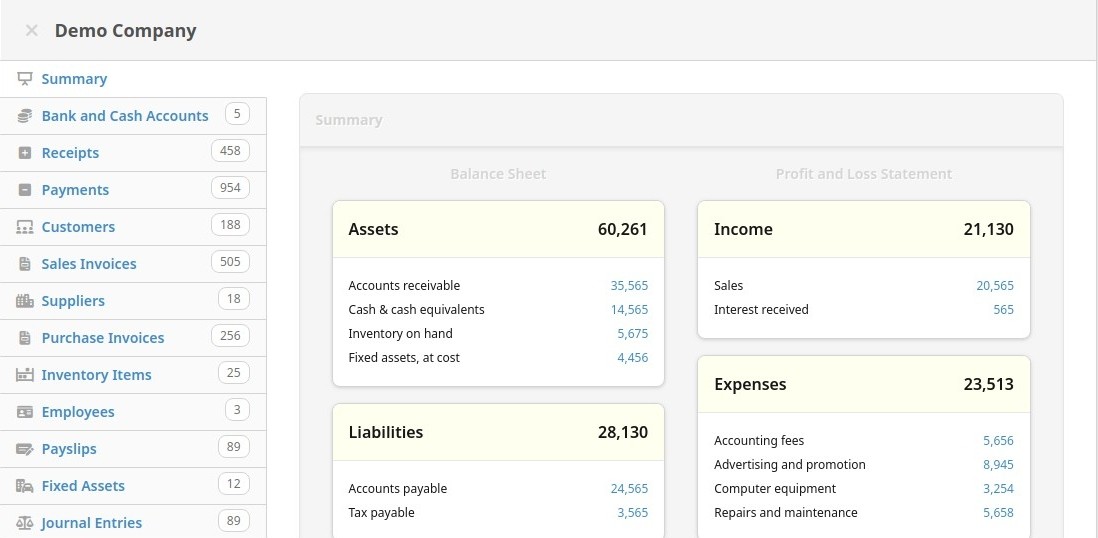
Manager Desktop Edition (Manager.io) is an accounting program that you install directly on your computer. It’s built with small business owners, freelancers, and individuals in mind—people who want to keep their books in order but don’t necessarily want to pay for expensive software or deal with a steep learning curve. When you open it for the first time, the design feels straightforward. You’re not overwhelmed with confusing tabs, and you don’t need hours of training just to add your first invoice.
The software covers the basics you’d expect: general ledger, invoicing, accounts receivable and payable, expense tracking, and reports. But it doesn’t stop there. If you’re running a shop with physical products, there’s inventory management. If you’re dealing with employees, there’s payroll functionality. Everything is organized in a way that makes sense, and you can pick and choose what features to use depending on the size and nature of your work.
One of the best things about Manager Desktop Edition is how lightweight it feels. Some accounting software drags your system down, but this one doesn’t. It’s not flashy or bloated—it’s a practical tool for people who need to focus on numbers without distractions.
Why should I download Manager Desktop Edition?
The first reason is privacy and control. With the desktop edition, everything stays on your computer. That means you don’t have to rely on someone else’s servers to hold sensitive financial data. If the internet goes down, you don’t lose access to your records. You simply keep working like nothing happened. For businesses that value independence, that’s a huge benefit.
Another reason is simplicity. If you’ve ever tried large-scale accounting programs, you’ll know how quickly they can become overwhelming. Manager.io avoids that problem by giving you just what you need in a clean interface. You can send invoices, check who owes you money, and track expenses without spending half your day navigating complicated menus.
Cost is another big factor. Because the desktop edition is free, you save money that can be put back into your business. Many accounting programs lock their most useful features behind a paywall. Manager.io doesn’t do that. The version you download is complete and usable, which is refreshing in today’s world of endless subscription models.
It’s also adaptable. You can set tax rules that match your local laws, customize invoice templates, and adjust accounts so they reflect the way you actually run your business. That flexibility makes it feel personal rather than generic. Whether you’re a freelancer who just needs simple records or a small company keeping track of inventory, it can be adjusted to fit.
Is Manager Desktop Edition free?
Yes, it is completely free. You don’t have to enter a credit card or worry about trial periods running out. Once installed, it’s yours to use. That’s not to say Manager.io doesn’t have paid products—the Cloud Edition and Server Edition are available for companies that want remote access, multi-user support, or more advanced setups. But those are optional. The desktop edition is a fully working program without a price tag.
This makes it especially attractive to startups, freelancers, and small businesses who are trying to keep costs down. Instead of paying for software every month, you can invest that money into other areas—advertising, equipment, or simply keeping cash flow healthy. It’s rare these days to find accounting software that’s both capable and free, which is why Manager.io has earned a loyal following.
What operating systems are compatible with Manager Desktop Edition?
Manager.io is flexible when it comes to operating systems. You can run it on Windows, macOS, or Linux, which covers most computers people use. This cross-platform support means you’re not locked into one environment. If you prefer a Mac at home but your office runs Windows, you can use Manager.io on both without any trouble.
Installing it is simple. On Windows, simply download the installer and follow the on-screen prompts. For Mac users, you drag the app into your Applications folder. For Linux, there are packages designed for different distributions. Once installed, it doesn’t demand much from your computer. Even older machines run it smoothly, which is another reason people appreciate it.
This compatibility is also beneficial when collaborating. For example, if you’re running Windows but your accountant works on Linux, both of you can still use the same program. That eliminates the stress of transferring files between different systems or worrying about version mismatches.
What are the Alternatives to Manager Desktop Edition?
A good open-source substitute is GnuCash. It is several years old and has a reputation for reliability. It is also free and can work with all operating systems, like Manager.io. It helps with double-entry accounting, billing, financial statements, and cost tracking. The default disadvantage is that its interface is a bit outdated in relation to contemporary tools. Nevertheless, it remains a strong choice among those who like open-source and do not mind spending more time reading the layout.
Wave takes an alternative path because it is cloud-based. That is, you don’t need to install anything and can peruse it using your browser. That is particularly popular with freelancers and microbusinesses since the fundamental services, such as accounting and invoicing, are free. The company realizes revenue by means of add-ons like payment processing and payroll. Wave may work well should you feel at ease storing your data in the cloud and like the flexibility of working anywhere. It is also easy to use, and therefore, you do not need to be an accountant to master its use.
Zoho Books belongs to the broader Zoho ecosystem, including CRM and email, and project management tools. In contrast to Manager.io, it is not free; you pay a subscription fee. You receive more features, automation choices, and integrations with other Zoho applications in exchange. Zoho Books is highly recommended for medium-sized and small businesses that do not just need accounting software. You can easily manage it in one place in case you are already using Zoho products, which are easily integrated.