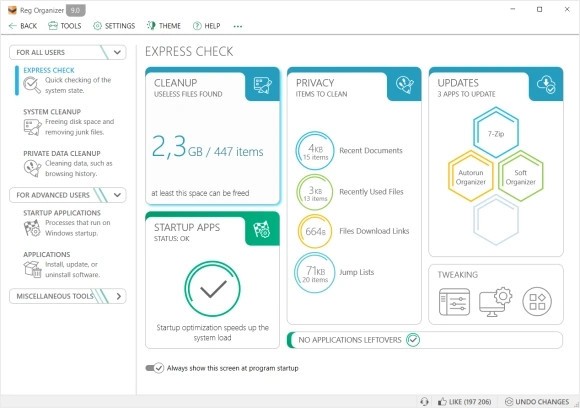
If you’re looking for a tool to clean up your Windows computer and make it run faster, Reg Organizer is one of the best options out there. It’s a software made by Chemtable that focuses on optimizing your computer’s registry and overall system performance.
Now, what exactly is the registry, and why should you care about it? Well, think of the registry as the central hub for all the settings and options for your operating system and programs. Over time, as you install and uninstall apps, the registry can get cluttered with leftover entries. These leftover bits can slow things down and cause errors. This is where Reg Organizer comes in. It helps clean up and optimize the registry, so your PC works more smoothly.
But it’s not just about the registry. Reg Organizer also includes features to help you uninstall software completely, clean up junk files, and even manage your startup programs. The best part? It's easy to use, so even if you’re not a tech expert, you can still get the most out of it without feeling lost.
Why should I download Reg Organizer?
There are a lot of reasons why Reg Organizer could be a great addition to your software toolkit. Here are a few things that really stand out:
The main feature of Reg Organizer is its ability to clean up your registry. Over time, your registry can become filled with outdated or unnecessary entries. Reg Organizer scans for these and removes them, improving your computer’s performance and preventing crashes.
We’ve all been there—when you uninstall software, sometimes it leaves behind files and settings. This can clutter up your computer and affect its performance. Reg Organizer has a deep uninstallation feature that ensures programs are completely removed, not just the app itself, but all its leftovers, too.
The app lets you manage which programs load when your PC starts up. By disabling unnecessary startup items, you can speed up your boot time and make your computer feel snappier from the get-go.
It’s not just about cleaning; Reg Organizer gives you the ability to tweak hidden Windows settings. This lets you adjust things like system settings to improve speed and responsiveness, so your computer feels like it’s running at its best.
Even if you're not super tech-savvy, Reg Organizer is still easy to use. It’s got a clean, intuitive interface that guides you through all the features. You don’t have to be a computer expert to take advantage of everything it has to offer.
It’s not just about one thing; it’s about making your system faster and more reliable across the board. With tools to clean up junk files, fix the registry, and manage your system’s performance, Reg Organizer does it all.
Is Reg Organizer free?
Reg Organizer isn’t a free app, but it does offer a free trial. This is a great way to see if the software works for you before committing to a paid version. The trial lets you explore most of the features, but if you want to unlock everything—like the full registry cleaning options and advanced tools—you’ll need to purchase a license.
The paid version is reasonably priced considering the features you’re getting, and it’s a one-time payment, not a subscription. Plus, the software is regularly updated, so you’ll keep getting improvements and new features. If you decide to stick with the trial version, it’s still useful, but upgrading to the full version opens up the full potential of Reg Organizer.
What operating systems are compatible with Reg Organizer?
Reg Organizer works on a range of Windows operating systems. Whether you’re using Windows 7, 8, 10, or even the latest Windows 11, you’ll be able to use Reg Organizer without any issues. The software is designed to work on both 32-bit and 64-bit systems, so no matter what type of hardware you have, it should work just fine.
It’s a great tool for anyone with a Windows PC, whether you’re on an older machine or the latest model. The software is lightweight, so it shouldn’t slow down your system, and it’s been optimized to run smoothly across various Windows versions.
What are the alternatives to Reg Organizer?
If you’re considering other options to clean and optimize your system, there are a few alternatives to Reg Organizer that might work for you.
Microsoft PC Manager is a free tool from Microsoft that focuses on optimizing your PC’s performance by cleaning junk files, managing startup programs, and fixing other system issues. It’s a solid choice for basic maintenance but lacks the depth that Reg Organizer offers, especially when it comes to registry management.
CCleaner is one of the most well-known tools for PC cleaning. It offers registry cleaning, junk file removal, and system optimization features. While it’s easy to use, some users have raised concerns about recent changes to its features and privacy policies, so it might not be as trustworthy as it once was.
Glary Utilities is another popular system optimizer that includes tools for disk cleanup, registry repair, and privacy protection. It offers a lot of similar features to Reg Organizer, but it’s generally considered a bit more basic. However, if you’re looking for something free, the basic version of Glary Utilities can get the job done.