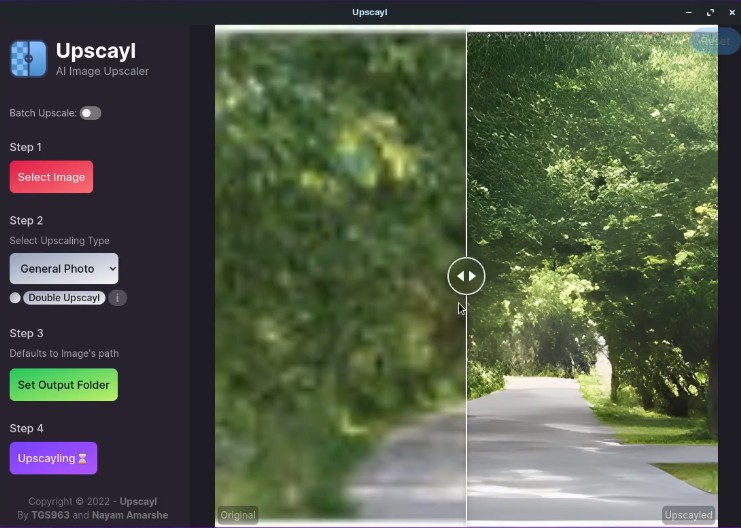
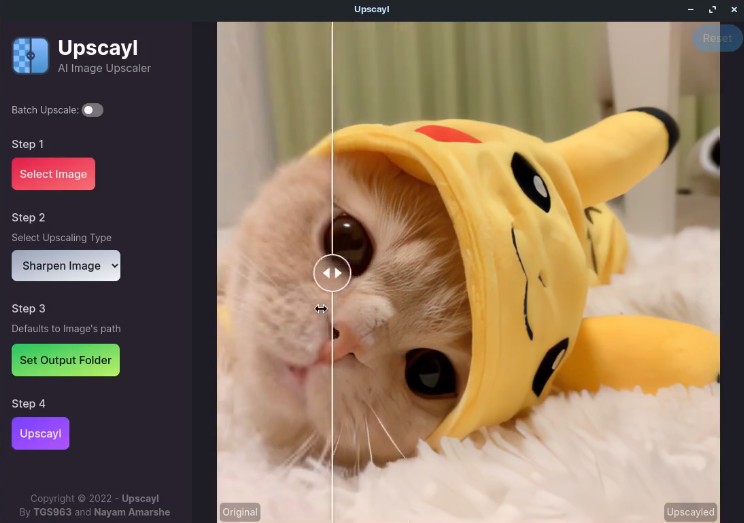
With Upscayl, you can use the newest AI models to improve the resolution and clarity of your photographs. Based on Enhanced Super-Resolution Generative Adversarial Networks (ESRGAN) and other deep learning mechanisms, the tool takes your photos and analyzes their content to return them in an improved version with refined details, sharp edges, and unnoticeable artifacts.
You can use Upscayl both as a command-line tool and as a desktop client. The app has features such as batch processing, using multiple AI models for a single job, hardware acceleration, and CPU multithreading. With all of those, you can be sure you will get optimized performance no matter the machine you're using.
The process is simple: upload your photos to Upscayl and choose from various models to get your desired effect. The tool works great whether you're looking to restore old images, improve textures, or prepare your pictures for printing. You can download Upscayl on Windows, macOS, and Linux, and the tool is distributed under the GNU GPL license.
Why should I download Upscayl?
Upscayl is a tool with a very refined purpose that does what it's supposed to do at the highest level. As a utility for upscaling images, it protects your privacy and processes your photos locally on your machine instead of sending them to a cloud service. If you download Upscayl, you can enjoy enlarged images with intelligently reconstructed details thanks to the AI upscaling models like Real-ESRGAN that the tool uses.
Traditional methods of resizing pictures often result in pixelation or a lot of blur; Upscayl, on the other hand, gives you sharp and natural-looking photographs, but in a bigger resolution. You can choose from various presets adjusted for photo types, like general photos, digital art, or low-resolution images specializing in heavily compressed or damaged pictures.
Depending on your hardware, Upscayl uses GPU acceleration, using OpenCL, CUDA, or Vulkan frameworks to give you high-resolution outputs, whether you select 2x, 4x, or custom scaling options. Thanks to its batch-processing feature, you can even upload an entire folder of images. It can prove very useful if you're working on restoring an old archive, preparing multiple photos for printing, or need to upgrade your digital art for HD displays.
After you download Upscayl to your computer, you'll notice that the tool has a very intuitive interface. You can drag and drop your images in JPEG, PNG, BMP, and WebP formats, select from various models and options, and preview how your photos will look before you start processing and exporting your files.
There are no limits as to the size of images you can use with Upscayl, and the tool leaves no watermarks. You can also use this solution offline on your Windows, Linux, or macOS computers, and it's completely free with no trackers or advertisements inside the tool.
Is Upscayl free?
Yes, you can download Upscayl desktop applications for free and use all of its AI features at no cost. The tool works locally and doesn't display any ads. It also protects your privacy when your content isn't used for tracking or targeting. However, it's worth noting that Upscayl recently released a paid cloud service, but you can still get the original app for your computer without any payments.
What operating systems are compatible with Upscayl?
Since it's a cross-platform solution, you can download Upscayl on Windows 10 and 11 (64-bit), macOS (12.0 or newer), and Linux (Ubuntu, Fedora, Arch Linux, and others). Numerous alternative distributions are also available on the Upscayl GitHub page.
In order to get optimal performance out of Upscayl, your machine needs a GPU with OpenCL, CUDA, or Vulkan support (NVIDIA and AMD cards preferred), a minimum of 4 GB RAM (8 GB recommended), and a dual-core CPU or better.
What are the alternatives to Upscayl?
Deep Image is a cloud-based AI tool that's available through its web service, where you can upload your photos and upscale them up to 4 times. If you use the free version, your images can only have a limited resolution and have a watermark placed on them. To create pictures of higher quality or to process numerous files at once, you need to either subscribe to Deep Image's paid plans or purchase credits. While it's a reliable solution, it only works online, and you need to upload your pictures to the cloud database, so keep that in mind when working with sensitive materials.
If you're looking for a high-quality enlargement of your photos, then Topaz Gigapixel AI is a commercial solution that gives you more control over the results. You can fine-tune things like noise reduction, face improvements, and artifact corrections to get better outputs. This app is targeted at professionals because its optimized models are perfect for work that is then printed or used in various marketing formats. To use it, you need to pay for a license after a 30-day trial, and you can download Topaz Gigapixel AI on Windows and macOS computers.
AI Image Enlarger is a solution that works on various platforms and is based on cloud services. You need to keep in mind that in order to use it, you need to upload your photos to external servers, and the tool comes in both free and paid versions. The premium plan unlocks HD exports, speeds up processing times, and increases your file limits, while the free option allows you to get watermarked images and access only to basic upscaling tools and file size restrictions. You can download AI Image Enlarger on iOS and Android devices or use it as a web service.