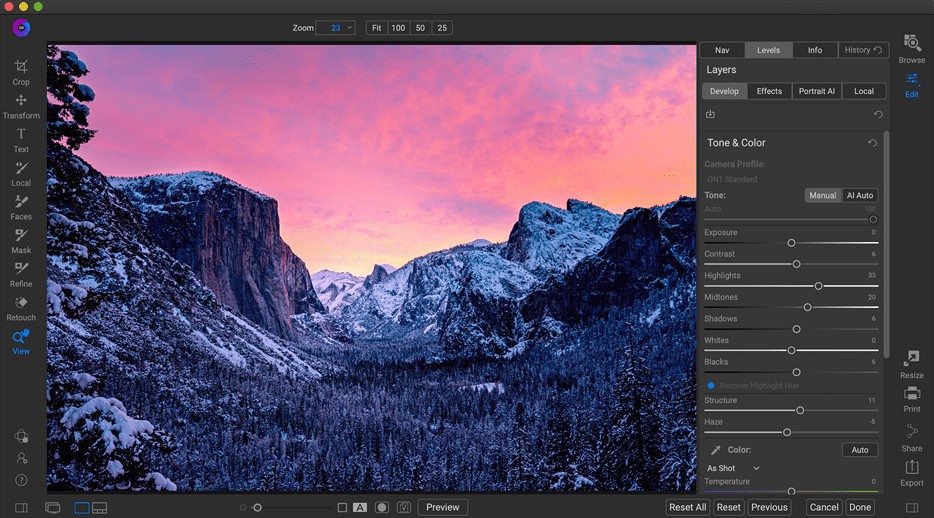
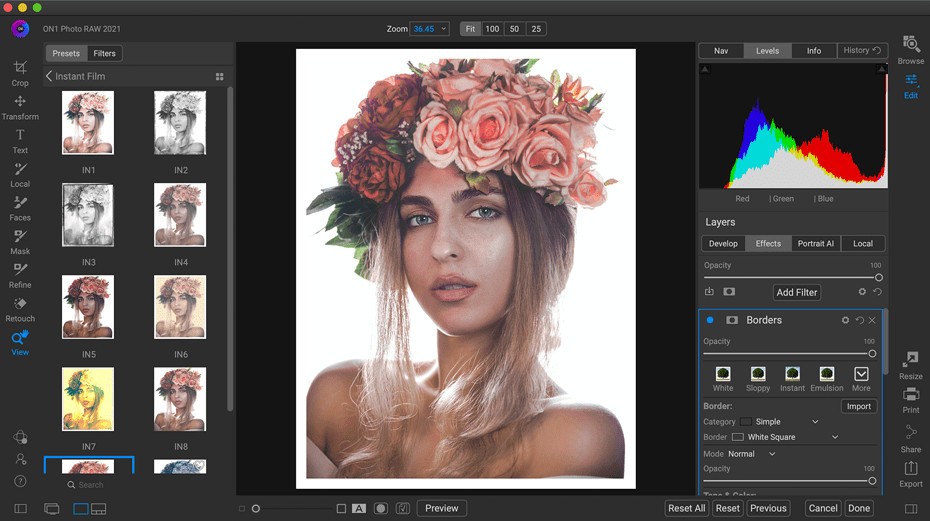
One of those tools that photographers essentially resort to when they need to have control of how their photos will appear without being consumed in other excessively complicated systems is ON1 Photo RAW. It is a tool designed to be used by people who wish to have something that can be considered powerful and yet manageable.
The main constituent of ON1 Photo RAW is that it is a photo editor and photo organiser. This simply implies that you are not only getting to work on improving how pictures appear, but you are also ensuring that your photo library is clear and well-organized in terms of search. It works with raw files, which are unprocessed image files that are directly taken by a camera.
Such files provide you with more to play with, but also require software that is capable of making the best out of them. That is the role that ON1 Photo RAW plays, providing you with the facility that you need to alter the lighting, color, sharpness, and so on, so that your basic image looks complete.
The software does not apply only to professionals. On the one hand, it has the depth that photographers with experience will be glad to notice; on the other hand, it is arranged in such a manner that a novice can use it without being overwhelmed by the depth of the material. It creates a space for you to learn, experiment, and create confidence in your editing skills as you handle all your images in the same space.
Why Should I Download ON1 Photo RAW?
There are a lot of reasons why one may prefer using ON1 Photo RAW as an alternative to other photo-editing tools. The fact that it allows gathering everything you need in one place is one of the largest advantages. In other programs, you just need to change apps in order to control your photos, edit them, and then share them or print them. That is an extra step that ON1 Photo RAW eliminates.
You can import, organize, edit, and complete your photos in the very same software. This gives it an easier feeling, and it allows you to work on your assignments and not spend time determining where you are going next. This may seem insignificant to most people, but to those who have to work with raw files regularly, the efficiency and satisfaction of editing can feel very different.
The program is also famous for providing upgrades in features and the inclusion of new tools. This translates to the fact that when you spend time getting familiar with ON1 Photo RAW, you are dealing with that which is indeed growing and evolving. This gives one the confidence that the software is up-to-date with the changes on cameras, file types, and editing requirements.
ON1 Photo RAW also has functions such as presets and AI-assisted editing, which can be useful to photographers who do not want to waste time on the editing process. The quicker options can be achieved, and then some further adjustments can be carried out when one needs more customization of the end result.
One more aspect that usually looks attractive to the user concerns the ownership way in ON1 Photo RAW. You can purchase it outright in most cases without the need to subscribe to it. That alone counts big with those who want to pay once and forget that they will have to pay some periodic charges to use the software. It makes you stable and avoids any sense of anxiety of losing or damaging your editing tools, which complies well with the idea of being a captain of your own creative ship.
Is ON1 Photo RAW Free?
ON1 Photo Raw is not free of charge. It can normally be paid for one time or may have a license fee; however, it usually offers trial versions so you can try it beforehand. All these things are completely free of hidden subscriptions unless you want to get further services.
What Operating Systems Are Compatible with ON1 Photo RAW?
ON1 Photo RAW is compatible with Windows and macOS. Running the software should not be an issue at all, especially when using either PC or Mac, provided that your machine is at least within the minimum system requirements. The program is made in such a way that it can utilize the capabilities of your modern computer hardware to allow it to work with huge raw files without any hitches and provide you with quick editing performance. The company also updates, which makes the software compatible with newer versions of these operating systems.
What Are the Alternatives to ON1 Photo RAW?
RawTherapee is among the alternatives that photographers may need to consider in case they want to have a free program with open-source code. It specializes in working with raw files and offers a wide range of possibilities to adjust a picture in detail. The software is highly customizable, although due to a somewhat technical interface, it may come a bit technical to some users who have just started out. It is nevertheless good enough to be used by anyone who likes to have a free application with a significant depth.
It is also possible to mention the DxO PureRAW. The software is specifically made to aid in the enhancement of your raw documents before you import them into other editing applications. It is directed toward the removal of noises, sharpening, and straightening of lens distortions in a fairly automated manner. Applying DxO PureRAW is a common starting point in the workflow of many photographers who want to obtain the cleanest files possible (and then perhaps refine them yet further in their editing application of choice). It is designed to serve those who are inclined towards getting high-quality outcomes without spending several hours making manual adjustments.
Another way is through Adobe Photoshop, together with an extension called Camera Raw. The bundle of these two provides you with highly useful instruments to process the raw files with the depth and precision that is difficult to surpass. Applied to a raw file, the Camera Raw extension allows making the types of adjustments that these files require (such as exposure, contrast, color, etc.), but leaves the file still closed, ready to open in Photoshop to continue working. It is a system that can do the trick, especially for those who are already using the system of Adobe system and are willing to have everything under the roof. It is expensive in the sense that it is linked to the subscription plans offered by Adobe, but the number of tools it offers, as well as compatibility levels, are enough to warrant its continued usage to many photographers.