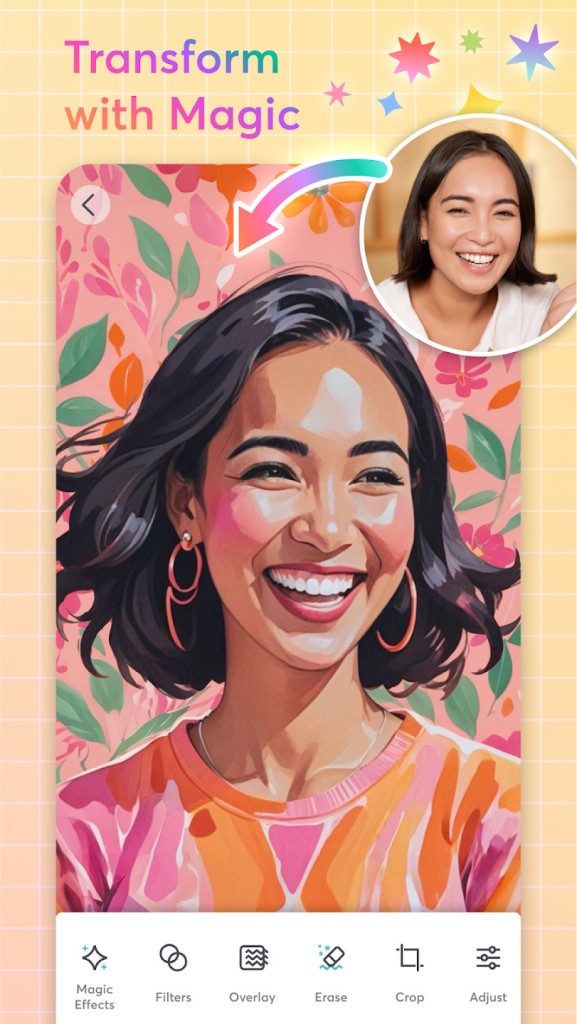
PicCollage allows people to easily use their pictures to make fun collages or even edit them (modify background, delete unwanted items). Having impressive layers or professional editing is not necessary for telling a nice story. It is about making those typical pictures on your phone feel a bit more personal or meaningful.
Pick some photos, open the app, arrange them, resize them, turn them, cut them, and drag them wherever you’d like them to be. If you like, you can draw anything you want, or you can draw on a grid or pre-made template. You are not required to choose set formats. You can even create a neat, personalized birthday invite. If you want your summer to be crazy full of fun memories, go for it.
Using text, stickers, doodles, and a wide variety of backgrounds is also possible. It feels lighthearted, which makes playing it enjoyable over time. PicCollage makes it simple to create anything, big or small, and use it anywhere by adding pictures, text, and interesting effects—no design skill is needed.
Why Should I Download PicCollage?
Every so often, you might just have a few photos you want to put together in something nice. You can use any program or style you like, and you don’t have to post polished content. Basically, you hope for something stylish, easy to use, and quick to put together. PicCollage makes it easy to do that, and it’s fast.
After starting the app, choose a style, maybe a grid or just an empty zone so you can arrange your pictures as you wish. The last part depends on you. Adjust the scene’s background to fit how you are feeling. Feel free to put on stickers or leave the stickers off. Drop some text in where you want. It’s an opportunity to be creative or to choose a safe and comfortable existing design with the templates offered.
People especially like that it’s so flexible. You can easily change the way your creation looks each time. You can change how widely apart your photos are, modify the angle, cut the edges, or make a collage that seems random, but you made it that way. It isn’t strictly set in stone, which gives it a personal atmosphere. It acts like scrapbooking, only with a neater result.
The seasonal features of PicCollage play a big role, too. Holiday, birthday, or event time prompts the release of matching stickers and templates by the app. If it’s Valentine’s Day or students are graduating, the PicCollage team adds corresponding features for the event. In addition, you can print what you made to have cards, prints, or make your collages into gifts.
Keeping memories is also a big reason to enjoy a photo moment like ‘Your Kid’s First Day of School’, ‘Weekend Getaway Photo’, and ‘My Dog Playing’ can be saved together as one picture. The most important thing is to give them a personal touch.
People who are active on social media appreciate that PicCollage can uplift their posts with cool templates. Place several pictures together and use them to describe one idea instead of just sharing pictures individually. Using the app, users can export their images to Instagram, Facebook, and other apps, and the tool makes sure no important details are cut off.
And if you don’t really know what you want to do, there is an AI assistant that will take charge of everything and make the perfect creation for you.
For iOS users, note that there is also an option to create video collages!
Edition tools
But the templates and arrangement of your pictures are not the only functionality of interest in PicCollage. The app also offers some editing tools. The first one is Magic Effects. It allows you to transform your picture into a drawing, like an AI tool.
You can also add filters or an overlay to change the look of your photo before making your final collage. And if you only need part of the photo, you can use the crop tool.
But that’s not all. Sometimes when you take a picture, there can be objects in it that you wouldn’t want in the finished photo. PicCollage offers you to remove these objects automatically. Just circle them and the app will do the rest, it’s as if they weren’t there in the first place!
The final editing tool worth noting in PicCollage is the background remover. It helps you change the background of any photo, just to change it or to put the subjects alone on a personalized card.
For iOS users, there are also editing tools for videos, as the app allows you to work with them in addition to photos.
Is PicCollage Free?
You can install and use PicCollage without paying anything. You do not have to pay for using templates, grids, stickers, and editing features. The premium version includes extra tools, templates, filters, and such, and has no ads, but the basic ones are free anyway.
What Operating Systems Are Compatible with PicCollage?
Android and iOS devices can use the PicCollage application. The app functions nicely on both phones and tablets, and new updates are added often to cover new systems and devices. PicCollage works on every screen and device, so creating designs on iPhone, iPad, or Android is always convenient.
What Are the Alternatives to PicCollage?
Some apps are very similar to PicCollage, and each tends to help users tell stories with photos in a unique fashion.
InCollage is better for people looking to make their work look polished fast. The themes are more about organized grids and expert-looking template styles. The main point is to pack power into a system created for goal-oriented people. If you prefer to make modern collages, eye-catching photos, and light editing, InCollage has easy-to-use tools.
Montage Photo lets you merge several photos into one whole scene. Squares can be one way to put photos together, but collage lets you make the photos fit together in a more beautiful way. The overall look is a bit different, which is great for people who wish their collages were like art, not just typical grouped pictures.
The collage and editing tool Lumii gives greater weight to the editing feature. You get to change the lighting, apply effects, filters, and adjust little things in the image. Even though Lumii is not meant to be a collage app, lots of people prepare their photos in Lumii and then take them into PicCollage or other similar apps. Color adjustment, the addition of mood, and cleaning images for a collage are all reasons you can use it.