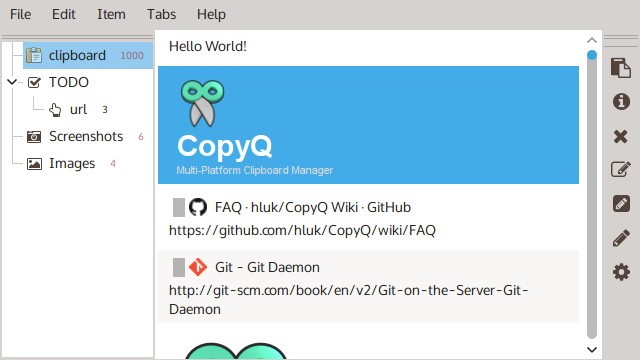
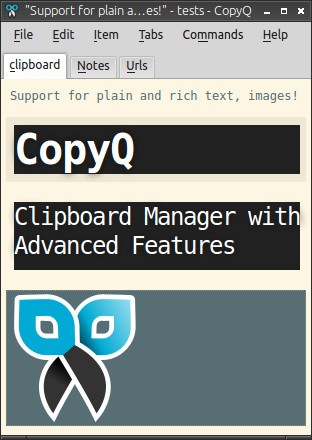
CopyQ is an enhanced clipboard manager that extends the standard copy-paste functionality most users are accustomed to. Rather than only holding the last item you copied, CopyQ stores everything you copy, text, images, and custom formats—in a searchable, organized list. Whatever you copied earlier in the day, or even days ago, remains available and retrievable whenever you need it.
The interface gives you a range of tools for managing your clipboard history effectively. You can tag and sort entries, use commands to modify clipboard content, and perform quick paste operations directly from the history list without having to scroll through everything. Custom shortcuts and hotkeys can be assigned to clipboard actions, keeping your workflow moving without unnecessary interruptions.
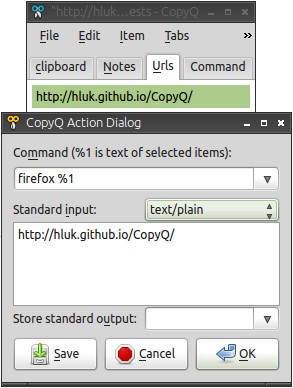
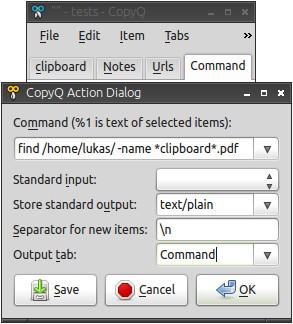
CopyQ also supports scripting and automation. You can set up commands that run automatically on clipboard data, which is particularly useful for users who need to format text before pasting it into another application. Plugins extend the software further, letting you integrate CopyQ with other tools and tailor it to fit your specific needs. The overall result is a flexible clipboard platform that scales from simple history tracking up to complex automated workflows.
Why Should I Download CopyQ?
CopyQ solves a problem that anyone who works at a computer regularly will recognize: copying something new and losing the content you had copied just before it. Whether you are working on documents, writing code, or browsing websites, copying and pasting is a constant part of the process. CopyQ keeps everything you have copied accessible so you can go back and retrieve it at any point, not just the last item in the queue.
Organization is one of the strongest reasons to use CopyQ. You can sort copied items into categories and apply tags, making it easier to find specific content later. The built-in search function lets you locate entries in your clipboard history without manually scrolling through everything you have copied. The result is a tidy, searchable repository rather than a single ephemeral slot that gets overwritten with every new copy action.
Customization is another reason power users are drawn to CopyQ. The interface can be adjusted to match your preferred workflow, with themes and keyboard shortcuts configurable to your taste. For users who need more than basic clipboard management, the scripting and command integration make it easy to automate repetitive tasks. If you regularly need to clean up or reformat text before pasting it somewhere, you can set up a command in CopyQ that handles this automatically every time, saving consistent effort across your working day.
Is CopyQ Free?
CopyQ is free and open-source. There are no hidden fees, no subscription costs, and no feature restrictions. The complete feature set is available to all users at no cost. As an open-source project, the software is maintained and improved by its community, which means it continues to evolve based on real user feedback and contributions over time.
What Operating Systems Are Compatible with CopyQ?
CopyQ runs on Windows, macOS, and Linux, providing the same experience across all three platforms. It is a lightweight application that does not slow down your machine regardless of its age or specification. The software adapts to your system environment automatically, whether you are running it on a Windows PC, a Mac, or a Linux distribution.
What Are the Alternatives to CopyQ?
ClipClip is a clipboard manager that organizes copied content through a categorization system. Its interface is modern and accessible, making it easy for new users to get started quickly. Copied items can be saved as named clips and organized into folders for reuse later, which works well when you regularly need the same pieces of content across different tasks. A built-in editor lets you make quick changes to copied content without switching to another application. ClipClip handles image-based clipboard content effectively, and its folder-based organization suits everyday use well.
Ditto is a Windows clipboard manager that keeps all copied items in searchable storage. It is lightweight and fast, and it supports syncing clipboard content across multiple devices, which is a useful feature for people who work across more than one machine. You can save and retrieve plain text, images, and custom data types, and once you learn the hotkeys, you can paste any saved item directly without opening the main interface. Ditto is a straightforward and reliable option for users who want simple, dependable clipboard management that works without much configuration.
AceText takes a more structured approach to clipboard and text management. It goes beyond clipboard history to function as a full-text snippet organizer, letting users build collections of frequently used text and notes that can be retrieved and pasted instantly. The search and quick-paste features make it particularly useful for anyone who works heavily with text and needs fast access to a large library of reusable content. AceText is a paid application, which sets it apart from the free alternatives, but its developed feature set and focus on productivity make it a worthwhile option for professional users who need more than a basic clipboard tool.