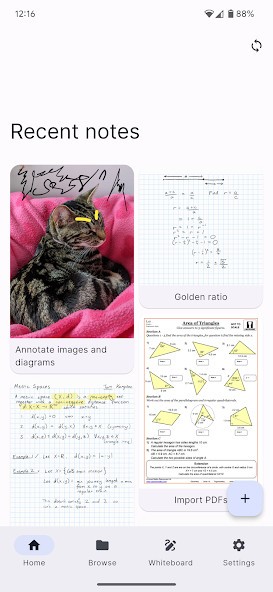
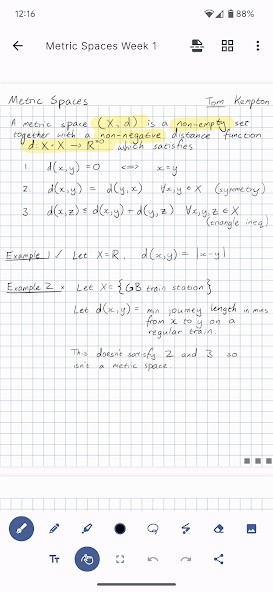
Saber is a fast and reliable note-taking app that prioritizes speed, a clean interface, and local file storage. You get standard text editing tools that also support handwriting and highlighting text, but Saber also offers features that allow you to track your to-do lists or collaborate with others.
With Saber, you can quickly find your documents, code snippets, or other notes thanks to its powerful search engine, which handles large volumes of data. As a result, it quickly scans all your files and delivers results within seconds.
With this fast and private note-taking app, you can add multimedia files to your notes, organize them to your liking, and work on documents with a team. You can download Saber for multiple operating systems and mobile devices.
Why should I download Saber?
If you don’t need resource-heavy software to create documents that could overwhelm you with its feature set, then Saber is a great option for you. It’s a minimalist, simple, and lightweight app that lets you create content and manage your documents effectively.
Saber gives you different Markdown tools so you can format headings, lists, quotes, and links; highlight various parts of the text; or add inline code with familiar syntax. Any developer, technical writer, or blogger who already needs to use Markdown should download Saber.
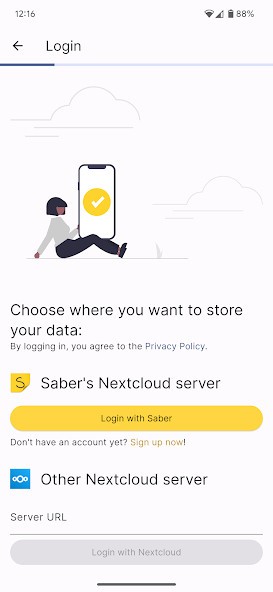
With Saber, you don’t need to have an internet connection, as it works on local files. You get total control over how your documents are used, but you can also connect services like Dropbox to sync your notes to the cloud storage and create backups.
Even if you have an extensive library of documents, Saber can handle them without compromising its performance. You also get to search your notes with ease, thanks to the app's powerful search engine that scans file titles, content, and metadata, such as tags or headings, to find what you need. The app indexes everything in real-time, so you can retrieve information quickly.
You can organize your content into different folders and apply tags to various files or create your own taxonomy that’s adjusted to your workflow. Saber doesn’t lock you into a single format, and the app's flexibility lets you structure everything however you like. You can link notes together and navigate between them, allowing you to create and store a network of connected ideas or resources.
Saber lets you create tasks and subtasks, set deadlines, and set up recurring reminders, which you can then track in Kanban or sync with your calendar to keep up with progress. This software also has features dedicated to team collaboration, allowing you to share notes with others, edit them simultaneously, and see the most up-to-date version as everything is synced to the cloud in real time.
With the revision history, you can view all changes and edits to the document, and who made them and restore previous versions if needed. When you apply different access permissions or encrypt files, you can ensure your content is safe and secure, whether you store the notes locally or share them in the cloud.
Even if you need to sync files between devices and edit them on different machines, you can download Saber on all major computer operating systems and mobile devices and access your files on the go.
Is Saber free?
As an open-source software, you can download Saber for free and use all of its features.
There are no restrictions on the number of notes you can make, the upload limit for embedded multimedia, or the features you can use. You can get Saber for free on all its supported operating systems and devices.
What operating systems are compatible with Saber?
With Saber, you can choose between a dedicated desktop app and a mobile app. Whatever you decide, you can collaborate on your files cross-platform.
For desktop computers, you need Windows 10 or later, macOS 10.13 or later, and the tool is also available on Linux (Debian-based and Arch-based distributions).
If you want to download Saber on a smartphone or tablet, you require iOS 12 or later or Android 6.0 and up.
What are the alternatives to Saber?
If you need a tool that combines note-taking and task management with the ability to handle databases and wikis, then you should try Notion. You can access this app via its web-based service or download it for Windows, macOS, iOS, and Android, and all your work is synced across devices. You create your content using different blocks that you can customize and nest under one another. You can also embed multimedia and work with others simultaneously. There is a free plan with limits on the functionality you can use, but it includes all the essential tools and lets you publish your document as a website on the notion.com domain. The paid version gives you access to enhanced permission settings, version history, and different database filters.
One of the most popular tools of this type on the market is Evernote, a cloud-based software that has been around for years. You can download it for Windows, macOS, iOS, and Android, or use the web version and choose either the freemium version with limits or an upgrade to a paid plan. You can sync your documents between devices, use the rich text editor, use a powerful search that can even scan your documents with OCR to give results, or integrate with calendars and other third-party tools. There’s also a browser extension that gives you a way to clip entire websites or their parts and add them to your notes.
Joplin is a free, open-source software that supports Markdown documents and cross-platform sync and allows you to use end-to-end encryption on your files for better privacy. You can get Joplin on Windows, macOS, and Linux computers, as well as on mobile devices running Android and iOS. You can create multiple notebooks, add tags, apply rich formatting, upload multimedia, including web clippings, and store your files locally or sync them to cloud storage like Dropbox or OneNote.