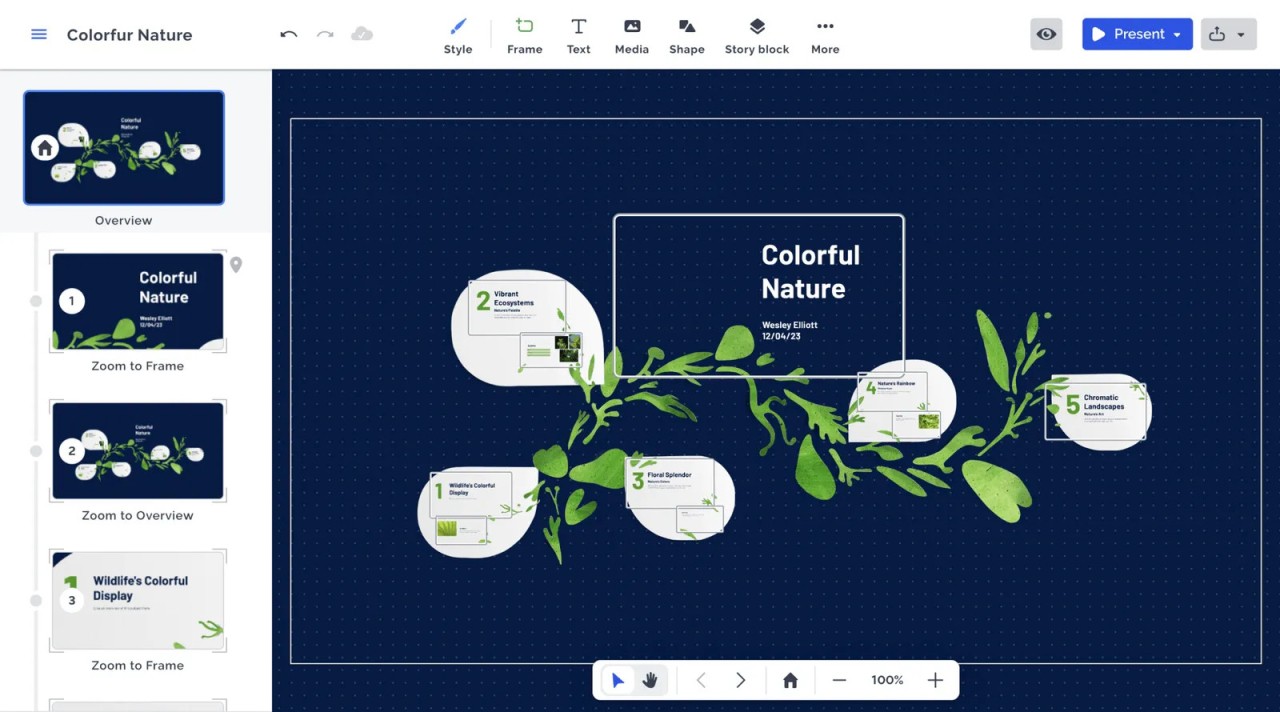
Prezi takes a different approach to presentations than most people are used to. Rather than a sequence of static slides, it gives you an open canvas where content is arranged spatially and navigated through zooming and panning. Sections connect fluidly rather than cutting from one to the next, which keeps audiences oriented within a larger visual structure. The result feels more like a guided journey through your material than a conventional slideshow.
The visual logic behind Prezi is built around storytelling. You can start with a wide overview, zoom into specific details, and pull back out again to show how everything connects. This kind of movement between levels of detail makes relationships between ideas easier to follow, and tends to leave a stronger impression than a flat, linear deck. For anyone who has sat through one too many slide-by-slide presentations, the difference is noticeable.
Prezi supports embedding images, videos, charts, and animations directly into the canvas. It works for business presentations, classroom teaching, and creative projects alike. The emphasis is less on displaying data and more on building a narrative around it, which makes it particularly effective when the goal is to persuade or engage rather than simply inform.
Why Should I Download Prezi?
The main reason to use Prezi is creative freedom in how you structure and present ideas. You are not constrained by a fixed slide order, and the zoomable canvas lets you design presentations that flow naturally between connected topics. Transitions and motion keep the audience engaged rather than passively waiting for the next slide to appear.
The visual experience Prezi creates is one of its strongest selling points. Working on a large open canvas rather than individual slides lets you see how your content fits together as a whole, zooming into detail when needed and pulling back to show the bigger picture. This spatial approach to storytelling helps complex ideas land more clearly, whether you are pitching to a boardroom or teaching a class.
Collaboration is also built into the platform. Multiple people can work on the same presentation simultaneously, making real-time edits without passing files back and forth. For team projects or group presentations, this removes a lot of friction from the process.
Beyond presentations, Prezi can be used to build dynamic reports, infographics, and interactive learning materials. The cloud-based setup means you can start work on one device and continue on another, whether that is a desktop, laptop, or mobile. It adapts to a range of working styles and environments without requiring software installations on every device.
Is Prezi Free?
Prezi offers a free plan that allows you to create and share presentations with basic editing features. It is enough for casual use and gives a solid introduction to how the platform works.
Advanced features such as offline editing, premium templates, and branding tools require a paid subscription. Educators and casual users will find the free tier functional for most purposes, while professional or business users are more likely to need one of the paid plans to get full use of the platform.
What Operating Systems Are Compatible with Prezi?
Prezi works on Windows and macOS as desktop applications, and is also fully accessible through a web browser, which means any device with an internet connection can run it without installation. Mobile apps for Android and iOS are available for working on presentations from a phone or tablet.
This cross-device access makes it practical for people who move between different machines or need to present from a device other than their main computer.
What Are the Alternatives to Prezi?
PowerPoint is the most widely used presentation software available and comes as part of Microsoft Office. It has been a standard in professional and academic settings for decades, which means most audiences and collaborators are already familiar with it. It offers a large library of templates, a wide range of slide transitions and animations, and tight integration with the rest of the Microsoft Office suite. For users who prefer a straightforward linear structure over Prezi's spatial approach, PowerPoint remains the go-to choice, and its familiarity alone makes it hard to displace.
Google Slides is a free browser-based presentation tool included in Google Workspace. Its main strength is collaboration: multiple people can edit the same presentation at the same time, changes save automatically, and content from Google Drive can be inserted directly. It does not offer the dynamic motion of Prezi, but for clean, professional presentations where simplicity and easy sharing matter more than visual flair, it is one of the most practical tools available.
LibreOffice Impress is an open-source presentation application included in the LibreOffice suite. It covers the core features of a slide-based presentation tool, including transitions, animations, and full compatibility with PowerPoint file formats. The interface is more traditional than Prezi and lacks the cloud-based collaboration features of Google Slides, but it works entirely offline and costs nothing. For users who want a capable, no-subscription presentation tool that does not depend on a browser or internet connection, LibreOffice Impress is a reliable option.