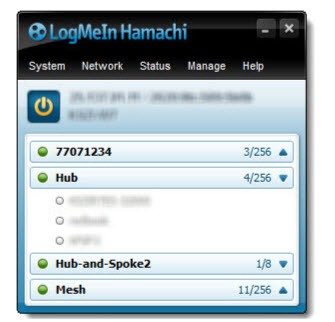
Most people consider a VPN to be something to hide their browsing activity or unlock streaming content from another country. Hamachi, the provider behind vpn.net, is a different animal entirely. Developed by LogMeIn, Hamachi is a hosted VPN service designed to create virtual local area networks between computers anywhere in the world. The idea is that once two or more machines are connected through Hamachi, they behave as if they are sitting on the same office or home network. Even if one is in Tokyo and the other is in Toronto.
This makes Hamachi particularly useful for small remote teams who need to share files or access network resources without setting up complex server infrastructure. Developers use Hamachi to test networked applications across multiple machines without being in the same room. Gamers have long used Hamachi to play LAN-only multiplayer games over the internet. Simulating a direct local connection between friends. Hamachi is a practical and affordable solution for anyone wanting to bridge the gap between machines that are geographically separated but want to share the same network.
Setting up Hamachi is mostly painless. You install the client, create or join a network, and the connection is managed through LogMeIn’s web interface. There is no need to open ports on your router or configure firewalls to get a basic network up and running.
Why Should I Download Hamachi by LogMeIn?
The central feature of Hamachi is on-demand virtual networking. You can spin up a private network in minutes and invite other computers to join, all through a web-based dashboard rather than requiring on-site configuration. This is ideal for IT teams or small businesses that need to provide access for remote employees without sending anyone to an actual physical location.
Hamachi supports three different network types depending on your needs. Mesh networking connects all devices directly to each other, so everyone has equal access to all shared resources. Hub-and-spoke networking routes traffic through a central computer, useful when you want remote users to reach one specific machine rather than the whole network. And Gateway networking provides access to a full LAN from a centralized Hamachi gateway. Handy for when remote workers need to reach internal servers or devices without touching the existing network setup.
Security is handled via AES 256-bit encryption covering all traffic between connected machines. Centralized access controls give administrators the ability to manage passwords, authenticate new members, lock networks, and configure client behavior from a single interface, all without needing to be hands-on with each machine.
Hamachi also supports unattended access, so the service can run quietly in the background on a remote computer, staying reachable and accessible even when nobody is physically present. This is particularly useful for IT support or remote desktop scenarios where you may need to reach a machine at a given hour.
Is Hamachi by LogMeIn Free?
Hamachi offers a free tier that supports up to five computers on a single network. Enough for personal use, small game nights, or basic development setups. For more advanced use cases, paid subscriptions unlock larger networks and additional management features. The standard plan is good for between 6 and 32 computers per network, while the Premium plan will handle up to 256.
A Multi-Network plan is also available for those managing multiple networks with higher computer counts. Subscriptions are charged annually. The free plan is perfect for light usage, but businesses or teams needing reliable remote access and larger networks should upgrade to one of the paid tiers.
What Operating Systems Are Compatible with Hamachi by LogMeIn?
Hamachi’s client software runs on Windows, macOS, and Linux. On macOS, compatibility will depend on your system version. There are separate downloads available for versions up to macOS Sequoia 15.3.2 and for those running 15.4 and above, so check your macOS version before downloading Hamachi.
Be aware that there is no mobile client for Android or iOS. Hamachi is built primarily for desktop and laptop machines. Network management is available through any web browser via the LogMeIn web interface, so you can monitor and adjust your networks from any device without needing the full client installed.
What Are the Alternatives to Hamachi by LogMeIn?
JumpJump VPN is a mobile-first VPN aimed at everyday users who require a fast, simple connection without any advanced settings. Where Hamachi focuses on creating virtual networks between specific machines, JumpJumpVPN is more of a standard consumer privacy tool. It masks your IP address, encrypts your traffic, and lets you connect to various servers in different regions. The free tier provides you with access to global servers with no data limit, though sessions are timed, and an ad is required to reconnect when the clock runs out. A paid subscription removes these restrictions and is ideal for users who want basic privacy protection on public Wi-Fi or need to reach content from a different region, with setup being as simple as a single tap.
Proton VPN was built by the team behind ProtonMail and focuses on transparency and privacy. ProtonVPN is open source, independently audited, and operates under Swiss jurisdiction, giving it a strong legal foundation for protecting user data. The free tier is unrestricted in terms of data, though server choices are more limited than on paid plans. Proton VPN is a consumer privacy tool rather than a virtual networking service, but for users who value secure, private browsing, Proton VPN is one of the most trustworthy options available.
NordVPN is one of the most widely used and popular VPN services, with a massive server network spanning dozens of countries and a feature set covering most everyday privacy and security needs, and then some. NordVPN offers fast connections, strong encryption, a kill switch that cuts internet access if the VPN drops, and specialty servers for streaming or enhanced security. Like ProtonVPN, NordVPN serves a different purpose from Hamachi because it focuses on individual users rather than teams requiring virtual networks. For anyone looking for reliable privacy protection and safe browsing with a polished interface and broad platform support, NordVPN is a popular choice. NordVPN is subscription-based and has no permanent free tier.