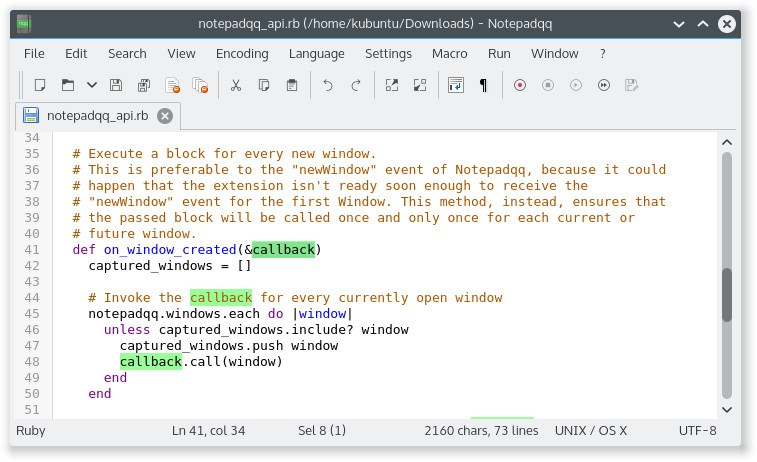
Notepadqq is a specialized text editor for developers, coders, and all users handling substantial amounts of plain text. The application ensures perfect performance for Linux users who need an uncluttered text editor program with light system requirements. Developers choose this software when they’re looking for a text editing environment like Notepad++ for Linux devices.
The tool enables syntax highlighting for over 100 programming languages, thus simplifying code structure and bug detection from a visual point of view. Notepadqq processes all file types, from HTML, Python, and JavaScript to plain config files. It can colorize and structure the content to maintain a clean workspace.
The program works quickly for every type of document, from programming code to Markdown and notes or documentation, without compromising performance. The program has a minimalistic and clutter-free interface that users appreciate. Notepadqq presents a no-fuss user interface that provides all the necessary tools at exactly the right time.
Why Should I Download Notepadqq?
The main reason users download Notepadqq is that the software works effectively. This text editor provides quick startup performance alongside reliable operations, and minimizes its presence during the work process. It has come forth as an open-source code editor specifically designed for Linux environments.
This program doesn’t require a powerful computing system to function correctly. Users can start Notepadqq immediately, which allows them to browse multiple files while making adjustments and searching within the application without causing system performance issues. The convenience of switching between files and large projects makes the app a pleasure to use.
The program shows syntax highlights and allows users to choose from different color schemes that are easy on the eyes. Customizable settings allow users to alter the look of the application.
Notepadqq enables users to modify their interface appearance according to their day-night work needs, providing dark and bright color themes. The application provides users with code folding features accompanied by real-time preview functions. Both have the capability to restore your work progress after closing the program. All of these features create a comfortable work environment.
Notepadqq also respects your privacy. There are no data collection activities, no displays of advertisements, nor attempts to sell a pro version. All functions appear during installation without additional hidden costs or unexpected changes to the program. Users who work with code consider Notepadqq an efficient tool.
The open-source nature of the software relies on a community-managed structure. This model produces applications that consider user feedback and show closer attention to detail.
Notepadqq serves as a lightweight code editor for people who work with multiple programming languages. It offers advanced features but remains easy to use, no matter the file size. It’s not overkill. It’s just right.
Is Notepadqq Free?
Users can download and use Notepadqq for free. The app follows an open-source model. Anyone interested in modifying the program or contributing to its growth can make changes to it. Notepadqq provides users with both an ad-free and cost-free experience.
What Operating Systems Are Compatible with Notepadqq?
This program delivers its best value on Linux systems since it was built specifically for that OS. The application can be installed through various popular Linux distributions such as Ubuntu, Fedora, and Arch. The program functions effortlessly on Linux while offering support for GNOME and KDE as desktop environments.
If you want to use Notepadqq, your computer should run Linux. The app’s user base finds the software perfectly integrated with their system.
What Are the Alternatives to Notepadqq?
Notepadqq is an exceptional tool, but it is restricted to Linux platforms. There are solutions for other operating systems and with varying functionalities.
Other feature-focused programs and systems serve diverse user needs. Notepad++ serves as one of the best-known Windows-based alternatives. The software comes with a typical collection of features that include syntax highlighting and tabbed editing, as well as plugins. It’s been on the market for many years. Free and open-source Notepad++ can be installed on Linux systems through Wine. However, the tool primarily supports Windows systems.
Among the alternatives, Sublime Text stands out because users love its speed, elegance, and availability across diverse operating systems. The software presents an attractive platform with its multi-line editing functionality, advanced search and replace features, and plugin support. A major drawback of Sublime Text comes from its license system. However, the product offers a free trial before it prompts users to buy a license. Many users still maintain their support for this editor because it offers light performance with expert-level tools. Those who seek refined operations should adopt Sublime Text as their editor.
The most popular text editor at the moment is Visual Studio Code, most commonly known as VSCode. Microsoft supports this open-source editor through their backing, even though developers keep it free for all users. VSCode can operate on all three main versions of Linux, alongside Windows and macOS, which provides users with high levels of extensibility. The right extensions allow you to convert this program into a complete development environment. You get more functionality from Notepadqq as it integrates Git and IntelliSense features alongside debugging tools, although the program runs heavier than its counterpart. The flexibility of the program appeals to certain people, although it might seem excessive for basic operations. To pick the right editor, decide if you need a basic editor or a complete all-in-one code studio.