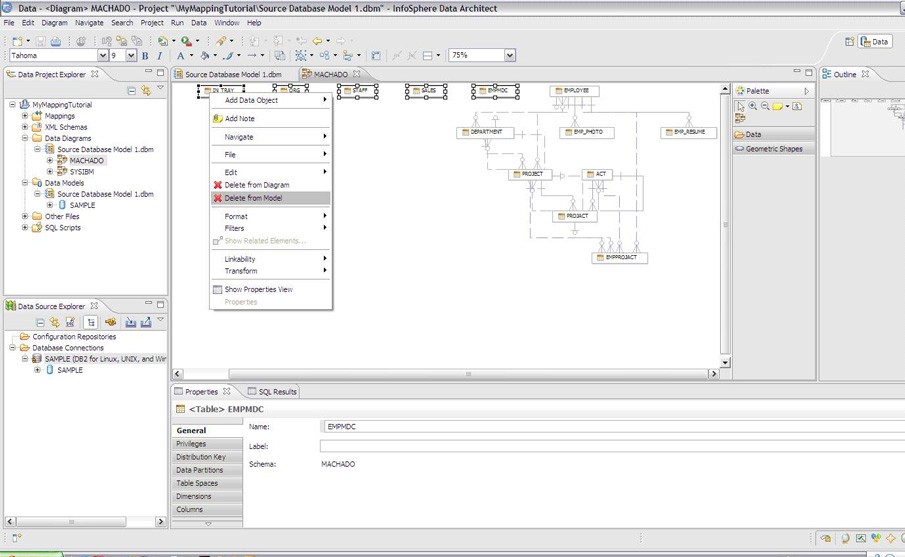
Data professionals use InfoSphere Data Architect to design enterprise-wide data systems and understand how data flows and connects across an organization. As an IBM product, it bridges the gap between raw data and structured applications, giving teams a clear picture of how information moves through their infrastructure.
At its core, the tool helps users build data models at both logical and physical levels, creating visual representations of system components within business and technical frameworks. It goes beyond simple database design. InfoSphere Data Architect also maps out data structures, sources, and pathways, showing how different parts of a system interact with each other. For teams dealing with complex environments, the ability to turn tangled data relationships into clear diagrams and models makes planning and communication significantly easier.
Large enterprise environments with multiple distributed data sources are where InfoSphere Data Architect proves most valuable. Teams use it to ensure that data operations stay coordinated and that system designs can scale as the organization grows. Whether you are building a new database from scratch or maintaining an existing framework, the tool provides a structured way to keep your blueprints organized and your architecture well documented.
Why Should I Download InfoSphere Data Architect?
Anyone who has tried to manage a complex data environment without the right tools knows how quickly things can spiral into confusion. InfoSphere Data Architect brings order to that process. One of its most important capabilities is visual data design, which lets you see how different databases, applications, and teams relate to each other. Having a clear layout in front of you is often half the battle when working through architectural decisions.
A key reason to download InfoSphere Data Architect is its ability to align business goals with technical implementation. The software serves as common ground between stakeholders who think in business terms and engineers who work in data modeling vocabulary. Instead of wading through dense documentation or relying on guesswork, everyone can look at the same model and understand what needs to happen.
Early issue detection is another practical benefit. By visualizing your data architecture before building it, you can spot potential problems, redundancies, or bottlenecks long before they become expensive to fix. For enterprise-level projects, that kind of foresight speeds up development while reducing costly mistakes.
If you already work within an IBM ecosystem, the integration is naturally smooth. But the tool is not locked into IBM-only workflows. You can import and export models, work across different platforms, and customize diagram outputs to fit your needs. InfoSphere Data Architect follows industry standards, so you are not trapped in a proprietary format. Over the course of a long-term project, the freedom to move data between tools and switch platforms matters more than many teams initially expect.
Despite the depth of its feature set, InfoSphere Data Architect avoids overwhelming you with complexity. Once you spend some time with the interface, the workflow becomes second nature. For professionals who regularly work on data architecture, modeling, and database design, the tool quickly becomes something they reach for on every project. It helps you build better systems, anticipate future complications, and have more productive conversations about data with both technical and non-technical team members.
Is InfoSphere Data Architect Free?
InfoSphere Data Architect is not free. It is a commercial product from IBM, and accessing the full feature set requires a subscription or licensing agreement. Organizations typically need to contact IBM or an authorized reseller to discuss pricing and licensing options that match their specific deployment needs and team size.
What Operating Systems Are Compatible with InfoSphere Data Architect?
InfoSphere Data Architect supports the major operating systems that enterprise applications typically require. The software runs on Windows and on several Linux distributions, covering the platforms most commonly found in professional IT environments.
Installation is generally simple as long as your system meets IBM's specified requirements. Because the application runs on Java, you will need the correct Java runtime environment in place during setup. Once installed, InfoSphere Data Architect works the same way on all supported platforms, and teams using different operating systems can share project files without compatibility issues.
What Are the Alternatives to InfoSphere Data Architect?
PowerAMC is an enterprise-grade data modeling tool that serves many organizations, particularly those working with Sybase-based or multilingual systems. It supports both logical and physical model design and shares a good deal of functional overlap with InfoSphere Data Architect. PowerAMC tends to be a strong fit for teams already invested in the Sybase ecosystem or those that need built-in support for multiple languages in their modeling environment.
Microsoft Visio is widely used as a general-purpose diagramming tool, and many teams adapt it for database modeling even though it was not specifically designed for that purpose. Visio works well for creating visual representations of database relationships, schema layouts, and conceptual designs. It does not include the deep data model validation features that InfoSphere Data Architect offers, but for teams that need a flexible visual planning tool and already use Microsoft products, Visio fits naturally into the existing workflow. You can download Visio as part of a Microsoft 365 subscription or as a standalone purchase.
MySQL Workbench is a free, open-source tool built specifically for MySQL database work. It covers ER modeling, SQL development, and server administration in a single application. While it does not offer the full enterprise-scale capabilities of InfoSphere Data Architect, MySQL Workbench handles database design and management effectively for small and mid-sized teams. If your infrastructure runs primarily on MySQL and you do not need to model interactions across multiple external systems, MySQL Workbench provides a lightweight, no-cost solution worth considering. You can download it directly from the MySQL website.