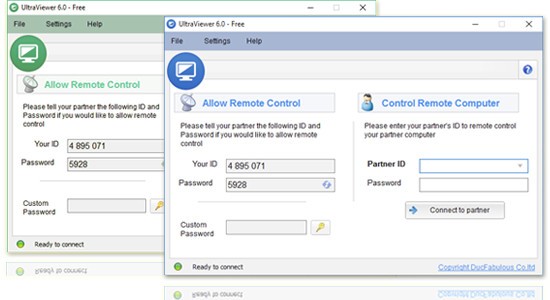
UltraViewer provides remote desktop functionality, which gives users full access to control other computers across the entire globe. It offers technical assistance and a seamless experience for accessing files on office PCs through remote support and task collaboration. UltraViewer software provides users with a lean installation process and simple setup, together with limited hardware demands. Your selected company partner can establish instant screen access by having your provided partner ID and password.
This tool proves necessary for IT support situations that require employee assistance towards clients or coworkers through remote methods. The tool reduces both time requirements and physical work for any application scenario. Providing aid to a family member in dealing with PC problems becomes easier when you can directly operate their computer instead of giving step-by-step instructions via the phone.
Through its interface, UltraViewer enables you to control the targeted computer seamlessly. You will discover that its functionality includes device file sharing and instant messages between different computers, while control functions perform like local commands. It provides safe screen sharing capabilities, together with file transfer options and chat features, thus enabling real-time support for users.
The product works well on older computers because its lightweight construction supports operational efficiency. The secure software platform UltraViewer provides users with streamlined connections to help everyone achieve quick and secure solutions for their tasks.
The product interface of UltraViewer exhibits an easy-to-use design that combines vital components in basic layout areas to avoid excessive menu complexity.
Why Should I Download UltraViewer?
Customers need reassurance when they are offered computer help through remote access. The core capability of UltraViewer establishes its foundation as a service. The application provides great support, especially for technology support engineers who encounter frequent software troubleshooting and system updating demands. Users can resolve problems from their workstation, no matter how far the computer they support is located. UltraViewer fulfills both communication needs due to its integrated chat feature, which eliminates the need for multiple apps or phone conversations.
Support services represent only one part of UltraViewer's features. Remote collaboration is another important feature of the platform. Two people working on a shared document or code review can view the same documents effortlessly without file exchanges and slow upload times. Real-time system sharing enables you to offer better support by visually following what others view throughout their screen.
The reality is that technology does not come naturally to everyone. Taking control of a person's mouse is an easier way to guide them in explaining complex steps through phone communication. UltraViewer serves as a time-saving solution that allows users to handle complicated tasks in just 2 minutes instead of requiring 30 minutes of explanation time.
The software is also secure. Its ease of use does not compromise security features. The software asks for authorization for every session and will not function unless the user expressly gives their consent. With your privacy fully controlled, you will find no unauthorized open-ended actions. UltraViewer provides that essential preparedness to users in any profession, including IT professionals, freelancers, or tech-support individuals, as well as helpful family members.
Is UltraViewer Free?
The individual and non-commercial users of UltraViewer receive free access to the app’s services. All essential functions to operate another device remotely are available without requiring any extra purchase. You can download UltraViewer for free, but users who need extended features or want to use the application for commercial purposes must choose from one of the available paid plans.
What Operating Systems Are Compatible with UltraViewer?
The UltraViewer application operates on Windows operating systems and their available versions. It works well with Windows 7 through Windows 11 in their different versions. The available version of UltraViewer software for Windows functions well on older machine configurations, but a macOS or Linux release has not been announced at this time.
Users can set up the application quickly. It consumes minimal computer resources, so low-end machines can operate it without performance issues. The reliability of this software on Windows platforms is one of the main reasons users requiring basic, no-hassle remote access solutions choose UltraViewer.
What Are the Alternatives to UltraViewer?
TeamViewer stands as the primary solution that people think of when it comes to remote desktop connectivity. The application maintains its reputation because it has existed for a long time, delivering extensive, useful features. TeamViewer serves various operating systems, including Windows, macOS, and Linux, and extends to mobile platforms, which makes it accessible to a wide range of users. The enterprise sector uses TeamViewer primarily because of its powerful features, which allow users to manage inactive systems while providing printing functionalities and management capabilities for multiple users. The basic version of this tool features usage restrictions, and business operators must pay high license fees to utilize it effectively.
Another solid alternative is AnyDesk. Users can enjoy rapid screen sharing and minimal delay with AnyDesk because of its speed features that operate effectively with slow internet connections. The program delivers swift performance alongside lightweight dimensions and works on different operating systems. The encryption standard used by AnyDesk follows banking protocols based on TLS 1.2, together with RSA 2048 asymmetric key exchange for secure remote communication. Users who need efficient performance should choose AnyDesk due to its optimized speed. The application appeals to independent workers and small groups who require basic remote control functionalities without complicated or expensive systems.
Among remote desktop options is the veteran program known as UltraVNC. Users who seek open-source freedom will find their platform in UltraVNC. Open-source software enables remote users to obtain full control of distant PCs through its available programming format. Users who value system customization and operational clarity select VNC over TeamViewer and AnyDesk. The detailed configuration settings in UltraVNC can be enhanced through plugin support, which makes this program suitable for individuals who want to customize their software features.