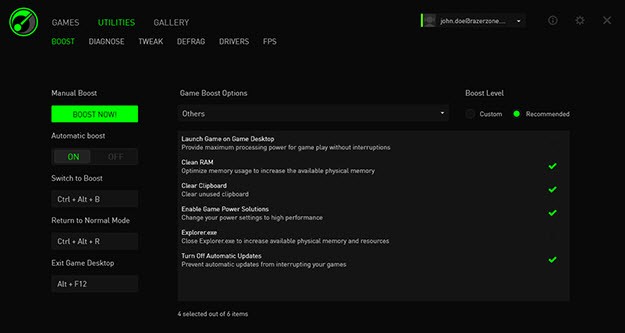
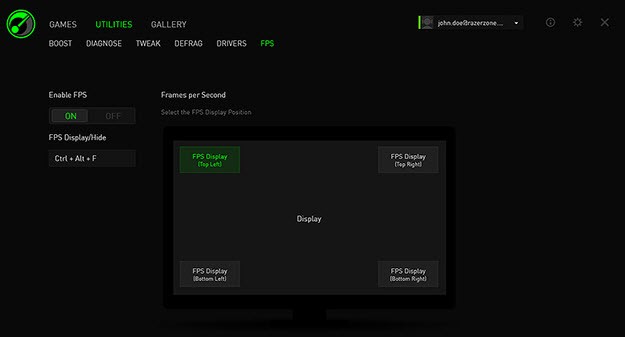
Razer Cortex is a free performance-enhancing utility that improves your PC gaming experience that improves your PC gaming experience. Developed by Razer, a company specializing in gaming hardware and accessories, the software is aimed at configuring the resources of the system in order to allow games to run smoother. It achieves this by temporarily disabling background activities, releasing RAM, and optimizing the CPU performance when you run a game.
It is not all about performance, however. Game launcher and a deals finder (discounts on popular game stores), as well as the ability to track stats in gameplay, are also provided by Razer Cortex. All this is packaged together within a single dashboard, which means that gamers can launch, enhance, and manage games without moving around.
Whether your mid-range system or an old one, Razer Cortex will ensure that you seek out additional frame rates and load times with a few clicks. You do not have to be a tech-savvy person to operate it, and it is designed with the people in mind who want to get more out of their games without engaging in manual adjustments or intricate performance optimization.
Why should I download Razer Cortex?
In case you are the person who plays games on a PC that is not the state-of-the-art one, Razer Cortex may provide you with the additional boost that you need. There is no necessity to overclock RAM or change BIOS settings to achieve a little bit better frame rates or gameplay quality. You simply have to install the app, perform a scan, and then it can clean up in the background on your behalf. It is a tool that just gets the job done silently to ensure that your games perform better.
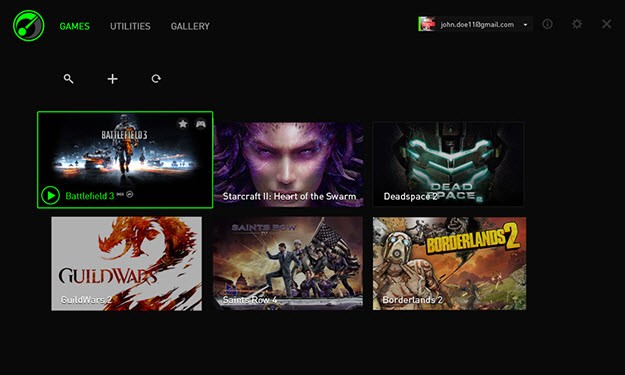
The second reason why it is good to download Razer Cortex is that the game launcher is uncomplicated. You may connect all your games, be it on Steam, Epic, Battle.net, or locally installed, and launch them all through a single tidy interface. The launcher keeps an account of the time you spent playing, shows your most played games, and makes your gaming experience concentrated. It is less messy than having to deal with numerous clients at once and allows one to remain organized.
The Boost feature itself is automatic. However, you can also define what it switches off. You can exclude programs that you want to constantly have running. In case of any background software that is stealing memory, Cortex will detect and suspend it during gaming. It is like a personal assistant, which cleans up your desktop environment by the time you are ready to play.
It’s not just useful in performance, as well. The Game Deals feature searches through digital storefronts, such as Steam, GOG, Green Man Gaming, and others, to examine the most advantageous deals on PC games. You may create wishlists and receive an alert when a title of your desire is put on sale. Razer Cortex adds all the stores in a single location and indicates the best price that is offered.
It also has a rewards program with Razer Silver. When you use the app, open games, and perform tasks, you may earn points that can be redeemed for digital items, peripherals, or store credit. It is a minor reward, but it makes opening the app more valuable, particularly in case you are already using it every day.
The other advantage is that of auto-boosting. After making your preferences, you do not need to open Cortex manually every time you want to game. It will notice when you start up a game and will optimize itself, and then put your system back the way it was. There is nothing to remember as it automatically works in the background.
When you need to play and worry less about glitches in the system, Razer Cortex provides you with no-nonsense, handy support.
Is Razer Cortex free?
Yes, Razer Cortex can be totally downloaded and used freely. No paid versions or nasty surprises. Access to all features, Game Booster, Deals, and Rewards is available without a subscription. Sign in with a Razer account (optional) opens cloud syncing and rewards, but is not needed to use the basic tools.
What operating systems are compatible with Razer Cortex?
Razer Cortex can be used on Windows PCs. It is compatible with the majority of modern Windows versions, such as Windows 10 and 11. The software does not run on macOS or Linux, but it is not demanding in terms of system resources and can be smoothly operated on the majority of gaming desktops and laptops. An Android version of the app is available, though the complete set of Game Booster features is currently unique to Windows.
What are the Alternatives to Razer Cortex?
A couple of other tools exist that can help you in other ways to have a better time gaming. There are performance-oriented ones and features or user experience-oriented ones, according to your requirements.
One of the alternatives, which has the same purpose, is GameBoost, which is aimed at increasing the performance of your PC during games. It will optimize your system settings, network configuration and RAM use so that the speed of the games you play will increase and the lag will decrease. It is not as refined, interface-wise, as Razer Cortex, but one can make many more tweaks in it, especially when a user prefers to roll up his/her sleeves. GameBoost can find its audience among the users who prefer more technical control of performance.
Another alternative is GeForce Experience, although this particular tool is optimized to target those possessing NVIDIA graphics cards. It allows you to automatically optimize game settings by your system specification, simplify driver updates, and also allows you to record or stream your games with NVIDIA ShadowPlay. It does not have features such as RAM boost and process cleanup found in Razer Cortex, but it is excellent at making graphics-related improvements. This application is a powerful sidekick application in case you possess an NVIDIA card.
Another type of alternative is Opera GX. It is a web browser specialized in gaming and not a game booster, yet it has an integrated RAM and CPU limiter. Opera GX can prevent its browser from eating into resources in case you always have it open when playing games. It also has a news feed of gaming, integration of Twitch, and has a colorful interface which makes it look attractive to gamers. It will not increase FPS, but it will allow you to avoid the problem of background browser bloat interfering with your gaming.