Wise Folder Hider is a practical utility designed to give you more control over your personal files and folders. If you’ve ever worried about someone snooping around your computer or accidentally accessing sensitive information, this software offers a straightforward way to keep things private. At its core, it lets you hide files, folders, and even entire USB drives from view. Once hidden, they won’t show up in Windows Explorer or any other file browser, which means prying eyes won’t stumble across them.
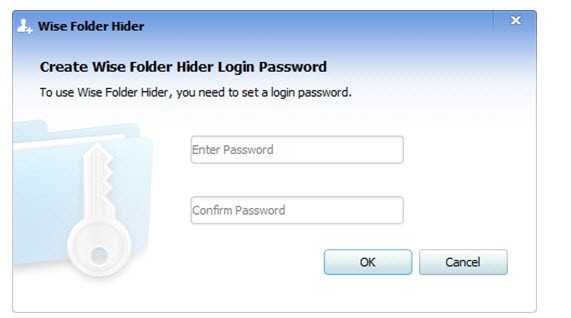
What makes it stand out is the dual-layer password protection. First, you set a login password to open the program itself. Then, for extra security, you can assign a second password to specific files or folders that you hide. This layered system makes it harder for anyone to access your information without permission.
Wise Folder Hider is also built to be user-friendly. The interface is simple, with drag-and-drop functionality that allows you to hide files in seconds. You don’t need advanced technical knowledge to use it. Whether you’re trying to protect financial documents, personal photos, or work-related files, this tool makes it quick and hassle-free.
Another highlight is its focus on removable storage. Many privacy tools focus only on local drives, but Wise Folder Hider allows you to hide entire USB drives, which is especially useful if you carry sensitive data on portable devices. You can also password-protect these drives so that even if the USB falls into the wrong hands, your data stays secure.
Why should I download Wise Folder Hider?
There are plenty of reasons why Wise Folder Hider can make your life easier. The most obvious one is privacy. If you share your computer with family, roommates, or colleagues, you know how easy it is for someone to stumble into a folder they weren’t supposed to see. Hiding those folders takes away that risk.
Another reason is peace of mind. Cybersecurity isn’t only about hackers; sometimes it’s about everyday mistakes. Maybe you’ve got tax documents on your laptop, or maybe you’re storing confidential work files. By hiding them, you add an extra barrier of protection. Even if someone borrows your computer or plugs in your USB drive, they won’t find anything unless they have your passwords.
It’s also a great tool for travelers and professionals. For example, imagine you’re taking your laptop through airport security or working in a café. There’s always the possibility of theft or someone glancing over your shoulder. By using Wise Folder Hider, you’re reducing exposure by ensuring your most sensitive files aren’t even visible without the correct access.
Convenience plays a role, too. The software integrates seamlessly into daily use. You don’t have to go through a complicated setup each time—you just drag the file in, set your password, and it’s done. Unlike encryption programs that require longer processes to lock and unlock files, this is quick and approachable, even for people who aren’t tech-savvy.
Is Wise Folder Hider free?
Yes, Wise Folder Hider comes in a free version, and for many users, that’s more than enough. The free edition allows you to hide files, folders, and USB drives, which covers the needs of most everyday scenarios.
However, there’s also a Pro version that unlocks more advanced features. For instance, Pro users get enhanced encryption using AES (Advanced Encryption Standard), which adds another layer of security beyond simple hiding. The Pro edition also allows automatic updates and offers higher levels of customer support. If you’re someone handling highly sensitive or professional information, the upgrade might be worth the small investment.
Still, it’s important to note that the free version isn’t stripped down. It gives you the essential tools to hide and protect your data without paying a cent. So whether you choose the free or Pro option, you’re getting a reliable solution for safeguarding your privacy.
What operating systems are compatible with Wise Folder Hider?
Wise Folder Hider is designed for Windows users. It supports a wide range of versions, including Windows XP, Vista, Windows 7, Windows 8, Windows 10, and Windows 11. That makes it accessible to people running both older machines and the latest systems.
The installation process is simple, and the program itself runs smoothly without consuming much system memory. It’s lightweight, meaning it won’t slow down your computer or interfere with other applications. This makes it a great fit for both casual home users and professionals who need fast, reliable privacy tools.
What are the alternatives to Wise Folder Hider?
Although Wise Folder Hider is a great choice, there are other competitors on the privacy scene. One of the given options might be more attractive to you, depending on your personal preferences and definite needs:
Folder Guard is a powerful program, enabling you, besides the ability to hide files and folders, to also limit access to system functions. As an illustration, you can block access to Control Panel features or certain programs. It is like the one that offers greater control over the system to people who prefer to conceal files.
One of the most popular ones is Folder Lock, which is associated with a good reputation for being secure. Besides concealing files, it also provides real-time encryption, backup protection, and even shredding files permanently, so as to make them irreversible. It is a more feature-intensive solution, which is why it can be appealing to professionals who have to operate with sensitive business or personal data.
EaseUS LockMyFile is concerned with ease of use and flexibility. It enables you to hide, lock, or encrypt files and folders within a short time. It is also effective in processing vast quantities of information and offering effective security against unauthorized access. It is a good competitor to users who need a balance between ease of use and high security levels.