Dia AI Browser is a new browser that integrates artificial intelligence in every aspect of your regular surfing routine. It provides more intelligent features and interfaces and promotes more intuitive, faster, and personalized ways of using the internet.
While Dia AI Browser loads web pages like any other browser, its deeper purpose is to help users engage with the web more naturally and efficiently. It is not merely a utility to use to display sites; rather, it is a friend who understands your preferences and helps with actions such as information search, tab management, and helps you concentrate.
Clean and modern design is one of the first things you will notice when opening Dia AI Browser. AI is not a gimmick the browser uses; it is another layer that makes whatever you are attempting to accomplish easier. e.g., it could recommend smarter search results, assist in organizing your open tabs to your activity, or highlight something that is of interest to you.
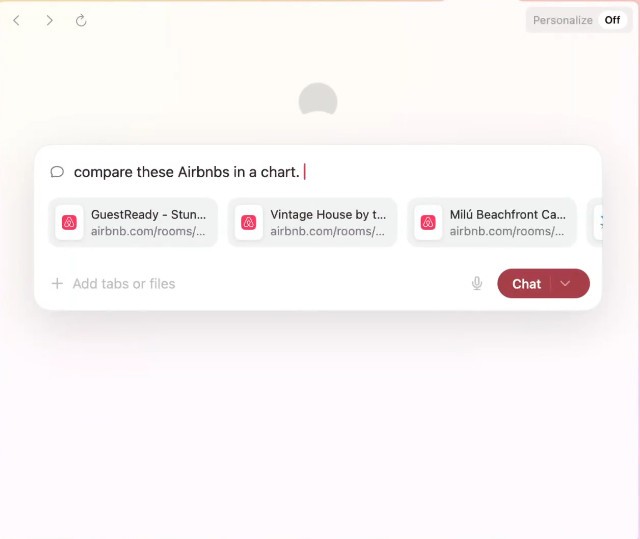
This is an AI layer that adapts to the way you navigate so you can more easily and more quickly find the place you want to go to without clicks and confusing directions. Furthermore, it allows you to access a chatbot on every tab you open, so you can ask the AI to do anything with all the information available on the webpage.
Why Should I Download Dia AI Browser?
Usually, we start a browser with one thing in mind and open dozens of tabs and switch between them to get the information we need. Dia AI Browser offers smarter and more intuitive tab management tools. It can automatically group related tabs, assist you in resuming work on the pages you left last time, or inform you when a tab is being idle for too long.
Dia AI Browser also offers a new way to navigate the web. With each web page you open, you can also open a chatbot AI to which you can ask any question regarding the content you are surfing on.
This chatbot offers lots of features such as writing for you, summarizing information, creating stats, translating, synthesizing a long video, doing actions on open tabs, searching for something related to you current page, and more.
The next fact that should make one choose Dia AI Browser is its focus on the topics of privacy and security. Some of the conventional browsers are loaded with trackers and advertisements, whereas Dia AI Browser provides the consumer more authority regarding the collected information and how it can be utilized.
All the AI functionalities are locally performed wherever possible, which implies that the understanding of your browsing patterns is used to enhance your personal experience and not processed on third-party servers. This is one of the reasons why this balance between helpfulness and the privacy of the user makes the browser appealing to individuals who are interested in the convenience and stress-free experience.
Dia AI Browser also focuses on customization. The AI will learn how you browse, but it also gives you control over how it behaves. It is possible to be more precise in the settings, select the types of suggestions you wish to view, and regulate the process of interaction of the AI with your browsing sessions. This assists in making sure that the help it renders is not felt intrusive. The browser is flexible, without the average computer user having to be a computer guru to set up the browser.
Speed is also another advantage. It uses AI optimisations and is made under the current web standards, which help to load pages efficiently. It reduces the number of redundant procedures, deletes the extra data in the background, and enables things to continue much better when you have several tabs open. It can make a visible difference in the long run, regardless of whether you are browsing to work, study, or be entertained.
Is Dia AI Browser Free?
Yes, Dia AI Browser is free to download and use. The main experience, with all features contained in the AI-assistance, is free. Add-on premium features or extensions can be introduced later, but the core of the functionality the browser offers is not dependent on payment and is focused on delivering the core of what it is: smart browsing, enhanced organisation, and privacy-focused AI tools, completely free. Through this, users can have an easy time testing the waters by using the browser to determine how it can work in their daily routine without having to make a purchase.
What Operating Systems Are Compatible with Dia AI Browser?
Dia AI Browser is currently only available for macOS users with an M1 system chip (or newer). Windows users can join the waitlist to be informed when a Windows version is available.
What Are the Alternatives to Dia AI Browser?
While thinking over the Dia AI Browser, you may still need to think over several alternatives that provide unique features in browsing and have their peculiarities.
From the same development team, there is Arc Browser. It is a new type of browser created with a priority in the spheres of creativity, organization, and minimalism. Following a new trend in the browser interface, Arc uses a sidebar layout to organize tabs, apps, and tools. It also prompts users to view it more as a workstation, and built-in tools allow it to store notes, create screen captures, and tab sets. Arc does not utilize AI in the capacity of Dia AI Browser, but they have a common goal i.e., to keep the user organised and focused.
Opera provides you with an AI tool that makes your life online easier. It also provides an unpaid VPN, an ad blocker, a battery saver mode, and support for messaging apps as WhatsApp or Facebook. Opera sidebar provides easy access to the features without the necessity of additional extensions. Opera does not go to great extents concerning AI support, and it supports smart browsing tools and solid customization possibilities, which can attract people who want more than a lightweight browser.
Over the past years, Microsoft Edge has changed considerably, and it currently delivers a combination of speed, security, and built-in features. Edge has all the essential features of the Microsoft ecosystem, complete with the Copilot AI, and a wide range of functions that are available, including collections to collect research, the immersive reading mode, and integrated coupon finders to shop online. There are also a few AI-based recommendations and functionality on Edge, namely, usefulness in productivity and shopping. It works well as a browser capable of being polished and well backed up with updates.