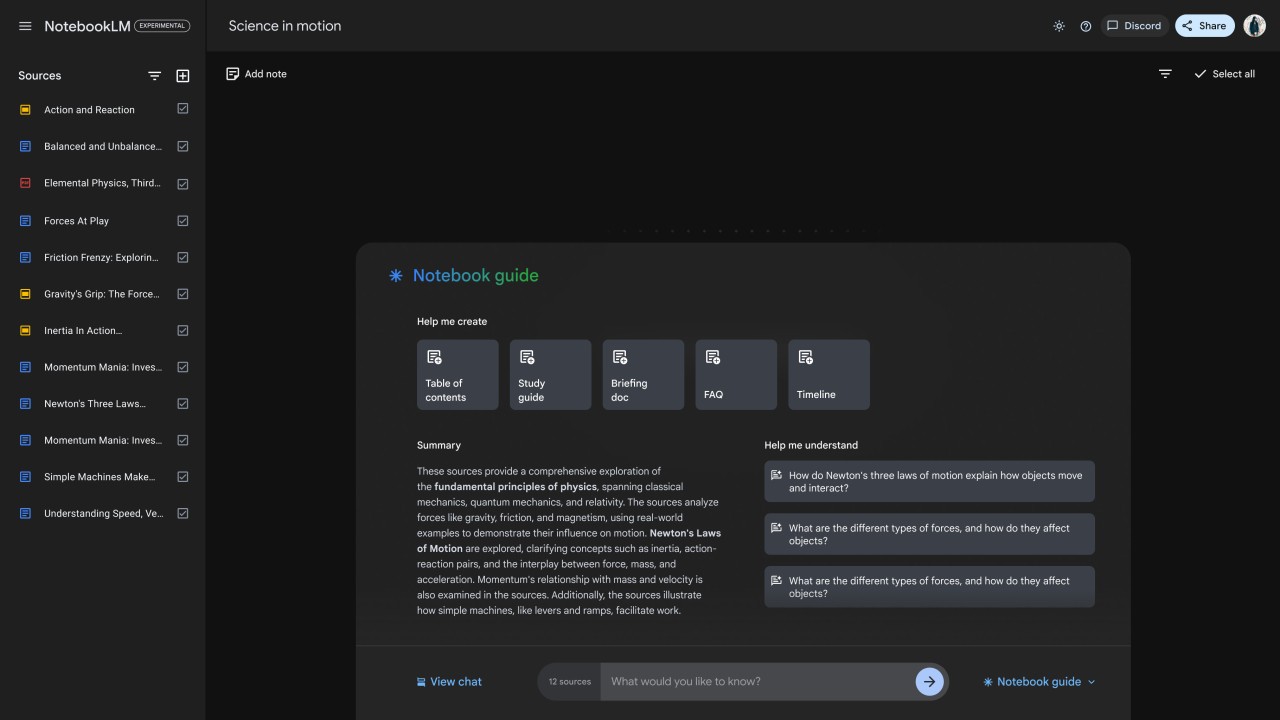
NoteBookLM was built to help users enhance their documents by turning them into smarter materials. Google technology and AI language models help your notes provide more than what is written in your text. In July 2026, Google decided to rename its tool to make it more AI-related. NotebookLM is now Gemini Notebook.
Rather than acting as a dump for your information, Gemini Notebook lets you examine your records, get simple summaries, and connect your ideas together. It takes your normal text and makes it interactive for users. You provide it with data from PDFs, text you copy, or anything you’ve pasted, and it will help you organize, study, and even explain what you have.
Traditional note apps don’t support structure; Gemini Notebook (NoteBookLM) is different by taking this into account. With it, your notes will respond to your questions and interpretation. The model can be used to explain a confusing part of your work, summarize a long reading, or help you tie various points together within different documents.
It isn’t meant to change your worldview, but it helps you refine your own thoughts. If you use it, you can sort, organize, and make clear things you need to study or review while you’re working through details. You don’t need to focus just on making notes—now, you should work with them to make your learning feel more natural.
Why Should I Download Gemini Notebook (NoteBookLM)?
A big reason people are interested in Gemini Notebook is that it helps address a problem that has long existed. Store your notes, create your content, but there’s nothing in between to actually improve your understanding of what you record? It’s right here that this app really shines. It doesn’t only exist for storing your data, it’s where you make those files more valuable. You place your content online, so you can interact with it, not just view it. It means everything shifts for students, researchers, writers, and anyone organizing a project.
When you have trouble organizing huge amounts of information—research notes, write-ups you’re floating around, or test papers—it can be overwhelming. Line-by-line reading can be time-consuming, and often, you’re not sure what’s where in your work. You can ask a question in NotebookLM, and the platform retrieves the answer from your own records. That by itself allows you to save hours. It benefits you by guiding you to notice how content connects. You notice your own regular habits, what you think about most, and sometimes what you don’t see yet. Very few other tools provide feedback as quickly and smoothly, Very few other tools provide feedback as quickly and smoothly as NotebookLM.
Another reason it’s helpful is that it doesn’t show you countless results. There is a single focus to the interface. You won’t have to spend time messing with lots of tabs or useless formatting schedules. It’s easy: import your sources, enter your questions, and discover what comes from it. People use a collaborative tone, not one that’s robotic. The system behaves like you’re having a chat instead of everything just being sent to you. It’s simpler to maintain interest and keep making your ideas better. It doesn’t matter if you’re doing school work, assembling a report, or trying to interpret many sources; it keeps you on track and out of your way.
Scale is probably where Gemini Notebook (NoteBookLM) delivers its biggest success. Your archiving can have a single file or ten, and it will still work without anxiety. It just highlights what’s in your mind, signposts new ideas, and keeps a blank slate for you to express your thoughts. It gives you a way to turn a pile of items into a cohesive space. It’s not meant to be flashy, and it doesn’t promise to do every job. I handle reading, summarizing, and clarifying well, which are the things that give students the most difficulty when faced with lots of information. For that reason, it’s worth downloading.
Is Gemini Notebook (NoteBookLM) Free?
Because it is still in testing, Gemini Notebook (NoteBookLM) is available to use for free. Right now, because Google Labs developed it, it is free and open, but it may follow a path to become paid or tiered later on.
What Operating Systems Are Compatible with Gemini Notebook (NoteBookLM)?
Because it’s on the web, Gemini Notebook (NoteBookLM) can be used on any device with a recent browser, regardless of what system you have. You can use it directly from your browser. When you use a Google account to log in, you’re all ready. You can use it best on a computer by logging in through a browser, but it’s also available on mobile browsers. Because it’s built for the browser, any updates happen without interruption, and all your work is stored online. You must be online to use the app, but when you are, it’s simple and direct.
What Are the Alternatives to Gemini Notebook (NoteBookLM)?
You’ll find that many other solutions try to tackle similar problems. A few prefer to organize what they have learned, while others like to create new material. If you’re looking for alternatives to NotebookLM or just want something else, a quick search often reveals AI Notebook, Notion, or Evernote. Each app offers its own perspective on digital thinking.
HyNote lets you use language models for your notes. It is designed to support your writing, boost your ideas and even guess what topic you’ll address next. Instead of reviewing big documents, it's best for users who prefer real-time interaction and idea-sharing, but it helps you do so. It isn’t as reliant on sources as Gemini Notebook, so it doesn’t dig that far into existing materials, but it’s perfect for those who want to make and discover new ideas with a little AI support.
Many people know that Notion is very versatile. You can do all your writing, organizing, planning, and teamwork from within one workspace. It doesn’t copy the style of Gemini Notebook, but it gives you the setup to handle your notes, tasks, and databases. Although you can use AI for summarizing or generating content in Notion, it isn’t a basic part of the platform. If you’re handling a complete workflow, it works harder for you than just looking at unorganized documents.
Many users continue to rely on Evernote because it’s been around for a long time. Simply put, it’s for capturing ideas, saving them in notebooks, and bringing them onto different devices. What counts is plain documentation, not interacting wisely. Even so, it’s helpful when you want somewhere solid to keep your ideas, links, pictures, and lists. Over time, the developers behind Evernote have made searching, online clipping, and recording voice notes available. However, it isn’t yet able to help with reading or comprehension like Gemini Notebook is working on.