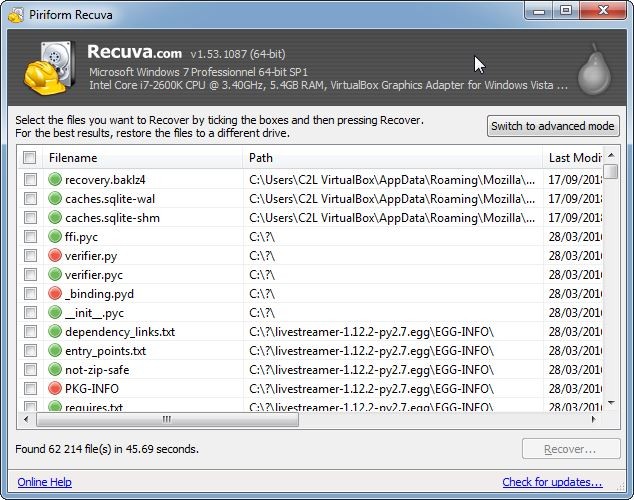
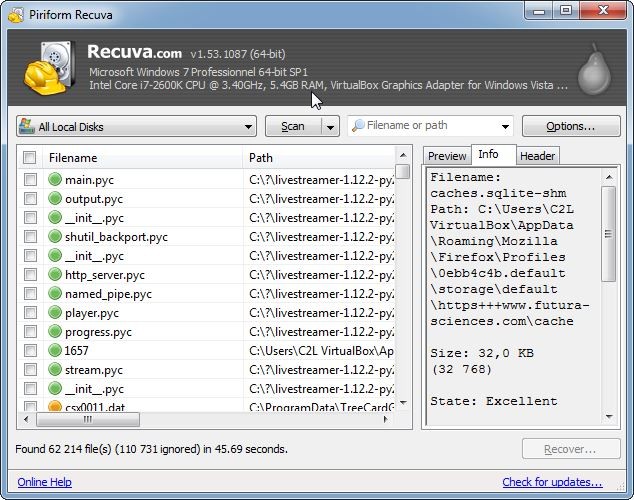
Recuva is a recovery software, created by Piriform, and now owned by Gen Digital, which also developed CCleaner. The Recuva application is designed for recovering lost files and retrieving data on a formatted or corrupted device by restoring files from external drives, memory cards, and USB flash drives. Compared to other basic recovery tools, Recuva employs deep scan algorithms that allow it to find lost files that may have gone unnoticed by standard retrieval methods, including files from damaged or freshly formatted disks. Because of this, it is a useful solution for users who have unexpectedly lost data.
Recuva is particularly notable for its elegant interface and easy-to-use recovery wizard, which walks users through scanning and restoring files in a step-by-step fashion. Whether you are a professional or a casual user who needs to quickly extract files, it can help with a variety of file types, including documents, images, videos, emails, and compressed files.
This software is available in a free version, but it also provides Professional editions (Recuva Professional and Recuva Professional Plus), which come with extra advantages such as virtual hard drive support, automatic updates, and premium customer service. It runs exclusively on Microsoft Windows. It is not available for macOS, Linux, or mobile platforms like Android and iOS.
Why Should I Download Recuva?
Losing files is daunting and sometimes even stressful, but Recuva makes the job easier with powerful algorithms and an easy-to-use interface. If you accidentally deleted a file, formatted a drive, or just ran into a big system crash, Recuva provides an easy method for reclaiming your data.
Recuva can recover files from hard drives, USB drives, memory cards, and cameras. Supported file systems include NTFS, FAT, and exFAT, so it should work with all modern storage solutions. Recuva can recover files that have already been emptied from the Recycle Bin, or deleted due to corruption or disk damage, unlike most other recovery tools.
Recuva's Deep Scan mode is one of its major benefits — it searches a storage device sector by sector to find signs of disappeared files. In fact, this method gives the highest chance of successful recovery, even if the files have been partly overwritten.
The software is also incredibly fast and efficient. The software is built to consume less system resources, allowing users to search their system for lost files without slumping the performance of their systems. The Quick Scan feature allows faster file recovery, whereas the Deep Scan mode offers a more comprehensive recovery process.
In addition to file recovery, Recuva offers a secure deletion feature to ensure that sensitive files are safely destroyed. This feature is particularly beneficial for businesses and individuals who want to prevent unauthorized access to sensitive information. Recuva renders deleted files irretrievable by overwriting them with advanced algorithms.
If you seek an economical solution, Recuva offers a free variant encompassing all vital recovery functionalities. The professional edition adds automatic updates, premium support, and virtual hard drive support, ideal for advanced users and IT professionals. Whether you’re a home user attempting to recover lost personal files or an IT professional combating business data loss, Recuva is a valuable tool that dwells at the intersection of efficiency, reliability, and affordability.
Is Recuva Free?
Yes, Recuva is available in a free version that includes all the essential file recovery features for restoring lost files. The free version can recover files from hard drives, external storage devices, memory cards, and USB flash drives, which means that for most users, it is an effective tool.
For advanced features, Piriform provides Recuva Professional and Recuva Professional Plus, along with extra advantages including Virtual hard disk support, automatic updates to your software, and premium customer service. The free version is more than enough for most people's general recovery needs, but the Professional versions are better for businesses or users in need of higher performance and support.
What Operating Systems Are Compatible with Recuva?
Recuva supports a wide range of Microsoft Windows versions, including Windows 11, Windows 10, Windows 8, and Windows 7 (32-bit and 64-bit). Follow our link to download it.
At this point, there is no native version of Recuva for macOS or Linux. Mac users can run Recuva using Boot Camp or software that emulates Windows, such as Parallels Desktop. However, for Linux users, you will need to look for other recovery tools specifically designed for Linux-based operating systems.
Recuva isn't available on mobile devices, neither Android nor iOS; however, it does support recovery from SD cards on Android devices when connected to a Windows computer for recovery.
What Are the Alternatives to Recuva?
Recuva is a great data recovery software, but it might not be for you, especially if you're a user of macOS, have something advanced in mind, or are looking for corporate features. Another alternative to Recuva is EaseUS Data Recovery Wizard, a fully-fledged recovery tool for Windows and macOS. It has inbuilt great recovery features like partition recovery and file recovery even from RAW drives. However, the free edition only allows recovery of up to 2 GB and is not well-suited to larger recoveries.
Disk Drill also has a lot of advantages. It offers a nice recovery mode with less complicated recovery options, which is very popular. It can run on Windows and macOS and gives extra tools to check out the health of a disk and restore lost partitions. Disk Drill does require a paid license to recover files completely, although Recuva allows unlimited file recovery.
For a complex data loss scenario, you need to implement a high-end enterprise-level partition data recovery tool like R-Studio. It can recover data discovered from RAID arrays, encrypted disk file systems, and network storage devices. It is more powerful than Recuva, but pricey and with a steep learning curve.
PhotoRec is also an open-source alternative if you need it. It’s specialized for recovering images and media files, and it supports Windows, macOS, and Linux. PhotoRec's downside is that it is not as user-friendly as Recuva and has no graphical interface.