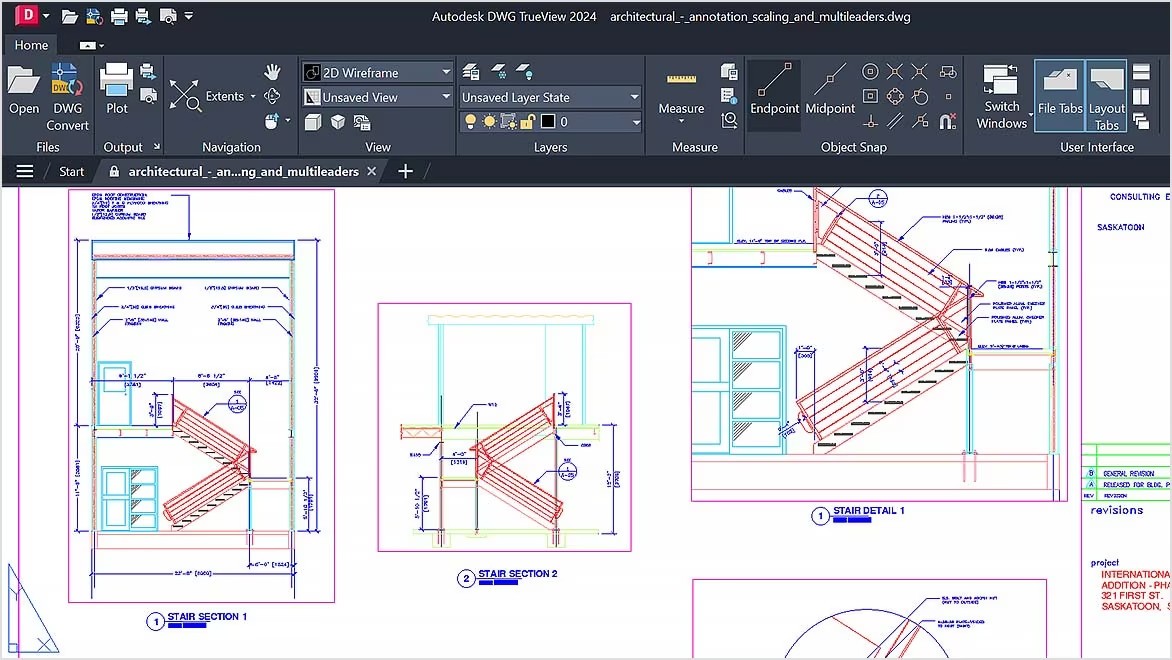
AutoDesk DWG Trueview supports DWG file formats as the standard CAD drawing standard from AutoCAD, which includes all necessary construction information, such as details, layers, and annotations that professionals in architecture, engineering, and construction need. People can use Trueview for viewing and reviewing DWG files, even though they do not require editing capabilities.
DWG file conversion is one major strength of this program because it maintains cross-version compatibility between Autodesk applications. The functionality enables teams with various AutoCAD releases to collaborate through this solution. The application includes essential markup features: users can add notes and draw annotations directly onto drawings without affecting their original state. The app functions as an important inspection platform since it enables CAD file analysis without requiring the purchase of AutoCAD.
There are many project managers, clients, and stakeholders who use Trueview because they require CAD drawing references rather than complete design functions. People benefit from simplified joint work processes because the software permits easy drawing examination, even though advanced software programs are not needed. The Autodesk origin of this product gives them a precise DWG file display, which perfectly maintains layers, line weights, and all annotations from the original AutoCAD creation.
Why Should I Download AutoDesk DWG Trueview?
The main reasons to use this app include its benefits for professionals who work with CAD files, though they lack complete editing requirements. Trueview provides them with complete DWG and DXF file viewing support without any cost through its free platform for the design and engineering, and architectural communities. People who need to see drawings exactly as they appeared in the original software can use the affordable Trueview application instead of purchasing AutoCAD licenses.
DWG Trueview includes an essential component that enables users to convert DWG file versions. AutoCAD saves files in different formats depending on the version, which creates problems during file exchange between users who maintain different AutoCAD software versions. Trueview provides a tool to convert these files between different versions, which creates effective teamwork and resolves file compatibility obstacles. The DWG file version conversion tool helps professionals maintain access to shared files across different CAD tools since their industries utilize multiple professionals with diverse CAD toolsets.
People can use the measurement tools through the app interface, which makes analyzing drawings easier without the need for a complete CAD infrastructure. Using this program enables people to view 3D designs by zooming and panning, and rotating without making changes to the original drawing file. Project managers and their clients, alongside contractors, benefit from these features because they can verify specifications for project approval.
The app maintains drawing formats exactly as designed by the professional designer when it prints DWG files. Trueview provides an exact cadastral drawing print function to generate precise reference documents and documentation from technical drawings.
The tool provides businesses with an economical solution to enable non-designers to view and understand CAD drawings without requiring professional CAD training. AutoDesk manages the development of this program, so viewers receive accurate file interpretation. The Trueview application allows all professionals across the construction, manufacturing, and engineering industries to view designs without changes through an efficient workflow process.
Is AutoDesk DWG Trueview Free?
AutoDesk DWG Trueview exists as a totally cost-free application. Users can access and assess DWG and DXF files through this tool because it operates without requiring payment or subscriptions.
This app offers crucial viewing and measuring functions together with conversion capabilities without charging any fees. People can use Autodesk DWG Trueview by downloading it for free from the Autodesk official website.
What Operating Systems Are Compatible with AutoDesk DWG Trueview?
The main target of Autodesk DWG Trueview development focuses on Windows operating system environments. Users can operate Autodesk DWG Trueview on their Windows 10/11 and later versions, as well as older versions.
Official support for macOS and Linux does not exist, so Mac owners must use virtualization programs or emulators to operate the DWG Trueview application. The application requires ample computer power and RAM resources to operate optimally; therefore, people should choose a system with sufficient capacity.
DWG files can be accessed from mobile devices through Autodesk’s cloud-based products, including AutoCAD Mobile and Autodesk Viewer, even though these platforms do not have a dedicated mobile version. The mobile alternatives enable people to manage CAD files anytime they need true DWG functionality after bypassing the need to install TrueView.
What Are the Alternatives to AutoDesk DWG Trueview?
As a powerful and free DWG viewer, Autodesk DWG Trueview has several alternative solutions that give extended functionality or system-specific support. The workflow needs of different users result in them choosing alternate software solutions that provide cloud access, extra markup functions, and support non-Windows platforms.
Autodesk Viewer represents an alternative to DWG files viewing needs since it operates from the cloud with zero software requirements. This solution helps CAD drawing viewers who require compatibility with multiple devices and remote collaboration access. The web-based operating system of Autodesk Viewer provides easy file access, while DWG Trueview requires program installation. People who work with multiple Autodesk design products can benefit from this application because it accepts DWF and Revit file formats in addition to DWG files.
FreeCAD stands as an accessible open-source CAD application that permits to view DWG files together and perform basic modification tasks. Featuring DWG and DXF file support as one of its basic functions, FreeCAD enables to edit drawings through modification and annotation features. Those searching for a cost-free and open-source replacement to AutoCAD should choose this program because it includes expanded design features. FreeCAD connects to all major desktop operating systems, including Windows, macOS, and Linux, which expands access options without Windows software.
People who need to view DWG files can pick DWG FastView as their third option because it operates on Windows computers together with macOS systems, and mobile platforms. Those who need to manage DWG files across different operating systems should use DWG FastView since this application delivers cross-platform functionality. The app allows viewing files as well as measuring dimensions with simple editing capabilities, which appeal to professional users beyond standard file viewing needs. They can benefit from cloud storage integration since the app enables them to save files and use files across different devices without hassle.