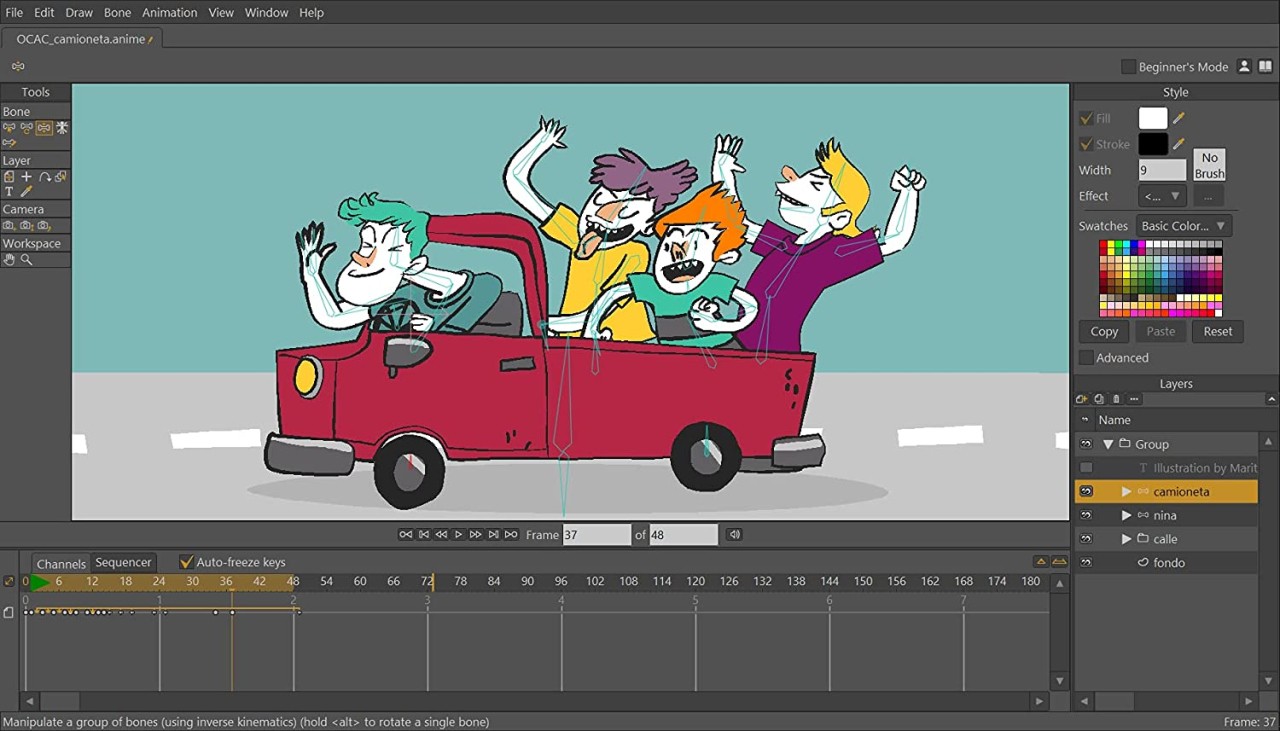
Moho Pro functions as 2D animation software, aiming to help people deliver professional-quality character animations and storytelling projects. Moho Pro has a vector system, so you don’t create animations through basic drawing.
This software enables a quick animation workflow through tools that maintain organizational efficiency and smooth operation. Moho Pro provides features designed to create advanced animations while allowing you to keep a hands-on approach for maintaining project control throughout the entire process.
Modern tools in Moho Pro allow artists to rig characters by adding bones and automating movement. The program has a steep learning curve, but it will simplify your workflow significantly once you understand how to use it.
Studios and independent artists choose Moho Pro because this software permits them to develop unique animations and meet project deadlines. Despite its professional features, the program is suitable for beginners who are willing to learn. All you need is some time and patience.
Why should I Download Moho Pro?
Moho Pro distinguishes itself from other animation tools by managing technical requirements with artist control needs. People looking for animation creation software that goes beyond simple frame drawing should consider Moho Pro. With time, it can help you speed up your workflow and improve output quality. The software operates with enhanced efficiency when users understand its system, creating time-saving opportunities.
Among all the features of Moho Pro, the bone rigging system stands out the most. The application allows users to give characters skeletal structures, which lets them achieve realistic or deliberately exaggerated movement. You create the model once and apply it to multiple different movements. There’s no need to draw every individual animation pose. The programmed system reduces animation work fatigue by making operations quicker.
Moho Pro boasts smart action features. Your saved actions can be applied to characters and objects instantly. If you create an animated blink and walk cycle, for example, you can keep using it again and again. This lets you complete your projects swiftly without compromising quality.
Individuals who wish to play with experimental features should take advantage of the physics tools offered. You get access to features that enable gravity interaction with objects, wind, and natural hair movements. Each minor element you implement makes a big difference when it comes to delivering authentic scenes. Users can benefit from working with vector and bitmap layers at the same time. Different creative methods can be merged to expand your freedom during project development.
The timeline features of Moho Pro allow users to manage keyframes successfully. You can alter frames and control motion timing adjustments. The application features an automatic lip-sync capability that reduces syncing work between mouth actions and dialogue.
The powerful tools of Moho Pro remain approachable for casual users. Professionals and independent creators can also find suitable tools for their needs. You will appreciate Moho Pro if you work with 2D animation and require enhanced software capabilities.
Is Moho Pro Free?
Although Moho Pro requires a payment for full access, you can use most of its functions for free in the trial period. If you want to keep using the program after the trial period ends, you need to buy a license. The cost is often worth the increased efficiency the tool offers.
What Operating Systems Are Compatible with Moho Pro?
The software Moho Pro is created to function across Windows and macOS systems. Your computer needs only to match the minimum requirements for Moho Pro to install without trouble. The program operates on Windows 10 and newer, and accepts recent versions of macOS for Mac users.
Most modern laptop and desktop setups run this software smoothly, so high-end equipment is not required. The software runs reliably for all users, assuming their PCs have sufficient RAM and strong graphics capabilities for processing bigger files.
What Are the Alternatives to Moho Pro?
The exact needs of users who find Moho Pro insufficient can be met through additional 2D animation tools available in the market.
Toon Boom Harmony is a popular animation software. This industry-leading application receives endorsements from large studios because it offers professional tools capable of producing excellent results. Although Harmony provides complete features, including rigging and effects, the program is pricier and has a steeper learning curve. Studio-level animators find Harmony excellent due to its robust capabilities, which support big projects.
Adobe Animate offers a combination of frame-by-frame animation with tweening technology that has existed for many years. The interface suits beginners particularly well, especially if you are familiar with Adobe programs. Users who alternate between creative tools will appreciate integration with Photoshop and After Effects. The programming tools are less focused on rigging than Moho Pro, but maintain flexible and ample support.
The graphics application Pencil2D Animation provides users with a cost-free, open-source solution. This software boasts simple tools that match traditional frame-by-frame animation work methods. The software doesn’t have the automatic capabilities of Moho and Harmony, but it has all the basic tools you will need. Artists who prefer the hand-drawn look love this software. The platform works perfectly for novice and student animators who want to explore the basics.
If you need 3D modeling and animating software, consider Blender. The Grease Pencil feature available in Blender provides users with a 2D animation drawing capability that integrates 3D model functionality. The program provides advanced and dynamic capabilities, though most users struggle with its complex interface when seeking basic 2D workflow solutions.