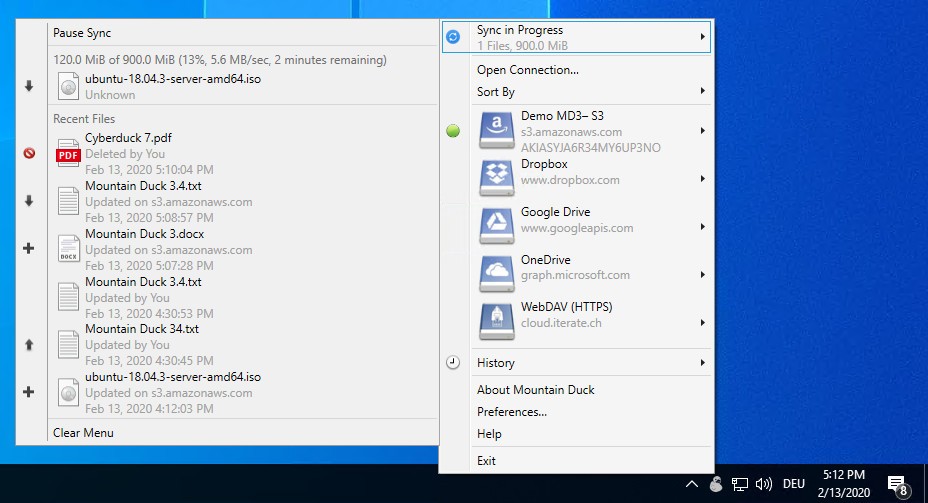
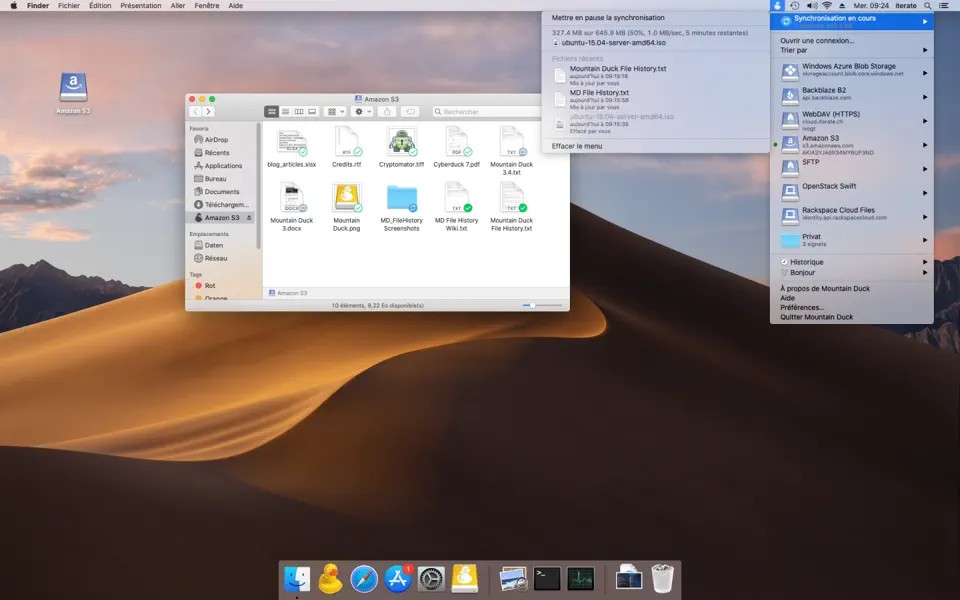
Mountain Duck is a file access and synchronization tool that lets you connect remote servers and cloud storage to your computer as if they were local drives. Instead of opening a separate application every time you need a remote file, you can browse your storage through Finder on macOS or File Explorer on Windows and open documents using your usual desktop applications. It's particularly useful if you regularly work with files stored across different cloud services, business storage systems, or remote servers.
The software builds on Cyberduck, a file transfer client known for its broad protocol support. Mountain Duck connects to services such as Amazon S3, Google Drive, Dropbox, Microsoft OneDrive, and compatible servers using protocols including FTP, SFTP, WebDAV, and SMB. This flexibility makes it useful for individuals who manage several storage locations as well as teams that need a consistent way to access shared files.
Rather than requiring you to synchronize every remote file to your computer, Mountain Duck can download files when you open them and cache them for later use. You can also mark selected files and folders for offline access. Its integration with the operating system makes remote storage feel more familiar, while synchronization controls help you manage local disk space and keep changes moving back to the server.
Why Should I Download Mountain Duck?
Mountain Duck's main advantage is that it makes remote storage accessible through familiar desktop tools. Once you've connected a supported service, you can browse folders, open documents, and edit files using compatible applications without manually downloading each item first. This is useful if you work with large cloud libraries or frequently switch between local files and remote projects.
Its Smart Synchronization features give you control over how files use local storage. You can see files stored remotely even when they aren't downloaded to your computer, with content synchronized on demand when you open it. Files and folders can also be marked to remain available offline. Background uploads send changes back to the server when a connection is available, while status icons help you track synchronization progress. This approach can save disk space compared with keeping a complete copy of every remote folder on your device.
Mountain Duck also integrates with the operating system rather than demanding constant attention. On macOS, it runs from the menu bar; on Windows, it sits in the system tray. You can manage connections, view synchronization progress, check transfer history, and access relevant actions through Finder or File Explorer context menus. Version 5 introduces an integrated connection mode that uses macOS File Provider and Windows Cloud Files APIs, reducing the need for traditional network mounts or separate device drivers.
Is Mountain Duck Free?
Mountain Duck is commercial software distributed with a trial version. You can test its features before deciding whether to purchase. Continued use beyond the trial requires a license, so it isn't a permanently free alternative to cloud storage clients.
The software is available through its own purchasing process, with alternative purchase options through the Windows Store and Mac App Store. The main functionality revolves around mounting remote storage, opening files, and managing synchronization, but the services you connect to may have their own subscription fees or usage charges. For example, using a cloud storage provider can still incur storage, transfer, or API costs depending on your plan and activity.
What Operating Systems Are Compatible with Mountain Duck?
Mountain Duck is available for Windows and macOS. On Windows, it integrates with File Explorer, while on macOS, it works with Finder. Both versions let you connect compatible remote storage and access files through the operating system's normal file-management interface.
Mountain Duck is a desktop application, not a mobile file manager. If you need to access cloud storage directly from a smartphone or tablet, you'll want to consider a mobile-focused alternative instead.
What Are the Alternatives to Mountain Duck?
NetDrive is a desktop tool that connects cloud storage and remote servers to your computer as virtual drives. It lets you access online files through familiar file-management tools without necessarily downloading an entire storage library. It's worth considering if you want a similar approach to working with cloud files as though they were stored locally. Its supported services, operating-system compatibility, and licensing options should be checked before switching.
RaiDrive connects cloud storage, network storage, and compatible remote services to your computer as mounted drives. It can be useful if you want to work with remote documents through Windows applications instead of constantly switching between browser tabs and dedicated storage clients. Depending on the service, you can configure connections and access remote files through File Explorer. It's a practical alternative for users who prioritize straightforward drive mounting and broad storage compatibility.
Amerigo is a mobile-focused file manager for iOS devices. It helps users organize local files and connect supported cloud storage services from a phone or tablet. You can manage downloads, browse files, and move content between supported locations without relying on a desktop computer. Unlike Mountain Duck, Amerigo is designed around mobile file management rather than mounting remote storage as a desktop drive, making it the more relevant option if you primarily need cloud access on your iPhone or iPad.