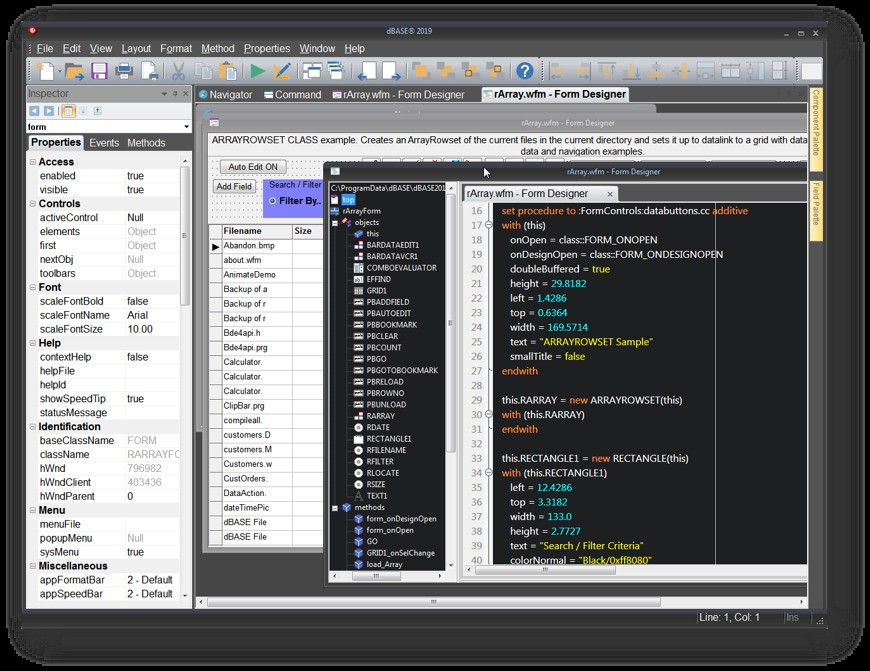
Launched in the 1980s, dBase is one of the oldest systems for managing databases and creating desktop applications reliant on databases. You can use it both as a runtime environment and a development platform that requires minimal coding to set up data-centric applications. Because of that, dBase is a great tool that allows you to create programs from start to finish. It has been developed and improved over the years as technologies change.
With dBase, you get access to a visual form designer where you can draft and create user interfaces and a report generator that allows data to be output in a structured format. It also has a built-in programming language called dBL, supports scripting, and various other tools for handling large sets of data. It's not just a tool for backend operations anymore.
dBase can be used with a wide range of database formats, such as DBF (native), ODBC, and SQL-based backends, which makes it easier to maintain, manage, or extend existing systems, even legacy ones. It's a great option for rapid application development (RAD) and a comprehensive choice for setting up standalone executable programs that manage, present, and process data on Windows-based PCs.
Why should I download dBase
If you're looking for a solution that is essentially a fully integrated, all-in-one development environment for desktop apps, then dBase is the software for you. You can find in it all the tools you need to design databases, create user interfaces, and code. In the dBase package, you'll find a source code editor, a compiler, a debugger, and visual designers that natively work with each other.
Because of that, you can quickly move from drafting a concept to getting a compiled .exe file that will launch on Windows computers, whether it's a business application, inventory system, customer management tool, or other data-based apps, making your development workflow hassle-free.
dBase uses its own programming, an object-oriented programming language called dBL, which has a smaller learning curve but still allows you to create reusable, modular code. That, in turn, means that the apps you make with it are easier to maintain and scale as time goes on. You can even create your own classes and objects if needed, so that the logic you're using matches your use case and is more organized. It's also a great language for manipulating data with rich commands that can be used to query, update, and process various datasets.
On top of that, dBase includes visual designers for forms and reports that are based on the principles of Rapid Application Development (RAD), which means you can use a drag-and-drop interface and create complex interfaces and reports easily. The tools include various objects like text boxes, buttons, data grids, and images that you can place on the canvas and then configure their properties and events linked to them, all without writing multiple lines of code. It's especially great when you want to visually link a data grid to a database table to show real-time data, so you don't need to be a highly specialized programmer, and dBase significantly reduces the time required for such operations.
Even though dBase has its own native .dbf file format, you can use it to connect to any external SQL database and create a frontend interface for them. Use the visual design tools and the dBL programming language to achieve that, and then simply connect them to such databases as Microsoft SQL Server, Oracle, PostgreSQL, and MySQL by using ODBC connectivity. By using dBase, you can set up enterprise-level database systems that are secure, scalable, and server-based. The tool is widely used in industries such as government, healthcare, and finance, and can import and export files in CSV, Excel, and XML formats, so you are able to migrate data easily.
When you're done, simply use the application compiler and installation process builder included in dBase to package your app into a standalone software that can be distributed to users and run on Windows computers. dBase can also work with legacy systems and is a great option if you're looking to modernize older solutions by simply importing and then using current tools to redesign the whole thing and adjust it, for example, to newer Windows systems.
Is dBase free?
No, dBase is not a free utility, though you can download a 30-day evaluation copy that includes all the features and tools. There are also multiple versions of dBase that match personal, business, or commercial users' needs, and each of them is offered at a different price.
What operating systems are compatible with dBase?
dBase is a tool created exclusively for Windows operating systems, but the benefit is that you can use it on a variety of versions, including Windows 7, 8, 8.1, 10, and 11 in both 32- and 64-bit.
It doesn't have extensive system requirements and can only be used after installing it on a computer; there's no cloud or browser-based edition or version for other operating systems.
What are the alternatives to dBase?
MySQL is one of the most popular relational database systems that works with Windows, macOS, Linux, and cloud environments. It can be used to build anything, from small apps to large enterprise systems, but the tool is mainly for backend work. This is because it doesn't natively include interface design tools, though it integrates well with frontend solutions and technologies. Since MySQL is an open-source project, it's available for free for personal users, but it also offers paid Enterprise editions.
Valentina Studio is a tool for managing and querying databases, and it works with MySQL, PostgreSQL, SQLite, and Valentina DB, just to name a few. You can browse data, edit it with SQL, build queries in visual editors, design reports, compare schemas, or run diagnostics. It works on Windows, macOS, and Linux and has both free and paid versions.
DBeaver is a comprehensive solution for managing databases that works with over 80 database types, including native cloud ones or those based on NoSQL. It can transfer data, create ER diagrams, collaborate with others, analyze, and visualize databases. You can get it for free or buy a paid version for commercial users, and it works on Windows, macOS, and Linux.