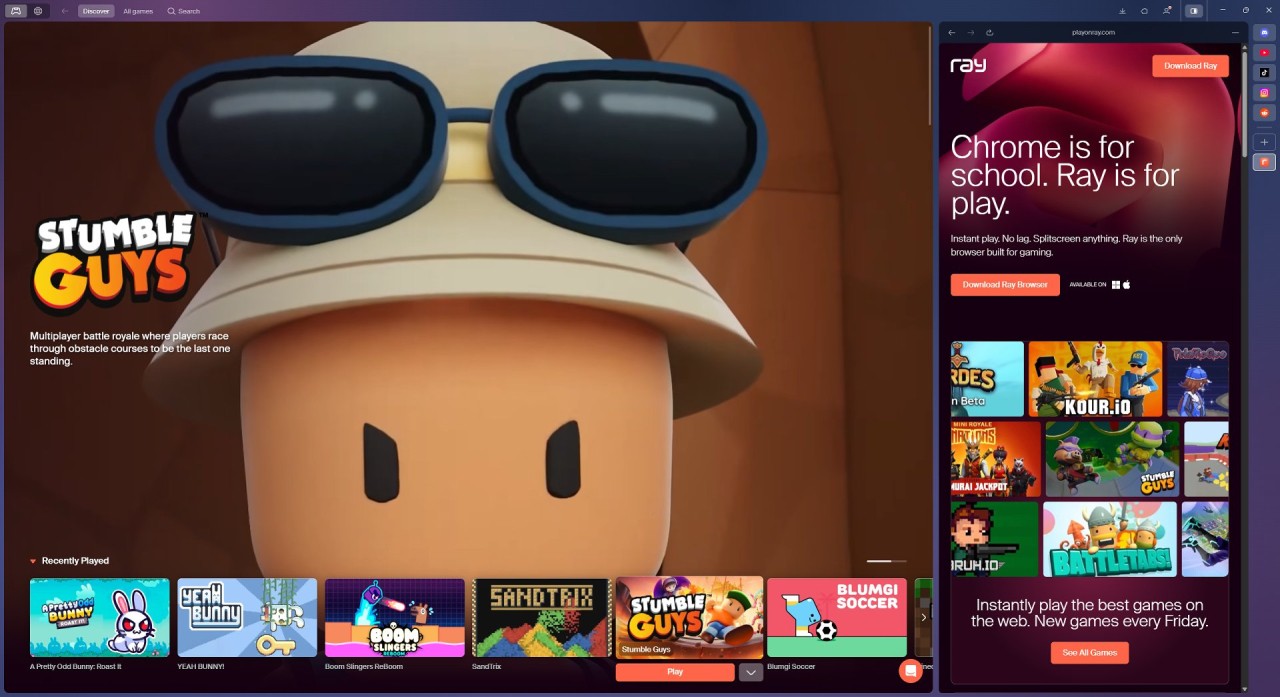
Ray Browser is a browser designed with one clear idea: to put games at the top. Where most browsers are made for work, study, or general browsing, Ray goes a different path. Its team openly says it’s not trying to be another “school browser.” On the other hand, it wants to be the browser you use when you kick back, play, and juggle things easily.
Deep down, Ray is set up on the Chromium base, which means it can deal with whatever you’d like from a browser these days: fast page loads, support for Chrome extensions, and steady safety fixes. And on top of that, it packs things you don’t often see elsewhere. The big thing is its special game hub, where users can start games right away, thanks to a variety of web games, no installation needed. Every Friday, new titles are added, so there’s always something fresh to try.
Ray also has a handy split screen. This lets you run a game on one side of the window alongside other apps or sites, like Discord, YouTube, or Spotify, open on the other. For gamers, this fixes a common hassle: trying to chat, stream, and play without juggling dozens of tabs. Throw in things like an already-there pop-out video player, custom skins, and smooth speed, and you get a browser that really feels made for playtime.
Why Should I Download Ray Web Browser?
If you’ve used browsers like Chrome, Firefox, or Edge, you already know they can do the job. But Ray tries to give a new feel by leaning into the fun side of the internet. Here’s why you might want to give it a shot.
First, speed. Ray is made for gaming and streaming, and, in speed checks, it showed up to 30% faster than Chrome when running WebGL games. That means less lag, quicker loading, and smoother gameplay. For anyone who has ever watched a tab crawl when trying to play online, this can make a real difference.
Second, multitasking. Splitscreen is already there in Ray. You don’t need extensions or complicated setups. Open your game on one half of the screen and slide Discord, a Twitch stream, or even your notes on the other. The pop-out player makes it simpler: videos from YouTube or other platforms keep playing in a small floating window while you continue browsing or playing.
Third, keeping your stuff private. Ray doesn’t ask you to create an account. You can use it fully without handing over personal info. And since it’s based in Finland, the browser follows European GDPR rules, one of the toughest data laws in the world. That means your data is dealt with openly and not sold off for ads. The Chromium base also makes sure of regular safety fixes.
Lastly, Ray just feels fun. You can tweak its look with skins and wallpapers, making it more personal than the bland gray window most browsers offer. And because new games are added every week, the browser never feels stale. It’s not trying to replace your work browser; it’s simply carving out its own space as the browser for play.
Is Ray Web Browser Free?
Yes. Ray Browser is completely free to download and use. You don’t have to pay for any of its main things, including splitscreen, the game hub, extension support, or the pop-out player.
The games you find inside Ray are also free to play, though some of them may have in-game purchases, as is common in modern gaming. Ray itself doesn’t charge for access to the setup. If you already have subscriptions to services like Xbox Cloud Gaming or Amazon Luna, you can even access those through Ray, but the subscription fees are handled by those services, not the browser.
In short, the browser doesn’t come with hidden costs, surprise paywalls, or premium tiers. You download it, install it, and you’re ready to go.
What Operating Systems are Compatible with Ray Web Browser?
Ray is still in its early stages, but it already works across major systems. Windows users are fully supported, and installation is as plain as any other browser. It runs smoothly on both new hardware and older PCs, which is an important detail since not every gamer has the latest machine.
Mac users can also use Ray, and it runs just as well on Apple devices. Battery use is quick, and things like the splitscreen and pop-out player shift neatly to the macOS setup. It is available for Intel and Apple Silicon systems.
What are the Alternatives to Ray Web Browser?
Opera GX was one of the first browsers to push itself as a gamer’s browser. Its big things include sliders that let you set how much CPU, RAM, or network the browser uses, leaving more resources for games. It also packs bold, changeable looks, side panels for Twitch and Discord, and a game-style news feed. Opera GX is free, and it’s a strong option for gamers who enjoy style and extra stuff alongside regular browsing.
Razer Cortex is not a browser; it’s a system helper. It’s mentioned as an alternative because it helps gamers get smoother runs. Cortex can free up memory, shut down background tasks, and boost frame rates. It also sorts all your installed games into one list. While it doesn’t handle browsing, it can be a handy side tool to Ray or Opera GX for players who want every bit of speed from their system.
Vivaldi is a browser made on Chromium but with a strong focus on tweaking. It’s not sold straight to gamers, but it fits people who love control. You can shift toolbars, stack and tile tabs, set up your own shortcuts, and write notes right inside the browser. Keeping your info private is solid, and Chrome extensions work here, too. For folks who want full control and enjoy personal touches, Vivaldi is an alternative worth a look.