
Yes, in seven of the eleven Netflix libraries we tested. CyberGhost unblocked the US, UK, Canada, Germany, France, Japan, and Australia without trouble. It failed on South Korea, Italy, Brazil, and Spain, where it either returned a proxy error or dropped us into the limited global catalog. So the answer to does CyberGhost work with Netflix is: it depends on which library you want.
CyberGhost maintains a set of servers labelled for specific streaming platforms and tests them against Netflix regularly. The libraries on that list work well. The ones outside it are hit and miss.
Quick Answer (Updated October)
- Works: Netflix US, UK, Canada, Germany, France, Japan, Australia
- Doesn’t: South Korea, Italy, Brazil, Spain
- Quality: 4K held steady on WireGuard, no resolution drops
- Test window: 45 days to get a refund if it fails on yours
Which Netflix Libraries CyberGhost Unblocks
We installed CyberGhost on Windows, macOS, Android, and Fire TV, connected through its streaming servers for each region, and checked whether region-exclusive titles actually appeared. Sitting on the global catalog counts as a failure, since that’s what you get without a VPN anyway.
| Netflix library | Result | What we saw |
| United States | ✅ Works | Region-exclusive titles loaded, including Better Call Saul and Arrested Development |
| United Kingdom | ✅ Works | The Office and Peaky Blinders both available |
| Japan | ✅ Works | Midnight Diner played without buffering |
| Canada | ✅ Works | Local catalog loaded on first attempt |
| Germany | ✅ Works | Local catalog loaded on first attempt |
| France | ✅ Works | Local catalog loaded on first attempt |
| Australia | ✅ Works | Local catalog loaded, despite not being one of the six countries CyberGhost advertises |
| South Korea | ❌ Failed | Redirected to the global catalog |
| Italy | ❌ Failed | Redirected to the global catalog |
| Brazil | ❌ Failed | Redirected to the global catalog |
| Spain | ❌ Failed | Proxy error on every server we tried |
Every library CyberGhost advertises worked, and Australia came through as well without being on that list. So the labelled servers are dependable, and unlisted regions are a coin flip rather than an automatic no. If the library you want is Korean or Spanish, though, no amount of server switching will produce it.
How CyberGhost Netflix Servers Work
Most VPNs give you a country list and leave you guessing which server unblocks what. CyberGhost has a For Streaming tab where servers carry the platform name, so you pick “Netflix US” directly. It’s the clearest implementation in the category and the main reason CyberGhost lands on our list of top Netflix VPNs.
The wider network is 12,000+ servers across 100 countries, with more than 50 locations for streaming. Most of the Netflix-specific ones sit on 10 Gbps ports, so they hold up in the evening when normal VPN servers usually start to sag.
CyberGhost Netflix Streaming Quality: HD and 4K
On a 300 Mbps line, 1080p started in 3 seconds on the US, UK, Germany, and Japan servers. 4K titles held their resolution throughout with no downgrades, which is the failure mode that matters more than initial load time. We also ran three devices at once, a Fire TV Stick, a laptop, and a phone, streaming different titles via the same connection. None of them really dropped quality.
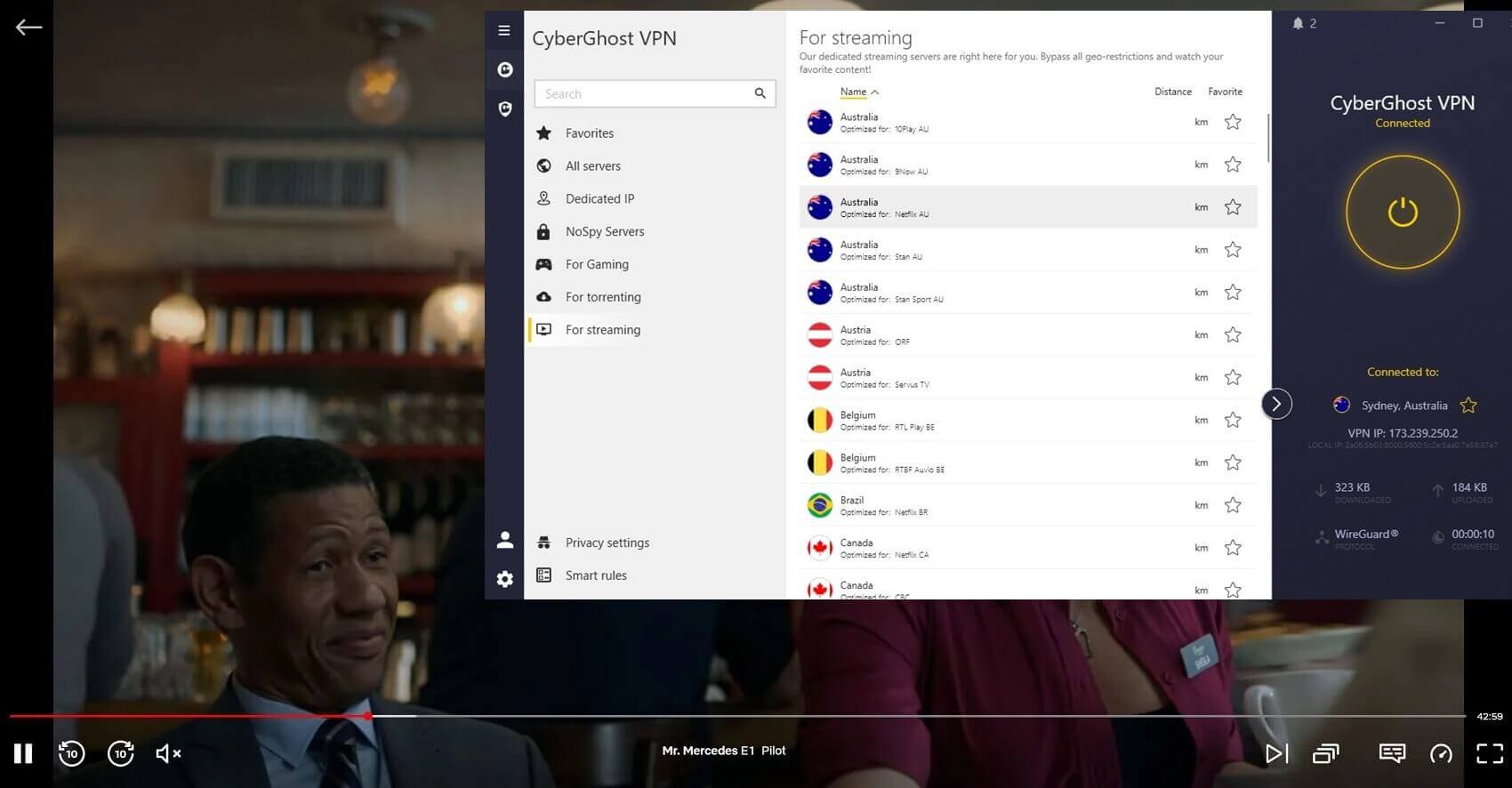
WireGuard is worth selecting manually. It cut connection times by more than half against OpenVPN and reconnected faster when we moved between Wi-Fi and mobile data. If you leave the protocol on automatic, you may not be getting it.
Stream Netflix in HD With CyberGhost
Where CyberGhost Falls Short
Two problems showed up, and both trace to the same cause. The #1 is coverage. CyberGhost concentrates its streaming capacity on a small number of curated servers, which is why the big seven are reliable, and everything else is not. CyberGhost performs well inside that boundary and poorly outside it.
The second is churn. A server that worked for us one day returned a proxy error later in the week. Netflix flags IPs, CyberGhost rotates them, and there’s a gap between those two events where you’re stuck. Switching servers fixed it, but you’ll notice it. This is a familiar weak spot among budget VPNs.
If you need reliable access across a wider spread of regions, NordVPN handles the edge markets better, and the same is true of pricier VPNs in our NordVPN vs ExpressVPN duel. That reliability is what the extra money buys, and it’s a fair question whether you need it for two or three libraries.
Fixing a CyberGhost Netflix Proxy Error
When CyberGhost Netflix access stops working, four fixes cover almost every case:
- Pick a different streaming server. There are several per region in the For Streaming tab. Disconnect, choose another, reload Netflix. This resolves most proxy errors on its own.
- Clear cache and cookies. Netflix caches your previous location, which is why the wrong library sometimes persists after you switch countries. This is the usual culprit when jumping between, say, France and Japan.
- Change protocol. WireGuard is fastest, but OpenVPN or IKEv2 occasionally get through when WireGuard doesn’t, particularly on mobile.
- Ask support. Live chat is 24/7 and can tell you which servers are currently working for a given library, which saves cycling through them yourself.
Verdict: Does CyberGhost Work With Netflix?
For every library it advertises, yes, plus Australia on top of those. Streaming quality is not the compromise you’d expect at this price either, and the labelled servers remove the guesswork that makes most VPNs annoying to use with Netflix. Outside that group, it’s unreliable, and the occasional flagged server means you should expect to switch once in a while.
Anyone who wants a specific smaller library, or who refuses to troubleshoot anything, should spend more on one of the stronger all-round VPNs. The refund window gives you 45 days to find out which camp you’re in.
Frequently Asked Questions
⛔ Why is CyberGhost not working with Netflix?
Almost always because Netflix has flagged the IP on that particular server. Switching to another server in the For Streaming tab for the same region fixes it. If every server for a library fails, that library isn't one CyberGhost optimizes for.
🗽 Which CyberGhost server is best for Netflix US?
Any server in the For Streaming tab labelled for Netflix US. These are separate from the standard US locations and are the only ones maintained against Netflix's blocks, so a general US server will often return the global catalog instead.
📺 Does CyberGhost unblock Netflix on Smart TVs and Firestick?
Yes. There's a native Fire TV VPN app, and it unblocks the same libraries as the desktop app. For Smart TVs without app support, its Smart DNS handles Netflix, though it changes your region without encrypting the connection.